
Hello there, I am back again with another interesting topic. I am sure I have witnesses that can testify that they don’t like the default language provided by their google mail otherwise known as Gmail. Today, I will teach you how to change Gmail display language.
How to Run Android Apps on PC
Developers are always finding ways to bring the Android experience to the Desktop. In the past few years, they have made quantum leaps in this endeavor. The google play store is a treasure trove of games, apps and so many other developmental miracles that even those who don’t own an Android device want to benefit from its valuable items. There are many emulators on the market that enable users to run Android apps on PC. But, not all of them provide the convenience and performance one desires. Most of them just slow-down your PC and create further problems for you. Amidst the heap of useless emulators, there are two emulators who have gained enormous popularity for all the right reasons. We will discuss them in this article.
How to Contact Facebook Support

Facebook is always rolling-out new and unique ways for its users to post content. However, most Facebook users face frustrating problems when using these new features. Not everyone is well-acquainted with how the social media giant works. In desperate times like these, a Facebook representative can reach out to you and rid you of your worries. Many people get their account blocked or have problem figuring out how to report a certain problem. In graves cases, you might feel the need to abuse span or hate speech
(Which is quite pervasive on Facebook).To help people you in this regard, Facebook has introduced a “report a Problem feature” that has been specifically designed to address the concerns of their highly esteemed users. In this tutorial I’m going to tell you how to contact facebook support in simple and easy steps.
How to Whatsapp an International Number

We all have relatives living around the globe. Sometimes, it so happens that one of your best friends emigrates to a foreign country and you feel completely alone. In times like these we can whatsapp an international number and save ourselves from the pinching sadness. In ancient times, before the advent of messaging apps, such as Whatsapp, it was impossible to instantly get in touch with our distant friends. But now, the game has changed. The obsolete methods of communications, such as sending letters by post have been superseded by the invention of Whatsapp. Initially, International calling was expensive and it wasn’t a luxury everyone could afford. But now, International calling doesn’t cost you a thing, all thanks to Whatsapp.
How to Reset an iPhone Safely
A reset on the iPhone will restore it back to its original settings. Depending on the reset options you choose, your iPhone can selectively reset specific settings, delete all data and content, or restore your phone back to its original settings, as if it just came out of the factory. There are many reasons why users want to reset their iPhones. Some want to dispose and sell their iphones, others want to give them as gifts to loved ones, and some just want to start fresh with their devices. Whatever your reasons are, it is important that you know what you are doing and that you know the precautionary steps required before performing a reset on your iPhone. This tutorial will guide you through the steps you need to reset an iPhone safely.
How to Fix a Samsung Galaxy Phone Stuck in Boot Loop

A Samsung Galaxy phone stuck in boot loop can be annoying and alarming at the same time. Anyone who has had a phone that is stuck on the loading screen and refuses to start can attest how stressful the situation can be. Luckily, it is not the end of your phone yet. There are still ways to fix a Samsung Galaxy phone stuck in boot loop. This tutorial explains how to get out of boot loop and gain access to your phone. Depending on the reason why your phone is stuck in boot loop, you can try any of the methods below.
How to Set Up Trusted Contacts on Facebook

We now live in a world where we use social media to chronicle our lives. Facebook is one of the sites where you store a lot of information, memories, and files. Ensuring that you have full control over your Facebook account is a must if you want to keep your data safe and secure. Aside from using complex passwords to protect your account against unauthorized entries, you should also have a backup plan in case you get locked out of your account. Trusted Contacts on Facebook is a good way to regain access to your account. This tutorial explains all the steps you need to set up the Trusted Contacts feature on Facebook.
How to Browse the Internet Safely

Today, we all are all aware of browsing dangers and that we need to protect our personal information. From inventing strong passwords and fighting never-ending spam to protecting your documents and private data, you constantly need to exercise caution in pretty much any type of activity online. To help you with that, use this basic guide to safer web browsing.
How to Highlight PDFs in Mac OS X Yosemite

Preview, the default program for viewing files such as PDFs in Apple’s OS X, is an underappreciated program. Preview has many features inconspicuously built in, including tools to let you highlight, underline, and cross out text in PDFs. All of the changes you make can be saved in the PDF.
How to Save Articles for Offline Reading in iOS

If you are like most users, you are inundated with web content every day. You scroll through countless videos and articles on Facebook, news sites, blogs, twitter, and more. However, you probably find that on there is too much information to get through in one sitting. One solution for quickly and easily saving content to read later is using Pocket, a free app and browser extension. Once you have a Pocket set up, you can save articles, videos, and images to your Pocket from anywhere on the web. The content you save can be viewed on any device and viewed offline using the Pocket app.
How to Enable Assistive Touch on iPhone
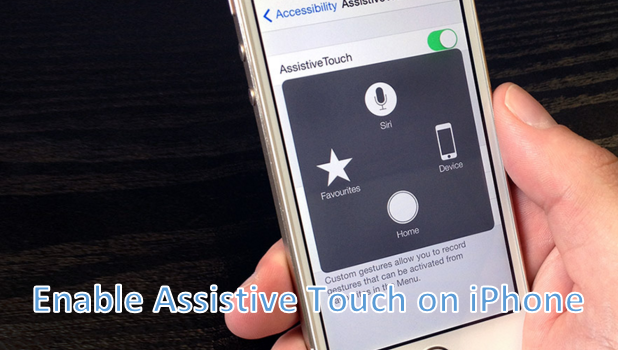
Since its introduction with iOS 5 in 2012, Assistive Touch has become one of the most practical and helpful features on the iPhone. One reason for this is that it can be used as an alternative for all of your phone’s physical buttons. In fact, you can use your iPhone with a broken Power button with Assistive Touch. Since the iPhone does not have a physical Back button, the Home Button also gets worn out over time. Fortunately, you can use Assistive Touch to save your phone’s Home button from wear and tear and to save you from repair costs for Home button replacements. The latest iPhones have the Assistive Touch enabled by default. If you accidentally turned it off, this article will show you how to enable Assistive Touch on iPhone.
How to Use iPhone Without the Power Button