

This recipe will explain how to enable / prevent VMWare Fusion from opening documents when in the Mac OS / Finder (ie not running in a virtual session). For example, I have Windows XP running in VMWare Fusion and in turn installed Office 2007 and also shared my User folder in XP. After doing this, I noticed that when i tried to open a .doc or .txt; VMWare Fusion would start my XP Machine and open it in Word 2007 (cool at first but annoying since i had iWork installed and preferred using Pages). For others though this might be nice integration. Here’s how to enable/disable this feature.
Open VMWare Fusion.
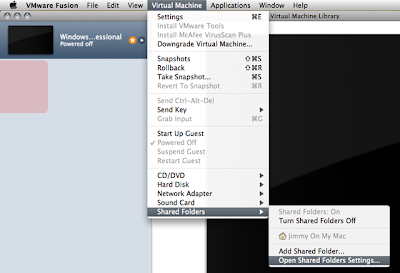
Go to Virtual Machine > Shared Folders > Open Shared Folders Settings
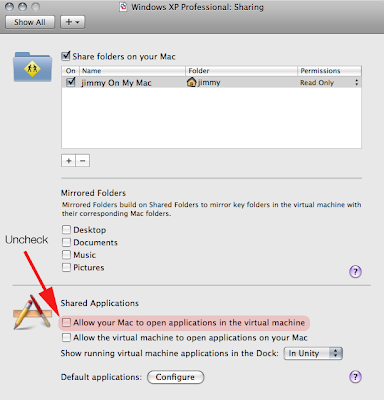
Once in here, just check / uncheck the ” Allow your Mac to open applications in the virtual machine” to your liking.
Voila!




