

This recipe is for those of us that work in an enterprise/corporate setup and support iPhones. If you support iPhones via Exchange, you most likely will at some point have to activate an iPhone or two.
By default, once you activate an iPhone on a PC it will then go onto ask you to setup syncing with the PC’s iTunes. Once in activation only mode, you will basically activate the iPhone and not be prompted for the syncing options; leaving the sync question/prompt for when the user connects to his/her own itunes pc/mac.
You can do turn on and off activation only mode several ways; we’ll just go over the easiest: a batch file
below are the commands to enable/disable activation mode for windows and the mac commands at the tail end:
Windows Version.
CODE START>
REM “c:\Program Files\iTunes\iTunes.exe” /setPrefInt StoreActivationMode 1
REM
REM
REM “c:\Program Files\iTunes\iTunes.exe” /setPrefInt StoreActivationMode 0
REM
REM 64-Bit Versions below
REM
REM remove REM infront of line, 1 = turn on activation only, 0 = turn off mode
REM “c:\Program Files (x86)\iTunes\iTunes.exe” /setPrefInt StoreActivationMode 1
REM
REM “c:\Program Files (x86)\iTunes\iTunes.exe” /setPrefInt StoreActivationMode 0
<CODE END
1. make sure iTunes is closed
2. create a text file on your desktop.
3. open it via notepad or your default .txt file editor
4. paste the code from above into it.
5. remove the REM in front of the line that is appropriate to your desire and system.
the top two commands are for xp, vista, win 7 32-bit systems.
the bottom two are for 64-bit versions of windows.
6. save the text file.
7. rename the file with .bat extension (ie activation.bat) and then run it. you may need to run the file as an administrator.
8. verify your mode in Help > About iTunes
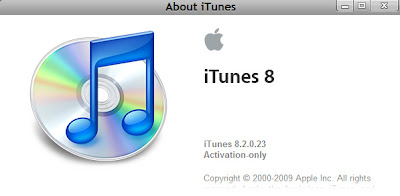
FOR MACS:
1. Make sure iTunes is closed.
2. Open terminal via Spotlight or Applications > Utitlities > Terminal
3. enter the following commands to enable or disable activation only mode:
ENABLE:
defaults write com.apple.iTunes StoreActivationMode -integer 1
DISABLE/NORMAL:
defaults delete com.apple.iTunes StoreActivationMode
4. go to iTunes > About iTunes and verify your mode.
5. connect the iPhone you wish to activate and voila. again, you will need a normal at&t or whoever your iPhone carrier sim / contract to activate this way.
this is not a hack but a normal legit activation and not for jailbroken iphones. useful for enterprise deployments, etc.




