Even if you delete an email from your address box, the Mail application will continue to offer it as an option to you when composing messages. By following these steps, you can convince your mac to forget annoying remembered email addresses.
Econ asked me this question the other day:
“Although I have deleted a bunch of contacts from the Address Book on my Mac, they continue to try to auto-fill when I am writing a new email. It’s driving me crazy! I see the old and new contacts still listed although I have deleted the old one long ago. How do I force Mail to forget those contacts?”
This is a common complaint that I hear from people. In fact, I just had to do this when one of my online services switched what email address they wanted me to use. The problem is that Mail really references two different databases to provide you options when you email. The first one, obviously, is your Address Book. What continues to give Econ and many other users is that Mail also keeps a database of the addresses of everyone that you have ever emailed. Even if you have deleted the contact, you will have to delete it from this Previous Recipients list as well.
1. Open Apple’s Mail app
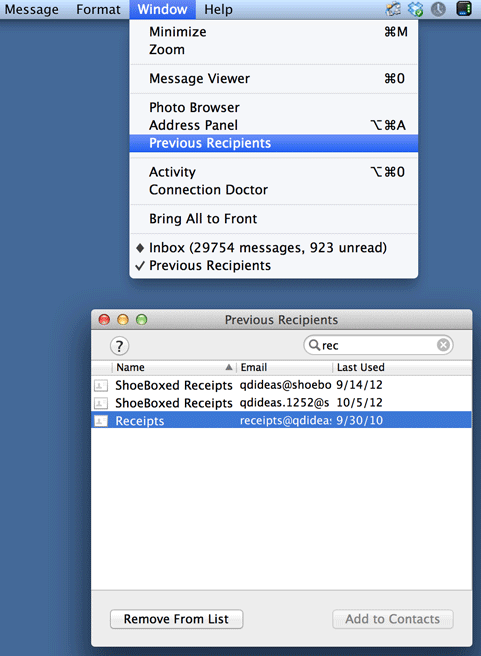
2. From the menu, select the Window menu and then Previous Recipients.
3. Select the email address you want to delete, and select Remove From List
If you have any problems, reference the below example.