

Blackberry phones are pretty resilient and robust devices. However, every once in a while there will be connectivity issues or problems getting data or email. This tech-recipe will give the steps to try to help resolving these issues without having to hard reset the phone or reload it.
Blackberry Pearl / Curve / Tmobile / AT&T Versions (ie you use a SIM card in it) and Data and Email dropouts:
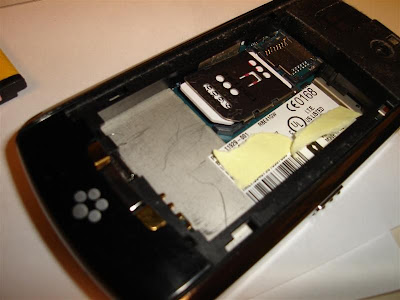
Check the SIM Card if your user is having data and email working off and on. I’ve noticed lately that most users when they put in the SIM Card do not properly lock the SIM card cage and eventually over time the card will eventually start coming loose.
Sometimes the easiest fixes the best fixes!
New Blackberry Phones not getting Internet icons for Verizon.
If you have a user that just received a new phone and activated it via the automated *228 method but they do not have the Internet Browser icon or any data services, you can do this to try to resolve the problem.
Go to Options > Advanced Options > Host Routing Tables
Then click and choose to Register Now. This will hopefully register your device on the Blackberry network and in turn pull down the internet service books.
Other Tips/Notes:
Also, be sure the user has a proper data plan for what type of email they have. BES = corp/work email; requires running BES server, connected to an Exchange/Groupwise/Enterprise email server.
BIS = personal plan, blackberry internet service. no BES required, uses the carriers email server which you can setup your own gmail,yahoo,hotmail accounts to sync with.
If your using a BES and your user has a BIS plan, it the device and email account will activate on it fine but after it activates it will basicallly not properly sync and eventually stop syncing all together. you will need to change to a BES data plan.
Another thing, be sure the user is in an area where they have data coverage; yes i know it sounds dumb but there are ‘dead’ spots in the big 4 carriers networks, especially w/CDMA based carriers in more rural areas (GSM seems to cover more rural areas in MN atleast).
Finally, the last and most common fix for most things.
a reboot; power down the phone and pop out the battery and power back up. popping out the battery is key sometimes.




