Outlook: Adding Holidays To Your Calender

Home -> Windows -> Office -> Outlook

9991 views

From the computer of: AlexTheBeast (133 recipes)
Created: Dec 10, 2003     Updated: Oct 18, 2006


Add a comment

Add to:
Add to stumbleuponAdd to del.icio.usDigg itAdd to FURL

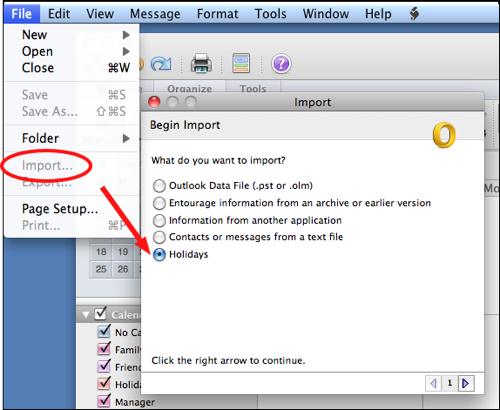
Outlook allows the user to add holidays from multiple countries into the calender.

Select Holidays:

1. In Outlook goto the Tools Menu
2. Select the Preference tab
3. Click Calender Options
4. Click Add Holidays...
5. Select the locations you want to add and click OK

Early versions of outlook may not have the holidays after 2003 available. Corrections and other holiday related issues are discussed here:

http://www.slipstick.com/calendar/holidays.htm

Subscribe to the Tech-Recipes Newsletter

You can get tips like this delivered in your email every week!

Enter your Email

We will never, ever sell your email address or spam you.


Related recipes:

  Drag and Drop For Quick Outlook Tasks
  Outlook: How To Delete Duplicated Holidays
  Outlook 2003: How to send a multiple day meeting request as one request
  Outlook 2003: Using AutoArchive
  Office Outlook 2007: Get Classic 3-Pane View
  Outlook: Creating Out of Office / vacation replies using rules
  Outlook 2007: Use Google Reader for RSS Feeds link
  Outlook 2007: Add Images to your Contacts
  Outlook 2007: Minimize to System Tray
  Outlook 2000 and Greater: Free Outlook Backup Tool from Microsoft


Sponsored links


Login

Nickname

Password

Don't have an account yet? You can create one. As a registered user you have some advantages like theme manager, comments configuration and post comments with your name.