
IE9: How to Uninstall Internet Explorer 9
Posted by David Kirk in Browsers
With each new version of IE, people flock to download it. However, with each new version is a whole slew of new bugs as well. If you have installed IE9 and regret it, this tutorial will show how to remove IE9 and roll back to your prior version of Internet Explorer.
As I am writing this article, the IE9 beta was released. Several users have installed it and are noticing that it crashes upon starting. By following these directions, you can uninstall IE9 without any difficulty.
1. Enter your Control Panel
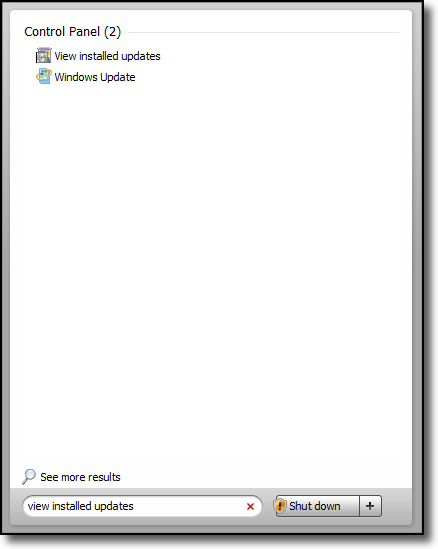
2. Select Programs and View Installed Updates or
you could also just search for “View installed updates” from your Start Menu search.
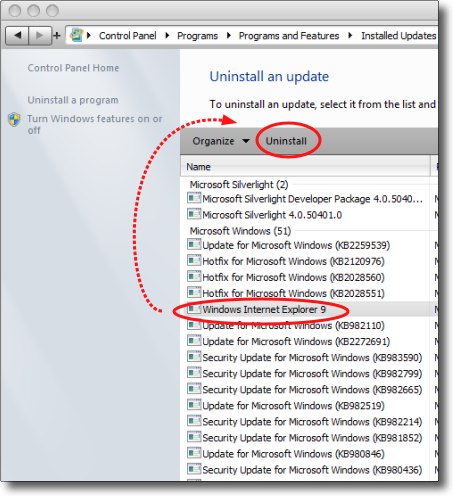
3. Click Windows Internet Explorer 9 and click the Uninstall button
About David Kirk
View more articles by David Kirk
The Conversation
Follow the reactions below and share your own thoughts.


September 16, 2010 at 1:14 am, 7632416 said:
Very strange! I have no entry as “Internet Explorer 9″ under “Microsoft Windws” in the “View Installed Updates,” or elsewhere. (Windows 7 Ultimate 32) But I indeed downloaded and installed IE9 (beta) today, but it does not allow access to Office Live Small Business Applications. (So, while I’m searching how to uninstall IE9, I’m using Firefox to access Office Live Business Applications.
September 16, 2010 at 1:21 am, 7632416 said:
Oops. Found it. (Blush.)
September 16, 2010 at 10:30 am, Ulissi said:
Crazy they do not even support their own programs. Having the same problems…
October 06, 2010 at 11:10 pm, christopher said:
its beta
October 03, 2010 at 8:05 am, richiebee said:
thanks for that found it not playing .ogv
December 11, 2010 at 5:36 am, Gjtvs said:
You are a lifesaver! I had installed IE9 on one Vista computer and it solved a lot of problems we had been having with IE8. After it worked well for awhile, I installed IE9 on the other computer. DISASTER!!! IE9 wouldn’t start up. Uninstall wasn’t available thru Control Panel. Tried to reinstall it, thinking maybe I just got a corrupt file. The download link I had used an hour before told me I couldn’t download that version, since my current version is later than the download. HUH?!?!? Followed the instructions to uninstall from MS’s website. What they said to do did not produce the results they said it would. Thanks to you, I have now successfully removed IE9. Thank you, Thank You, THANK YOU!!!
December 11, 2010 at 1:43 pm, Anonymous said:
You are welcome! I had problems with my IE9 install as well…
March 05, 2011 at 12:32 am, Apageor2 said:
I have installed the program but yet it is not showing anything in the control panel that it has been installed. So tell me how is it that this can be eliminated safely?
March 30, 2011 at 4:28 am, Aaron Barnett said:
I also need to know how to uninstall IE9 Beta I havent been able to find how to uninstall it.
August 28, 2011 at 1:35 pm, luuk said:
Thank you. uninstalled it cause it was just sooooo slow!
October 20, 2011 at 9:33 am, Norm said:
I’m in my office, so can’t get to the affected pc. Something went wrong with the install – upgrading from IE8 – and a few other things like Win HELP won’t work.
I’ll let you know if it worked….



