
BlackBerry 6 / Torch: Clear Browser History and Cache

Contributor Icon Contributed by David Kirk     
Tag Icon Tagged: Blackberry  

Need to erase your browsing data? Knowing how to clear your browser history will protect your privacy by preventing others from discovering the sites that you visit. This tutorial will show how to clear your browser’s history, cache, passwords, and cookies.

Devices running the new BB OS 6 get the new, beautiful webkit browser. The new browser makes viewing the web much more enjoyable. The more one uses the web, the more important it becomes to protect privacy as well.

Here is how to clear your BB browser’s history and cover your tracks:

1. Open the Browser
2. Press the BlackBerry Menu button
3. Select Options
4. Scroll to the bottom of the menu to the Clear Browsing Data section
5. Check what you would like to clear from Passwords, History, Cookies, Cache, and/or Pushed Content
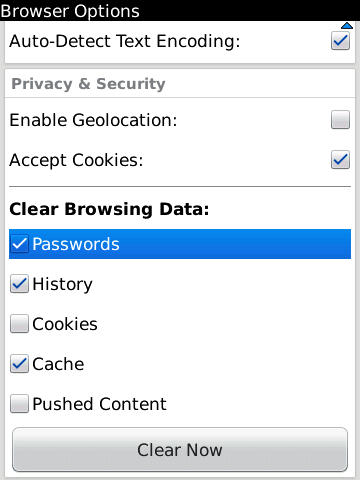
clearing browser history bb torch

Clearing history and cache should be enough to keep casual viewers of your BB phone from viewing your previously visited web sites.

6. Press the Clear Now button and you see a Cleaning Memory box appear while the information is being removed.

Your viewing history on your BlackBerry should now be gone.


9 Comments -


  1. totto said on August 30, 2010

    thank u really bro ty ty ty ty :D

  2. Jerryboy said on December 24, 2010

    And now go back back back on your browser and you see that everything is still there.

    Even better, click on recent pages and it STILL shows you everything!!

    This is the only flaw the Blackberry has… it is not discrete at all!!

  3. Metrotoronto2008 said on January 13, 2011

    AGREED

    There IS NOT a way to delete browser history

    These so called experts dont know a thing

  4. Bob said on January 26, 2011

    And when you do a general search from the main screen, the history is still there.

  5. James Forrest said on February 21, 2011

    Bob i got the same prob, after a general search the history is STILL there!

  6. james said on February 21, 2011

    This is mad!

  7. L2s said on March 11, 2011

    I read somewhere that you will need to do a battery pull to remove from global search!

  8. Moi said on March 11, 2011

    I did some research and it can normally be cleared by doing a battery pull after clearing the history. This will stop it showing up in universal search.

    Another method is to go into the universal search settings and uncheck Browser History so that it just does not appear there altogether.
    I’ve tried it and it seems to work!!!!!!!!!!!!

  9. Mehmetefendidagli said on May 17, 2011

    ye its cleaning but in searching u can find everything how can ı delete history 


RSS feed for comments on this post. TrackBack URL

Leave a comment -



