

If you use Gmail as your primary email client, Opera 10 makes it easy to associate any mailto links that you might encounter to use Gmail as the default email client. All you need to do is make one small modification to one of the .ini files. Instructions are included for both Windows and OS X.
For Windows Users:
1. Close all open Opera windows.
2. Open Windows Explorer and go to C:\Program Files (x86)\Opera\defaults (64 bit) or C:\Program Files\Opera\defaults (32 bit).
3. Find the webmailproviders.ini file and double-click on it to edit. Alternatively, you can right-click on the file and choose Edit.
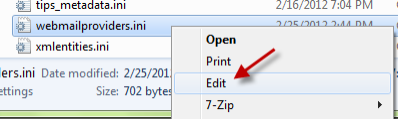
4. Add the following lines to the bottom of the text file. (URL = compose URL for the web mail service, ICON = the icon url for the site)
[Gmail]

ID=8

URL=https://mail.google.com/mail/?extsrc=mailto&url=%s

ICON=https://mail.google.com/favicon.ico

5. Save the text file.
6. Launch Opera browser.
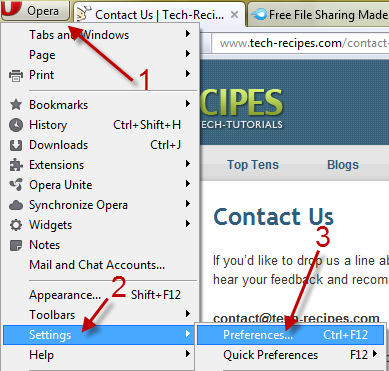
7. Click the Opera icon on the top left of the window and then choose Settings -> Preferences. You can also use Ctrl + F12 to access the Preferences page.
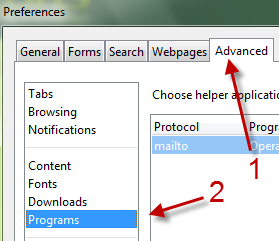
8. Go to the Advanced tab and then choose the Programs section of the left side of the window.
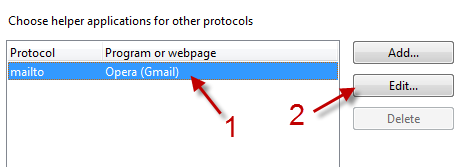
9. Choose the current mailto program or service from the box and click Edit…
10. Choose Use a webmail service and select Gmail from the list.
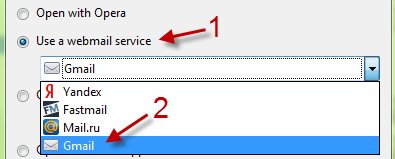
11. Hit OK to save the setting and then close all other options window.
For OS X Users:
1. Open Finder and select Applications.
2. Right click the Opera icon and select Show Package Contents.
3. Go to Contents\Resources\defaults.
4. Find the webmailproviders.ini file and open it with TextEdit.
5. Go to the bottom of the list and add the following:
[Gmail]

ID=8

URL=https://mail.google.com/mail/?extsrc=mailto&url=%s

ICON=http://mail.google.com/mail/images/favicon.ico
6. Save the file.
7. Open Opera and go to Preferences.
8. Select Advanced.
9. Select Programs.
10. Select mailto from the Protocol list.
11. Click the Edit button.
12. Select the Use a Web mail service radio button and select Gmail from the dropdown.
11. Click the OK button.
12. Restart Opera.




