Excel 2013: Convert Columns to Rows

Did you create a spreadsheet and realize that you got the layout mixed up? Did you receive a table or a chart through your email, but you need to reformat it? Excel’s Transpose option will allow you to fix your charts easily.

When to put data into rows or columns is debatable. When receiving a spreadsheet with data entered incorrectly, many users will delete the columns and manually re-enter them in rows. Obviously, this method is slow and painful. The faster way to fix your tables is by using the Transpose feature. By using this feature you can convert your column-based chart to simple table rows.

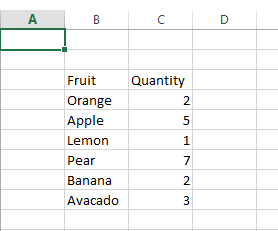
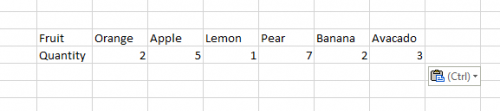
1.Below is a column-formatted data. Select the whole table. 
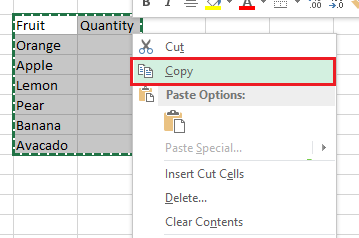
2.With the data highlighted, right-click on it, and click Copy

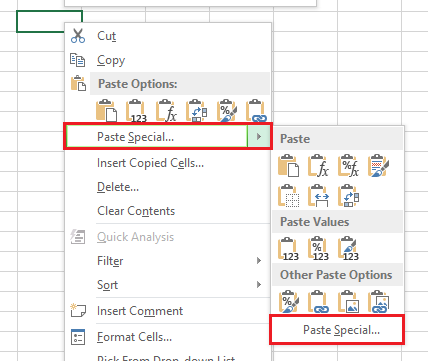
3.Right-click on an empty cell, and select Paste Special and then Paste Special… again. 
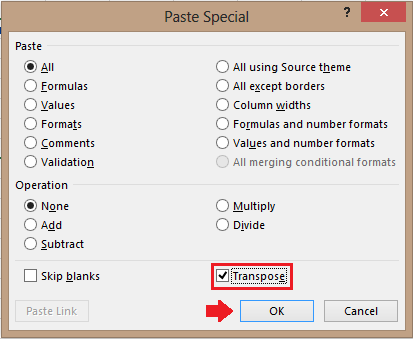
4.Under Paste Special, select the check box next to Transpose , and click OK

Through these steps you will be left with your reformatted table.
 

About Alex Bahdanovich

Writer, author, wordsmith -- this tech enthusiast enjoys Starbucks, good reads, and golden retrievers.
View more articles by Alex Bahdanovich

The Conversation

Follow the reactions below and share your own thoughts.

3 Responses to “Excel 2013: Convert Columns to Rows”

  1. January 04, 2013 at 3:58 pm, Incanto Blanko said:

    In Excel 2008 for the Mac, there’s a ‘Transpose’ check box in the ‘Paste Special’ dialog; one fewer step than the one you’ve outlined and it works.

    Reply

    • January 05, 2013 at 12:00 am, David Kirk said:

      Incanto – Thanks for the information!

      Reply

  2. January 06, 2013 at 3:01 pm, rafay said:

    awesome blog, keep it up guys…….!!!

    Reply

Leave a Reply

You may also like-

Excel 2007: Clear All Formatting From a Range of CellsExcel 2007: Clear All Formatting From a Range of CellsIf you have a spreadsheet that contains the data you desire, but the formatting isn't to your liking, Excel can clear the formatting from ... Excel 2007: Print Part of a SpreadsheetExcel 2007: Print Part of a SpreadsheetIf you are working with a large spreadsheet, you may want to only print a portion of the total worksheet. Why print out 1200 ...