
Google Calendar: Howto Import Outlook (CSV) or iCal Calendar Events
Posted by David Kirk in Google, Microsoft Outlook
Want to import your schedule from Outlook into Google calendar? Importing from any CSV or iCAL file is very easy.
Users frequently need to get schedules exported from Outlook and imported into Google Calendar. These directions have been updated for the latest changes in Google Calendar.
Export from Outlook
1. Open Outlook
2. Click File menu
3. Click Import and Export
4. Click Export to a file
5. Click Comma Separated Values (DOS)
6. You may be required to install the possible translator here. Just follow the directions on the screen.
7. Select folder to export from: Calendar
8. Browse, name, and save the file some place easy to find it. (Desktop)
9. Click Next
10. On the follow actions will be performed screen click the Finish button.
11. Allow the export to perform
Import into Google Calendar
1. Open Google Calendar
2. Click the small arrow in the upper right corner of the “Other calendars” box that is on the left side of your calendar page.
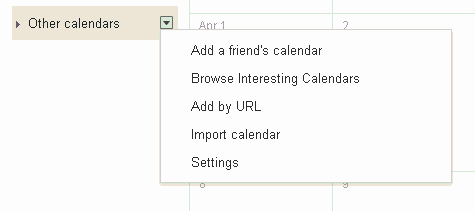
3. Click the Import Calendar link under Calendar settings
4. Click the Browse button and select your exported file
5. Choose your calendar
6. Click Import and wait. It may take a bit.
7. You will be notified when the process is completed.
Congratulations. Your Outlook Calendar is now entered into Google Calendar!
About David Kirk
View more articles by David Kirk
The Conversation
Follow the reactions below and share your own thoughts.

October 01, 2008 at 4:15 pm, Kevin said:
could not see “Import” only “Export” in Calendar settings. I am using Google Chrome browser.
December 24, 2008 at 12:36 pm, moi said:
same here whats up with that?
October 01, 2008 at 4:47 pm, davak said:
Kevin: It looks like this was recently changed. I’ll update the main recipe, but here is how to do it now.
Click the Add arrow under the Calendar list in the left column
Select Import from there.
October 01, 2008 at 4:54 pm, Kevin said:
Holy smokes! There it is. Thanx.
October 01, 2008 at 5:14 pm, davak said:
Anytime!
October 01, 2008 at 6:44 pm, Kevin said:
…any idea about importing contacts from Outlook to Gmail so that all the fields and entries make the trip?
October 25, 2008 at 10:31 am, wdonders said:
Sorry, but I still can’t find the import option.
Only in the pulldown menu under ‘Add’ in the ‘Other calendars’ pane, there is an import option.
But not in the ‘My calendars’ Pane.
And i want to import a calendar which i can edit, not a ‘other calendar’, cause these are not editable.
help! Am i missing something?
October 02, 2008 at 4:32 am, J. Cadow said:
For this to “work good” in the current Google Calendar interface, change step 13 to:
13. Click the small ‘Add’ link in the bottom right corner of the “Other calendars” box that’s on the left side of your calendar page.
October 02, 2008 at 4:34 am, josh said:
Thanks, it worked good.
October 14, 2008 at 4:16 pm, Monte_Asbury said:
I moved my Palm calendar to Gcal by exporting it to yahoo calendar, then exporting as a csv to Gcal.
July 09, 2010 at 8:21 pm, Jjkennard said:
How did you do that? I have a Palm Tungsten E2 which I love but is starting to give up the ghost and now just purchased an Incredible phone. I have a Gmail account already set up. Palm Support helped me to get my Palm calendar into Outlook, but you can’t transfer “recurring” events, and that’s about half of my calendar. Please help as I am not very computer savvy.
December 31, 2008 at 11:07 am, Web Suunnittelu said:
Cool app, but the import feature was a pain in the back!
June 11, 2009 at 3:58 pm, richard S said:
does this process update the google calendar when you add stuff to the outlook?
July 01, 2009 at 8:57 pm, Linda gollette said:
thanks for the advise it worked perfectly
July 24, 2009 at 1:06 am, Liperty said:
I don’t seem to be able to import reoccurring events – they become 100s of individual events.. is there any way to resolve this..
eg. If I have a weekly appointment in Outlook – it becomes an separate appointment for each week in Google Calendars – not good if you want to change the address / details of the appointment for all instances!
Pls. help!
Cheers,
-=Steve
February 11, 2010 at 11:19 am, rafdevis said:
Great! Gracias.
March 29, 2010 at 5:53 pm, John P. said:
Awesome! Just followed your instructions and it worked like a charm!
Many thanks-!
April 29, 2010 at 12:47 am, Anonymous said:
This does not work well when you begin to import your Outlook calendar on a regular basis (weekly).
I am finding numerous duplicate entires in my google calendar, and this gets worse each time I import with more duplicates.
Can I stop this occurring?
May 28, 2010 at 8:56 pm, Keith said:
Your tease says that “Actually importing from any CSV or iCAL file is very easy.” But I don’t see any instructions re: importing from iCal, just Outlook. Am I missing something?
June 25, 2010 at 4:46 pm, NyeTheLoanGuy said:
Thx, this was easy and worked great.
October 18, 2010 at 1:34 am, TomKayak said:
Anyway to write an app that automates all of those tasks?
Tommy
October 24, 2010 at 12:41 am, Ajblye said:
Yay it worked! Now I must learn how to synd both calendars and get all that to my blackberry
November 12, 2010 at 4:48 pm, Drew said:
Awesome! Worked like a charm, thanks.
December 02, 2010 at 12:03 am, Leenwa said:
I am unable to get it to work on Outlook 2007 12/1/10
January 22, 2011 at 2:24 pm, Craig Salvay said:
Thanks. Good Instructions…especially “it will tell you when it’s done.” Impatience is a terrible thing!
April 06, 2011 at 12:57 pm, Jbridges said:
Thanks, worked like a charm the first try. And I’m a non-techie.
May 31, 2011 at 3:35 pm, Heidy Morales said:
I agree…I first tried using the Microsoft instructions and as always, they sucked. I did this all on the first try and I’m certainly a non-techie also. THANKS!!!
April 24, 2011 at 5:33 pm, Tacktoday said:
it has grayed out, has a small box in the corner that says import calendar but doesnt seem to have worked. I NEED THIS can someone email me back and help me, i dont want to loose this info and can’t seem to get it from outlook 03 to google???
sue
tacktoday@gmail.com
September 02, 2011 at 1:25 am, Marian said:
I imported my ical file (ics) into the Google calendar and saw it did ( in a second) but nothing shows. Restarted the Mac but whatever I try the Google calendar stays empty :S
Can you help?
January 26, 2012 at 3:25 pm, Megan Vice said:
Hi,
I was able import the football calendar using the ICS file, but not the CSV. I was wondering if there will be a ICS file version of the Men’s basketball schedule?
Thanks!
March 23, 2012 at 2:26 pm, Landan said:
When I open up my Google Calendar, I am missing what used to be there. All I see is the calendar and “Subscribe with Google Calendar”, and “Time Zone Central Time”. Where is the “left column” that you speak of? Where are the “Calendar Settings”? There is nothing to click on other than to change the month or subscribe to Google Calendar.
HELP!!!!!!!!!!
March 24, 2012 at 9:12 am, David Kirk said:
@landan – I updated to article to include a picture which shows the import selection.
March 31, 2012 at 9:55 am, Sheds said:
Thanks for your help, I have been trying to do this for the longest time.
So glad I found your Blog
Thanks



