
XP: Display Date in System Tray and Taskbar

Home -> Windows

10262 views

From the computer of: davak (394 recipes)
Created: Apr 25, 2007


2 comments:
View all comments

Add a comment

Add to:
Add to stumbleuponAdd to del.icio.usDigg itAdd to FURL

A buddy of mine was shocked to see that I have the date, time, and day of the week in my system tray. I had forgotten that this is not standard. Here is how to do it without any additional software.

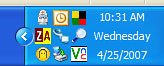
The main reason that users do not see the time in the system tray is that they have the taskbar height set too short. If you increase the height of your taskbar, the date will appear automatically.
time-date-system-tray-taskb

1. Right-click the taskbar
2. Uncheck Lock the Taskbar if checked
3. Mouse over the upper margin of the taskbar until the pointer changes to an up-down arrow
4. Drag the taskbar up until the date and day of the week appears.


Subscribe to the Tech-Recipes Newsletter

You can get tips like this delivered in your email every week!

Enter your Email

We will never, ever sell your email address or spam you.


2 Recipe comments: View comments

XP: Display Date in System Tray and Taskbar by Robert_
Re: XP: Display Date in System Tray and Taskbar by DriveSoft


Related recipes:

  XP: How to Always Hide or Show an Icon in the System Tray
  XP: Display Volume Icon in the System Tray
  XP: Place Media Player in the System Tray. New Media Bonus Pack Released.
  XP Home: Registry Edit to Disable Taskbar Modifications
  Winamp 5: How To Control Multimedia Playback from the System Tray
  Vista: Clock, Network, Volume, Power -- Display or Hide from System Tray
  XP:Display Network Activity in the System Tray
  Remove QuickTime Icon From System Tray
  Vista: Add Additional Clocks to Taskbar
  XP: How To Hide All System Tray Icons


Sponsored links


Login

Nickname

Password

Don't have an account yet? You can create one. As a registered user you have some advantages like theme manager, comments configuration and post comments with your name.


