
Install Uberoid HoneyComb Rom On Chinese Android Tablet
Posted by ryanramsey23 in Android
Android tablets come pre-installed with unneeded software that hogs resources. Installing a custom rom can really boost performance while improving touchscreen response, wifi connectivity, and removing bloatware as well. There are several excellent Android mods available, but we will be installing the Universal Uberoid HoneyComb v. 10.1 by HCH.
How difficult is installing a custom OS on a tablet? It’s not difficult but you must first be aware of the possibility of making your tablet completely inoperable. If you have a Chinese tablet then the most important part of the process is correctly identifying your tablet since several of them use the same model numbers but use different hardware. HCH has forums with a wealth of information about identifying your tablets and selecting the right rom. Be sure to back up your original firmware before installing a rom!
In this tutorial I’ve installed Uberoid on my MID Via 8560, and it performs better than ever. Here’s a step by step tutorial of how it’s done.
1. Download Universal Uberoid WM8650 by HCH to your pc.
2. Extract the zip file to a directory on your pc using winrar or other archive software.
3. Connect your sd card/reader to your pc.
4. Navigate to the directory where you extracted the files, and click on the “changer.bat” file. The Uberoid SDformat and Copy tool will open.
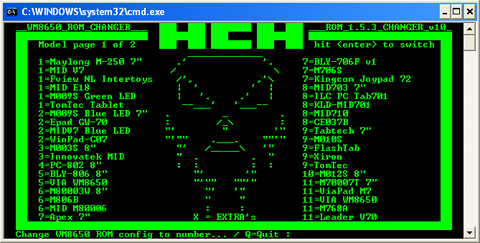
5. Type “SDFORMAT” at the prompt. Press Enter.
6. You will be asked to enter the drive letter for you SD card. Type the letter that corresponds to your SD card and press Enter.
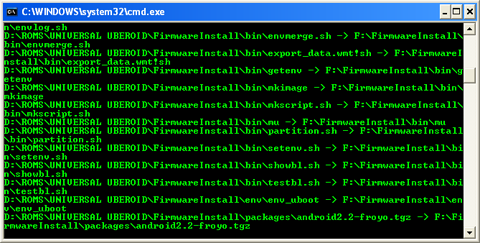
7. The program will format your SD card, and when it’s done press any key to return to the main screen. Do not remove your SD card yet!
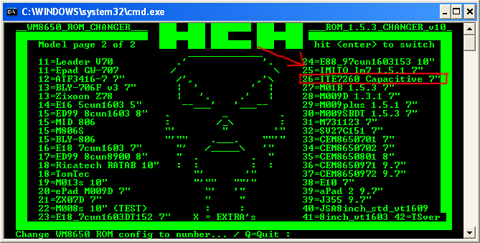
8. At the main menu you will see options for installing Uberoid on many different tablets. Press Enter to go to the next page of options. For this tablet option 26 works. Type 26 and press Enter.
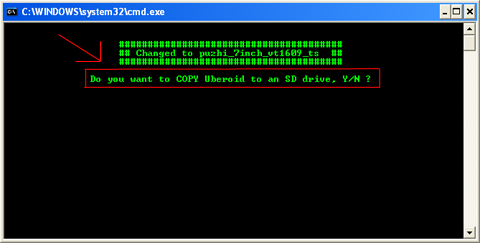
9. You will be asked if you want to copy Uberoid to an SD drive. Type Y and press Enter. At the prompt type the drive letter for your SD card and press Enter.
10. Press any key to install the firmware that corresponds to your tablet, the old firmware directory will be automatically deleted.
11. Remove your SD card from your pc and insert it into your tablet.
12. Turn on your tablet. The device will boot from the SD card and begin to install Uberoid.
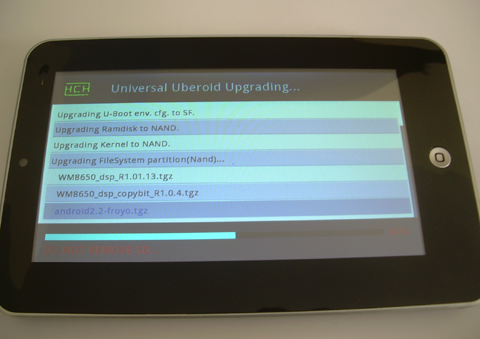
13. Once the installation reaches 100% complete, remove your SD card. The tablet will reboot automatically.
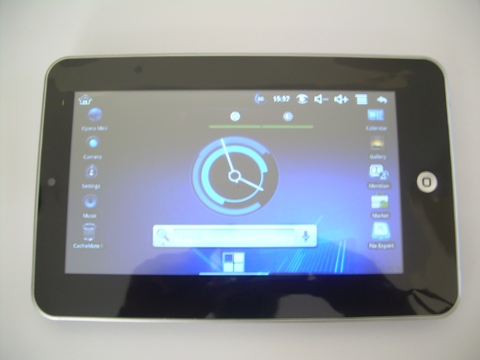
14. Allow a few minutes for the OS to boot up the first time.
15. Enjoy using Uberoid!
The Conversation
Follow the reactions below and share your own thoughts.


April 05, 2012 at 3:48 am, jas said:
on my tablet zync z909.it works many options,but touch screen not working. It has android 2.2,wm8650,cpu 800 mhz,4gb rom green led,and red while charging.and blue while screen saver mood.plz help me
January 10, 2013 at 3:26 pm, deelaka said:
> it install perfectly but not working touchscreen please help me!
May 07, 2012 at 3:30 pm, david said:
please help… i installed the rom in the sd card and when i turned on my tablet its just on a dark screen and nothing more !!!!
i even can’t get back to the ex- operating system… please help
May 27, 2012 at 7:04 am, Joel said:
I know how to fix it I fixed mine wat you need to do is flip your tablet
Back and search for a small hole I’ll say MIC/RESET get a needle and
Press it down gently and that’s how you’ll fix the BLACK/FROOZEN
Problem. FOR ANY MORE HELP tell me…
August 27, 2012 at 8:24 pm, Nabeel said:
> Heyy I am FAcing same problem my android freeze on android logo ..
i have press reset button multiple time but i failed in starting my android pleease help me at danger.guy22@gmail.com
October 11, 2012 at 10:06 pm, blckbrd said:
> have tried to reset my chinees tablet but it wont start at all only a green light but black screen
June 10, 2012 at 6:43 pm, john said:
MY tablet freezes at android robot screen now it not even turns to android robot screen! tell me plzz!!! anyone ? reset, hard reset every solution i tried didn’t work but it follows to no screen. doesn’t have home button three capacitive buttons.
July 01, 2012 at 4:32 am, Rodrigo said:
Hi! I can’t download the file (private) is that package available in another url ?
September 22, 2012 at 11:33 am, dada said:
> copy the name, go to filecrop.com and paste it. you can download it frm ther
July 25, 2012 at 4:04 am, howie said:
Dear ryanramsey23, Would you please reset the file to allow us to download it in mediafire.Thank you very much
August 06, 2012 at 8:27 pm, raj bains said:
I have a Chinese tablet that is not booting and gets stuck on black
android logo and I have tried reset button and supplies sent like to drop any to get firmware but even after unzip and adding to s d. Card the installation wont start. Do I need to press and combination of buttons.? I have tried volume and power button which gets into screen with android lying down with warning sign on it but nothing happens.
October 25, 2012 at 4:46 am, Ken said:
you dont need to unpack it on the sd card but rather on your computer and run the changer file from the computer and follow the instructions given on this page.i had a hanging logo problem but i followed and i have resolved it now.>
August 07, 2012 at 9:58 pm, pad35-u909 said:
hi i have a pad 35 i dont see my tablet witch opsion should i select
September 04, 2012 at 7:05 am, zohair said:
i have wondermedia wm8650 which option i should use to make my tiuchscreen also work
September 11, 2012 at 7:56 am, jackie said:
hi!!
i have a Chinese tablet android share 4.o and i cannot retrieve my password so i need to reformat it.
but i don’t know how to make it..please help me on this…
thnx godbless..
September 16, 2012 at 1:47 am, Keith Petrie said:
Clicking on the “Download Universal Uberoid WM8650 by HCH” link takes me to a site where I am informed that the file is marked “Private” and cannot be accessed except by the owner.
September 25, 2012 at 7:58 am, t s said:
This worked great I downloaded from here http://apadsworld.com/ and used these instructions
October 09, 2012 at 4:44 am, chancy said:
cant download the mod. n one to send me the site to download from
October 24, 2012 at 12:05 pm, Marion said:
i cant connect to wifi.. help me…
November 04, 2012 at 4:25 pm, cathy said:
i can’t dowload to the link given the uberoid honeycomb rom? can you please help me bco’z my table is hang on logo. or can anyone give me a link that i can download the uberoid file.
November 26, 2012 at 10:11 am, prathap said:
thanks a lot. It worked for me.
December 04, 2012 at 5:49 am, david said:
the touchscreen not responding.. plsss help..=( how to fix?
December 05, 2012 at 7:18 pm, Shahil jol said:
done all the process but touch screen not working…what can i do now??? my tab’s model is that you use in your picture..tnzz
January 02, 2013 at 9:45 pm, Claudia said:
can i do this but with a usb cable instead of a sd card? my computer slot for the sd card is broke and i’m trying to do something to my kids tablets since i have the same trouble as everyone else in here
January 08, 2013 at 6:50 am, freedom said:
please i successfully installed the honeycomb Rom on my Chinese tablet but my OS still shows 2.2 instead of 4.0 please is there something i can do to upgrade that.anyways my tablet works a lot better now. thank you very much,
January 08, 2013 at 8:54 am, Mobile Point said:
Wow great tutorial, i’m tested with this. Thanks.
April 29, 2013 at 1:48 pm, jmacaireng@yahoo.com said:
thanks……………



