
OS X Lion: Prevent Mission Control from Rearranging Spaces

By default, Lion’s Mission Control rearranges spaces based on recent use. If you have your spaces set up the way you want them and don’t want Mission Control messing this up, you can disable this and keep your spaces in their original position.

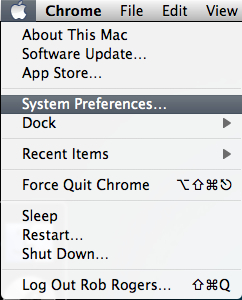
1. Click the Apple icon in the menu.

2. Select System Preferences.
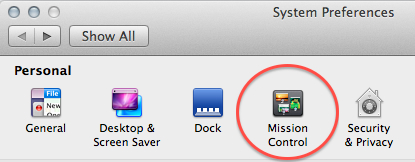
3. In the Personal section, select Mission Control.
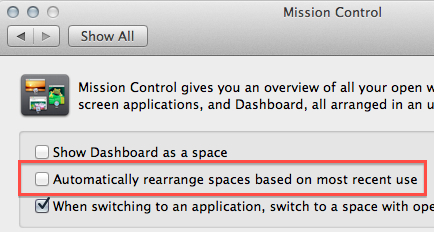
4. Uncheck the Automatically rearrange spaces based on most recent use checkbox.
 

About Rob Rogers

Once a prolific author here on Tech-Recipes, Rob has moved on to greener pastures.
View more articles by Rob Rogers

The Conversation

Follow the reactions below and share your own thoughts.

Leave a Reply

You may also like-

OS X Lion: How to Keep Dashboard from Showing in Mission ControlOS X Lion uses Mission Control as a way to display all open windows, full-screen apps, spaces, and Dashboard. If you don't use Dashboard ...



