
OS X Lion 10.7: Reverse Scroll Direction
Posted by David Kirk in Apple Mac
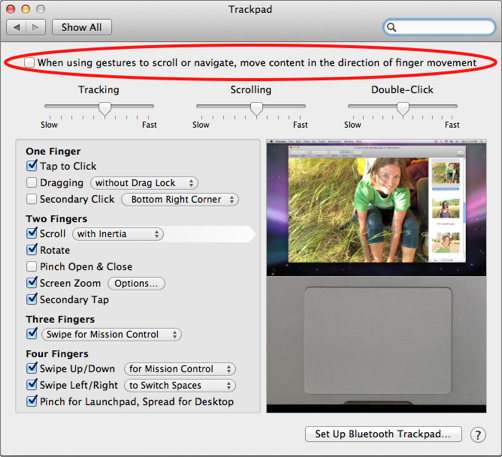
In the development versions of OS X Lion, Apple has inverted the scroll direction. This is a logical progression to a more gesture oriented system; however, for many users it is confusing and breaks old habits. It is always hard to do exactly the opposite of what was previously learned. To revert to the older scrolling direction, follow these steps.
The reversed scroll direction in OS X Lion 10.7 really threw me for a loop. I use the two-finger swipe up and down to scroll web pages all the time. Now it seems inverted. I’m sure I’ll eventually need to convert over to Apple’s new method, but for now, I just have to revert it back to the older scroll method.
1. Select System Preferences
2. Select Trackpad
3. Uncheck the box When using gestures to scroll or navigate, move content in the direction of finger movement.
You can also reverse the scroll direction using a Terminal command. This is useful if your hardware doesn’t bring up the option to uncheck the When using gestures to scroll or navigate, move content in the direction of finger movement checkbox.
1. Open Terminal.
2. Execute the following Terminal command:
defaults write ~/Library/Preferences/.GlobalPreferences com.apple.swipescrolldirection -bool false
3. Log out of your account for the change to take affect.
About David Kirk
View more articles by David Kirk
The Conversation
Follow the reactions below and share your own thoughts.

February 28, 2011 at 12:59 am, jimmyselix said:
man, this really got me right away. thought my touchpad was freaking out for a bit
February 28, 2011 at 10:26 am, David Kirk - Founder/Editor said:
AHahahah… yeah, as the OS goes toward iOS, changing the scroll seems logical… but yeah, it’s painful for me. I never even realized that the scrolls on the two devices were opposite. Shows how observant I am.
March 04, 2011 at 4:57 pm, Flyinrider said:
On older macs like mine it does not give you that option since it has the older style trackpad. However after connecting a new bluetooth track pad and putting the scroll option back to the old way, the macbook track pad followed as well to the old way of scrolling.
March 05, 2011 at 2:19 pm, Evangelist said:
Back being sane again
March 06, 2011 at 9:25 pm, Sean said:
is there a way to reverse it without connecting a bluetooth trackpad?
March 10, 2011 at 5:25 am, roger said:
Any usb mouse gets you a configuration that also lets you change it.
May 23, 2011 at 3:47 pm, Michel said:
Maybe I’m weird, but is it possible to reverse the scroll direction on MacOS 10.6? I’m switching back and forth between Lion and Snow Leopard, so obviously I want both to behave the same, but I prefer the new way rather than the old way. Any hidden settings magic in the Terminal or something like that?
May 23, 2011 at 7:39 pm, Anonymous said:
This app should do the trick:
http://blog.pilotmoon.com/post/4041089648/scroll-reverser-get-in-practice-for-lion
May 24, 2011 at 3:18 pm, Michelcolman said:
Looks like that’s exactly what I need, thanks!
July 20, 2011 at 5:29 pm, Simon Hayward said:
Thank you! This post will probably explode as Lion was released today
July 20, 2011 at 9:22 pm, David Kirk - Founder/Editor said:
FIngers crossed! Thanks for visiting, Simon.
July 21, 2011 at 3:01 am, Clarkc56 said:
just uncheck scroll direction: natural
July 21, 2011 at 1:46 pm, Travis Ellis said:
Dear goodness Thank you!
This was bothering the crap out of me.
July 22, 2011 at 12:40 am, Jon said:
You have saved my sanity!!! Thanks!
July 22, 2011 at 12:00 pm, Sean said:
Thank you so much! This saved me!
July 22, 2011 at 1:38 pm, Kostastnt said:
I have connected 2 usb mouses and 1 bluetooth mouse in my macbook late 2007.. still the option is hidden..
any solution?
July 22, 2011 at 4:57 pm, Casey Bird said:
Really it speaks to the intuitive natures of both setups. I’m sure that you’re plenty observant. ;-)
July 22, 2011 at 6:14 pm, Casey Bird said:
Apparently, it’s not ANY usb [device]. Is there a command line/manual way of changing this? (Please say yes and detail it.)
July 22, 2011 at 6:57 pm, Rob Rogers said:
The Terminal command for reversing the scroll direction has been added to the tutorial.
July 24, 2011 at 3:27 am, Dglenn9000 said:
I just went to my mouse setting and unchecked “Move content in the direction of finger movement when scrolling” Works like it use to now.
July 24, 2011 at 3:27 am, Dglenn9000 said:
I just went to my mouse setting and unchecked “Move content in the direction of finger movement when scrolling” Works like it use to now.
July 22, 2011 at 6:58 pm, Rob Rogers said:
We’ve added the necessary Terminal command to the tutorial.
July 25, 2011 at 2:22 pm, Anonymous said:
knowing the terminal command exists takes away the feeling of lonely hopelessness…
September 05, 2011 at 12:24 pm, Anonymous said:
I just got used to it in an hour or two. It’s much more natural now, more like the iOS.
I honestly wish the whole trackpad was inverted now..



