
Facebook: How to Enable Secure Browsing (SSL Encryption)
Posted by Rob Rogers in Internet
If you are worried about tools such as Firesheep or packet sniffers being used to hijack your Facebook session, Facebook is rolling out SSL encryption. Unfortunately, this is not enabled by default.
1. Go to Facebook and login to your account.
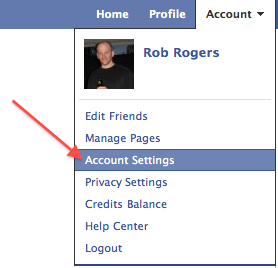
2. Go to the upper-right corner, click Account and select Account Settings.
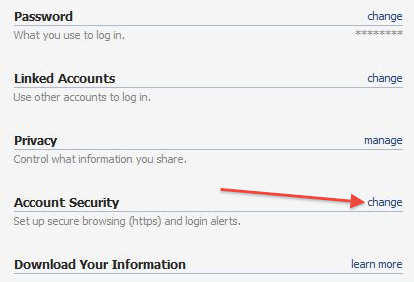
3. Go to Account Security and click change.
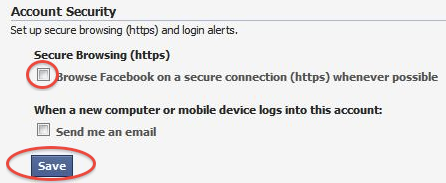
4. Under Secure Browsing (https), click the Browse Facebook on a secure connection (https) whenever possible checkbox. Click the Save button.
Facebook is currently rolling out this feature, if the option isn’t available on your settings yet, check periodically until it appears. Definitely a smart move for anyone that uses Facebook on multiple (and possibly vulnerable) networks.
About Rob Rogers
View more articles by Rob Rogers
The Conversation
Follow the reactions below and share your own thoughts.
February 04, 2011 at 10:53 pm, Anonymous said:
This is an easy thing to enable and something that’s important to do! I work for Symantec and we are thrilled to see this move by Facebook. It’s an important step toward being safe online, but it only works (for now) if you turn it on…
March 13, 2011 at 3:17 am, Nick Coles said:
that’s great – i just flicked the switch and feel a little better about security on facebook……was wondering though is it really true that facebook ‘OWNS’ all the pics, posts, vids etc that we put on their site? what does this mean precisely? are they able to copy and place our private information on other sites, databases etc or do privacy laws still protect us there?
March 13, 2011 at 3:17 am, Nick Coles said:
that’s great – i just flicked the switch and feel a little better about security on facebook……was wondering though is it really true that facebook ‘OWNS’ all the pics, posts, vids etc that we put on their site? what does this mean precisely? are they able to copy and place our private information on other sites, databases etc or do privacy laws still protect us there?
June 03, 2011 at 12:01 am, Mmirich711 said:
I don’t have the check box to turn secure browsing back on. Please help
July 10, 2011 at 6:14 pm, Mridulasarma said:
Thank you
!
January 30, 2012 at 11:39 pm, Terry Baggett said:
I dont have the box to switch to secure browsing, what can I do?
February 28, 2012 at 10:40 am, Cheryl McLaughlin said:
I enabled it and now can’t do much of anything. I can’t even get to account settings to turn it off.



