

We have all been there. You are on a public computer, and need to save some files found or created on the internet. Using this trick, you can download and save the files directly into your Google Docs account for easy access later.
In this post, i will transfer a PDF file from Tech-recipes to Google Docs. Because Google Docs allows you to upload all kind of files, you will be able to do the same with almost any filetype.
Many of these transfered document files can be opened directly from within the Google Docs application. With the playlist update of the Google Docs in near future, you may be able to play mp3 files too!
To copy the file’s link:
1. It must be a direct link. (example: http://example.com/abc.pdf)
2. Right click on the link and choose Copy link location.
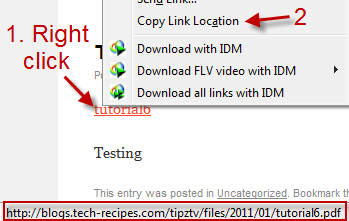
To save the file directly to Google Docs:
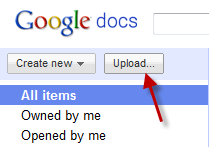
1. Log in to your Google Docs account.
2. Click on Upload…
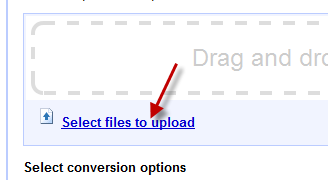
3. Choose Select files to upload.
4. Paste the link at File name and hit Open.
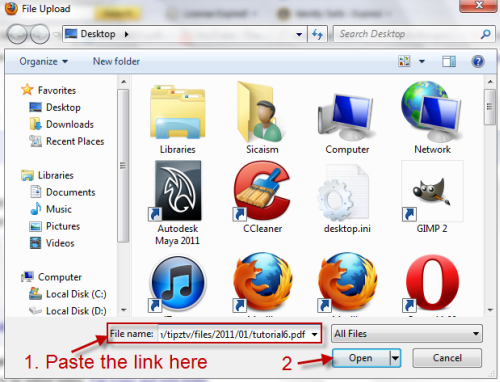
5. The file will be transfered to Google Docs.

Note: If you transfer large file, the browser may hang (although it is still working); therefore, I recommend doing all these steps on a seperate browser window.




