

With screens becoming larger and larger, many users have been asking us how to adjust the text size in Internet Explorer. Using these steps you can change the size of your text for easier viewing. These directions work for all versions of Internet Explorer including IE9. The zoom function is also described.
Many web sites do not specify what size of font the user must use. On these sites, one can easily change the font size to improve viewer comfort.
This method has been tested in all versions of IE including IE9.
Change the Text Size via the Menu
1. Click on View in the IE menu. You may need to press the alt key is the menu is not visible.
2. Goto Text Size
3. Select the font size desired
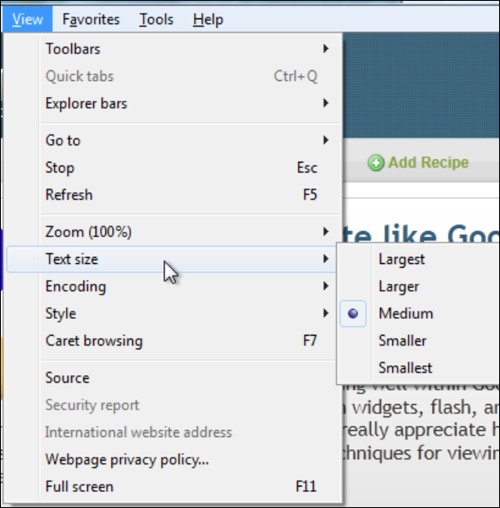
Typically people are increasing the font size to make the text easier to read on today’s larger screens. Increasing the size from just Medium to Larger can make a huge visual difference.
Text Size versus Zoom
This should not be confused with the Zoom option that is found on the same menu. Increasing zoom will increase the size of all elements on the web page including images. Adjusting zoom is frequently accomplished as a shortcut by holding down the CTRL key and scrolling the mouse wheel up and down. Zoom is also be adjusted by holding down the CTRL key and pressing the + or – keys.
I find that only adjusting the text size gives me the best experience. This makes the text more readable without distorting the layout. Other people like the zoom function better. The one advantage of zoom is that it will increase the text size even on sites (like tech-recipes) that does not allow the text size to be adjustable.
What text size and zoom setting work best for you?




