


You can quickly launch S Voice on your Samsung Gear S3 by double pressing on the Home key. The S Voice is a helpful feature, so some users are pleased that Samsung has made launching the app easier. However, recognizing the fact that not everyone uses the S Voice app, Samsung has made it possible for you to set the Gear S3 Home key to launch the apps and functions that you want. This tutorial will show you how to customize the Gear S3 Home key shortcut.
How to Customize the Samsung Gear S3 Home Key Shortcut
To change the default shortcut for the Gear S3 Home key, follow these steps:
1.Press the Home button on your Samsung Gear S3. 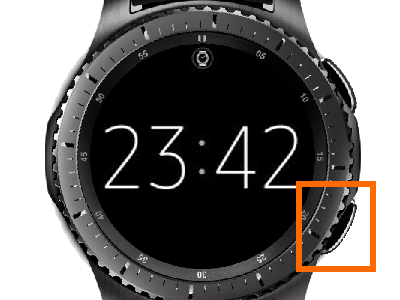
2.From Gear S3’s Home screen, tap on Settings.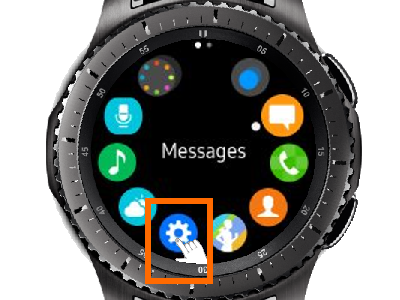
3.From Settings, scroll down, and open the Device option.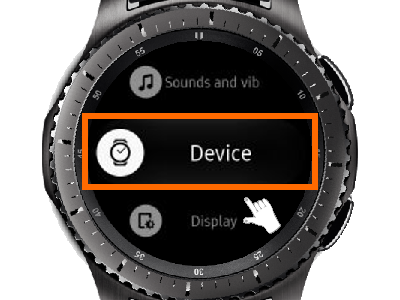
4.From the Device option, tap the Double Press Home option.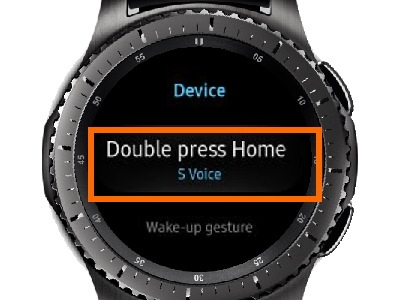
5.Choose from the list of available apps and functions. For purposes of this tutorial, I have selected Music Player.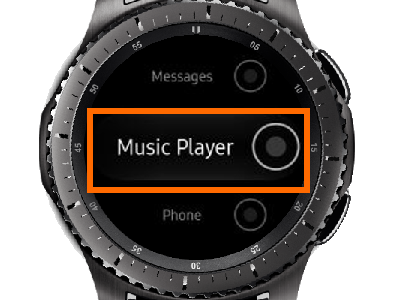
6.The Double Press Home option will now show Music Player.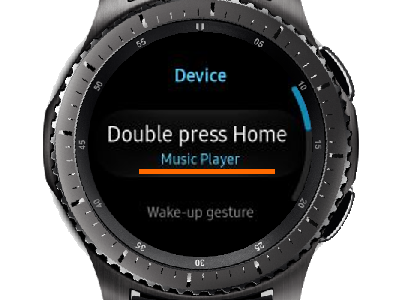
7.Press the Home Key twice to see that the Gear S3 Home Key shortcut is now set to open the Music Player.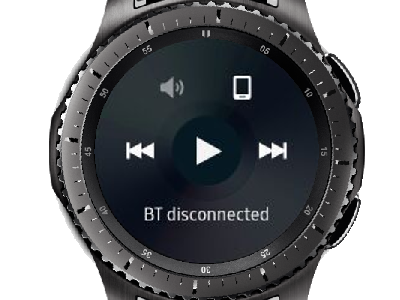
List of Available Home Key Shortcuts
These are the apps and functions that you can set to the Home Key:
● None – the Home Key will not do anything when you do a double press
● Last app – double pressing the Home Key will switch you to the last app opened; this is the “Alt+Tab” equivalent on the Gear S3
● Recent apps – opens the Recent apps page where all the apps that were recently opened are displayed
● Quick dial – opens the Quick dial feature
● Alarm – launches the alarm function
● Contacts – opens the Contacts
● Email – launches the Email app
● Find My Phone – opens an app that helps you find your lost phone
● Gallery – opens the Gallery app
● Messages – allows you to open, read, message on your Gear S3
● Music Player – launches the music player on your phone
● Phone – opens the Phone app
● Schedule – shows your set schedules
● Settings – opens Gear S3’s settings
● Weather – opens the Weather app
● World Clock – opens the World Clock app
Now you know how to set a Samsung Gear S3 Home key shortcut and the apps which support this feature. You can search our site for more tips and tricks on Samsung Gear S. If you have questions or concerns with any of the steps above, let us know in the comments section.





