

Yahoo has announced that the bookmarking service Delicious will be shut down soon. This tech-recipes tutorial will show you how to back up your favorite bookmarks and import them into Firefox or Internet Explorer.
To backup your bookmarks:
1. Sign in to your Delicious account.
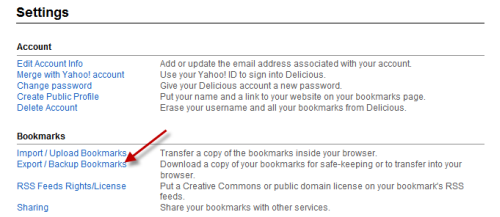
2. Choose Settings.

3. Choose Export/Backup Bookmarks.
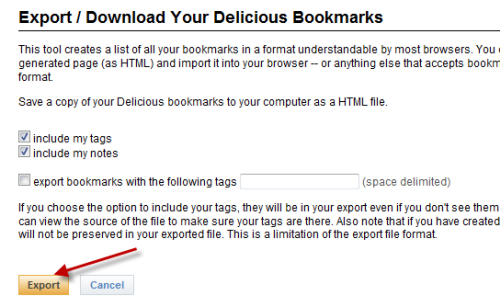
4. Hit Export. After that, you can save the hmtl file to your hard drive.
To import bookmarks into Firefox:
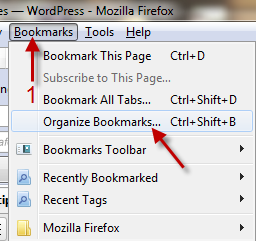
1. Go to Bookmark->Organize Bookmarks…
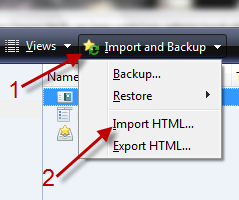
2. In Library window, choose Import and Backup -> Import HTML…
3. In Import Wizard window, choose From an HTML File->Next->Choose your Delicious HTML file and hit Open. After that, all of your Delicious’ bookmarks will be imported.
To import bookmarks into IE:
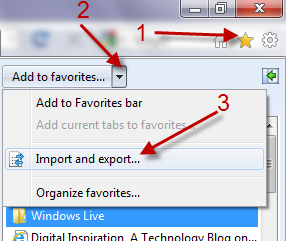
1. Click on the Star icon->the arrow next to Add to favorites…->Import and export…
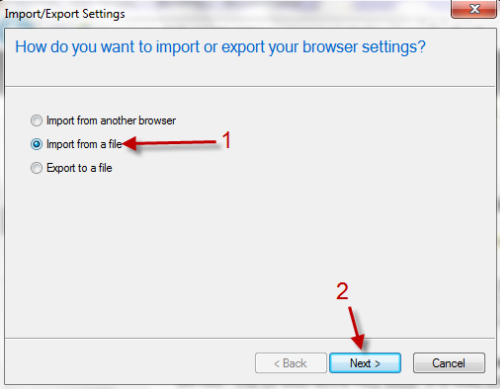
2. In Import/Export Settings window, choose Import from a file->Next.
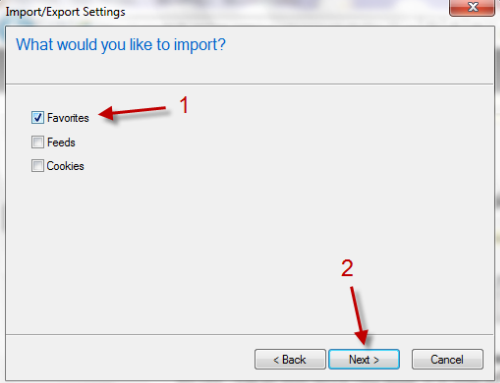
3. In the next window, choose Favorites->Next.
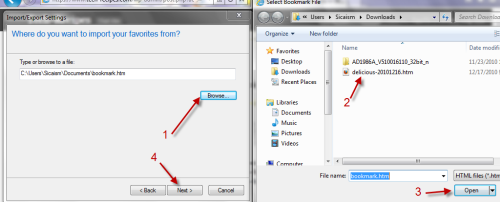
4. Click on Browse…->Choose the HTML file->Open->Next->Import->Finish. After that, all bookmarks will be imported.
Note: The IE guide is written for IE 9.




