

This tech-recipe describes how to open a command prompt by right clicking on a folder in explorer. The tutorial has been updated to include information about Windows 7 as well.
Many of us command prompt guys still like to drop to the command console for particular tasks. Executing cmd.exe from the RUN box still forces you to navigate to the particular folder in question. Wouldn’t be easier to just right click on a folder to open a command prompt in that particular directory?
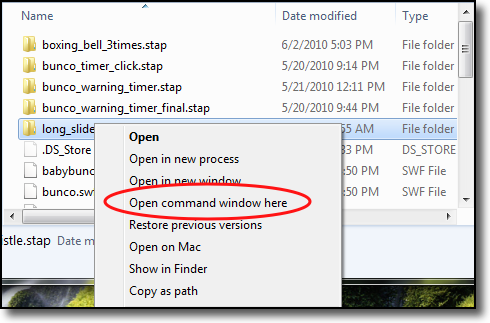
Windows 7 Systems —
1. Select the folder you want to open in the command prompt
2. Right-click on it while holding the Shift key
3. Select Open command window here
XP Systems —
Manual Method:
(This requires editing your registry. If you are not familiar with registry editing, this isn’t for you… so skip to the easy method below)
1. Open regedit
2. Navigate to HKEY_LOCAL_MACHINE/Software/Classes/Folder/Shell
3. Create a new key called Command Prompt
4. Your default value should be Command Prompt Here
5. Create a new key called Command under the Command Prompt key
6. Your default value should be cmd.exe /k pushd %L
Your popup menu when you right click on a folder will now contain an option called Command Prompt Here which will open a command prompt in the selected folder.
Easy Method:
Microsoft also has developed this ability into one of its powertoys.




