

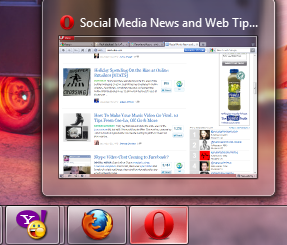
In Opera, by default, when you hover the mouse over Opera icon in taskbar, it will show thumbnail of only one current tab ever if there are many opened tabs. This tutorial describes how to show thumnails of all open tabs in Opera.
Note: Works with Opera 11 and above.
Here is a screenshot of how Opera’s thumbnail shows up in taskbar (although there were four opened tabs):
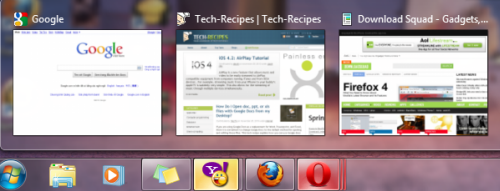
Here is how Opera appears after we had modified this setting:
To show all thumbnails:
1. Launch Opera.
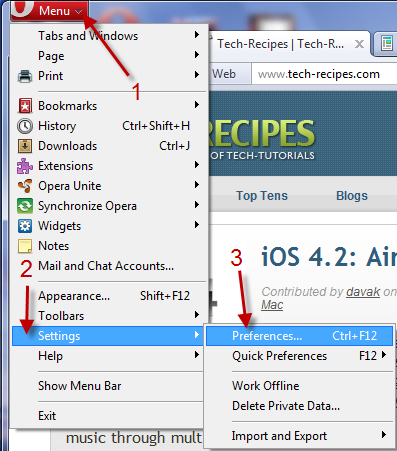
2. Go to Menu->Settings->Preferences…
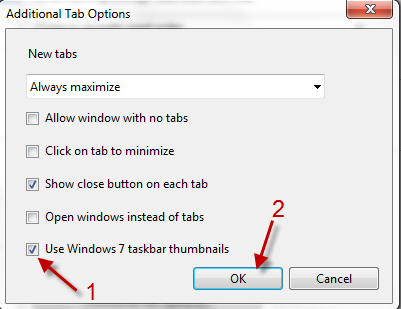
3. Go to Advanced tab, choose Tabs in the left sidebar->Additional tab options….
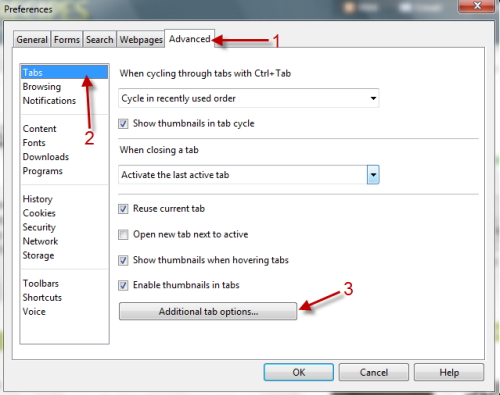
4. Check on Use Windows 7 taskbar thumnails and hit OK.
5. Back to Preferences window, hit OK again.
6. Restart Opera to make it works.




