
How to use Google Instant on Opera Now

   Posted by Lê Hoàng in Google

Google has just rolled out the new instant search feature which shows results as you type. However, this cool feature is only available on Chrome v5/6, Firefox v3, Safari v5 for Mac and Internet Explorer v8. Here is how to access it on Opera browser.

Tested on Opera 10.62.

Make sure you enable Google instant first!

1. Go to Google.

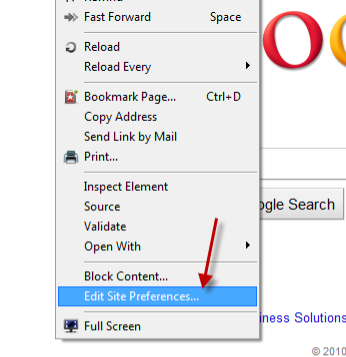
2. Right click on an emty space and choose Edit Site Preferences…
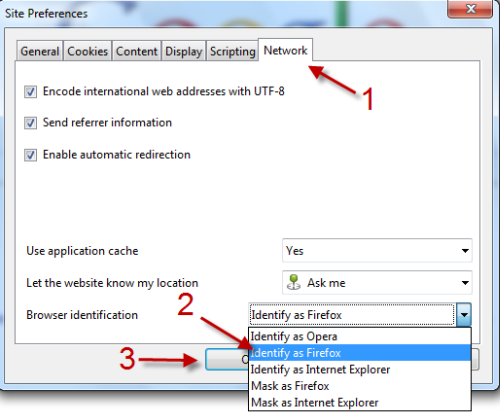
3. When the Site Preferences pops up, go to Network tab, head to Browser identification section and choose Identify as Firefox. Click on OK to close the box.
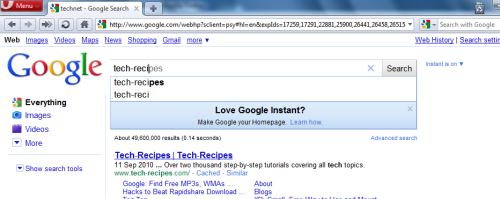
4. Refresh the page and you can acess Google Instant now.
 

About Lê Hoàng

When not creating exciting new Android games, Lê Hoàng is here crafting tutorials, tweaks, and fixes for your enjoyment.
View more articles by Lê Hoàng

The Conversation

Follow the reactions below and share your own thoughts.

4 Responses to “How to use Google Instant on Opera Now”

  1. September 17, 2010 at 5:51 am, aqwx1234 said:

    thx

    Reply

    • September 17, 2010 at 6:43 am, Anonymous said:

      Thank you!
      Glad you like the post :D

      Reply

  2. September 24, 2010 at 12:34 am, Anonymous said:

    It sucks that we have to be our competitor to become compatible…

    Reply

    • September 24, 2010 at 1:12 am, Anonymous said:

      This is the problem from Google :)

      Reply

Leave a Reply

You may also like-

Disable Google Instant Search to Return to Old Google SearchI am a big fan of google's new instant search. However, a lot of people do not like the change. This tutorial shows how ...



