

If you are experiencing random crashes, failing memory is often to blame.
This Tech-Recipes tutorial explains how to test your system’s memory for free.
People that debug numerous systems realize that failing memory is one of the hardest things to diagnose. Failing memory often gives random errors. Sometimes this causes crashes; at other times, it simply causes odd behavior.
With better operating systems, random crashing should no longer be expected. If you are crashing when spyware-free or when you have a fresh install, you should explore the possibility of memory errors.
Multiple memory testing programs can be purchased. However, Microsoft has provided one for free in all versions of Windows 7 and Windows 8.
The mdsched.exe command can be run from the command line terminal or from the routine search. Here I am running it from the Windows 8 search area. 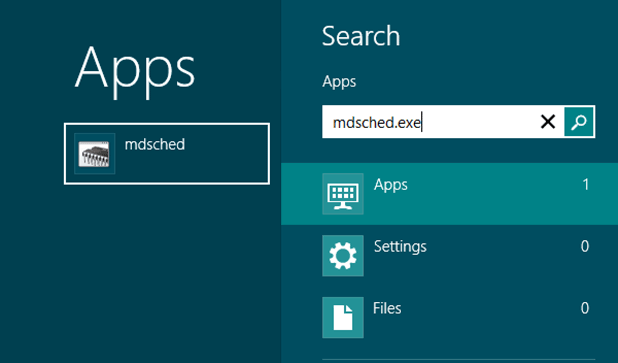
Once you run the application, you will be prompted to either restart and check the memory now or to delay the memory checking mechanism until the next time you restart the operating system.
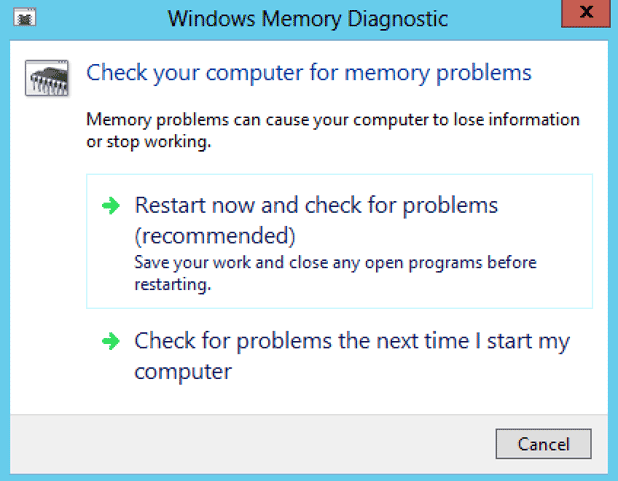
Once you restart the system, Windows will completely check the memory prior to completing the boot process. If you suspect overheating might be an issue, be sure to test the memory immediately after your crash or after putting your system under heavy load.





