Android: How Do I Backup my Contacts?

   Posted by David Kirk in Android

For many people, the phone numbers and addresses contained within their contacts are extremely valuable. Backing up this information is essential in case the android device is stolen or destroyed.

Eventually when everything is stored in the cloud, backing up contacts will not be as important. However, for now, it is an essential part of life. Many of us have worked years to collect our contacts. They can be priceless.

Here is how to backup your phone numbers, addresses, and other contact information on your android device.

1. Go to your Contacts
2. Press the physical Menu button
3. Press the virtual More button in the lower right corner
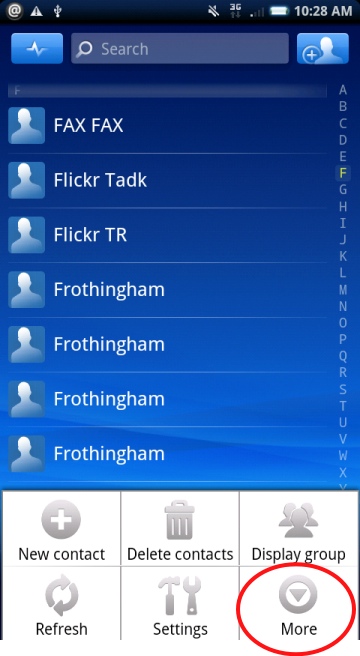
select the backup button

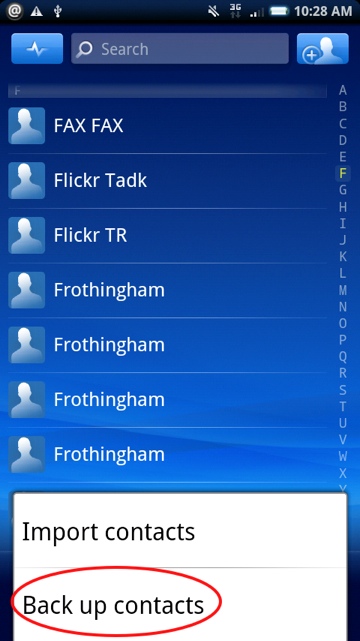
4. Select Back up contacts

press backup button

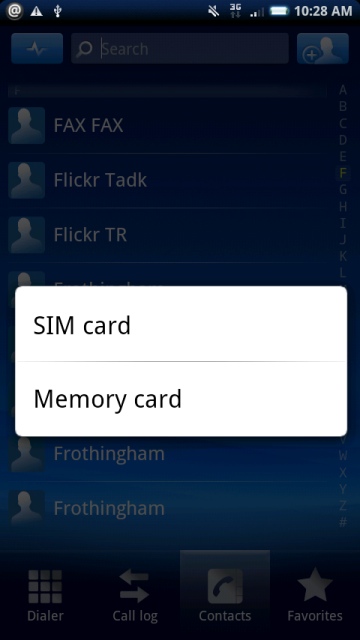
5. Select SIM card or Memory card

backup contacts to either sim or memory

I frequently backup to a separate memory card on a routine basis and store it in my office. Then if my phone ever dies or is stolen, I can repeat the process and import from my memory card.


 

About David Kirk

David Kirk is one of the original founders of tech-recipes and is currently serving as editor-in-chief. Not only has he been crafting tutorials for over ten years, but in his other life he also enjoys taking care of critically ill patients as an ICU physician.
View more articles by David Kirk

The Conversation

Follow the reactions below and share your own thoughts.

8 Responses to “Android: How Do I Backup my Contacts?”

  1. September 05, 2010 at 5:07 pm, Jordangsu said:

    contacts.google.com they are already backed up in the cloud, if your phone is wiped or replaced they will automatically be pulled down to the phone once you login

    Reply

    • September 07, 2010 at 1:05 pm, David Kirk - Founder/Editor said:

      Yeah, I love that about Android devices. The question is not if you are paranoid, but if you are paranoid enough! :)

      I agree that backing up is not as essential with Android devices… but it is certainly still a common request.

      Reply

  2. June 09, 2011 at 1:09 am, Moo said:

    I actually find some of mine don’t get into Google that easily. Worst case is though, you Export to SD, then Import from SD, but target the location to your Google account…

    Bam, forced update.

    Reply

  3. October 09, 2011 at 2:25 pm, Rachael said:

    The real problem lies if/when Google disables your gmail account that is linked to your phone and apps. No backing up contacts, and you’ve got to wipe your phone. They can blame you for a TOS violation and not reply when you ask for proof. No justice.

    Reply

  4. November 16, 2011 at 9:10 am, gyco said:

    I want to synch my PHONE CONTACTS only, I dont want them mixed up with google mail and skype and everything else. What do I need to do?

    Reply

  5. February 26, 2012 at 8:11 pm, brant said:

    A program called VeryAndroid Contacts Backup will copy and transfer all contacts from Android to computer directly for backup. Works well for my sentation.

    Reply

  6. February 27, 2012 at 8:57 pm, JIm said:

    This does not work. I have no “backup” option. Only “export.”

    What say you?

    Thanks

    Reply

  7. May 21, 2012 at 9:05 pm, Jack Otley said:

    I don’t get the menu options you talk about. I have Verizon Droid Incredible but run on the PagePlusCellular system. The phone will create a copy of contacts on Verizon’s Backup Manager but, as I have no Verizon account, I can’t access it.

    Reply

Leave a Reply

You may also like-

Android: Import Contacts from SIM and move to a new Android phoneThis article will explain how to import your contacts from a SIM card on an Android phone and in turn sync those contacts to ...