Sony Ericsson Xperia x10 – Transfer Music and Photos with Apple Mac

Contributor Icon Contributed by David Kirk     
Tag Icon Tagged: Android  

In typical Android 1.6 fashion, moving pictures and music files requires several steps. These directions walk through how to transfer these media files with USB between OS X and the SE Xperia x10.

1. Connect the x10 to the apple computer with your USB cable.
2. Touch the top of the x10 screen and drag down.
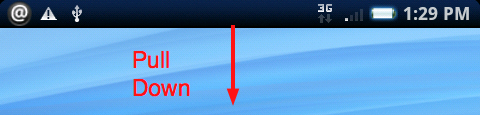
x10 pull down status screen

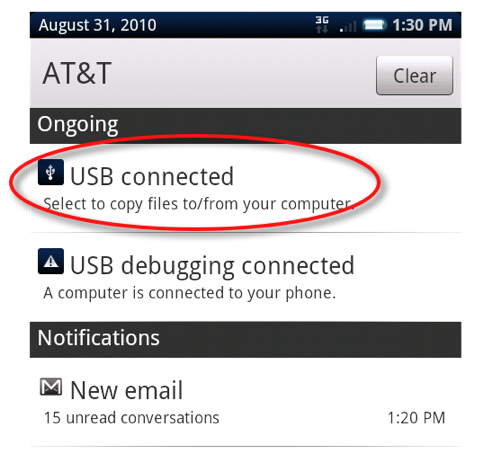
3. Select the USB Connected button

click the usb connected button on the x10

4. Click the Mount button when the dialog box appears
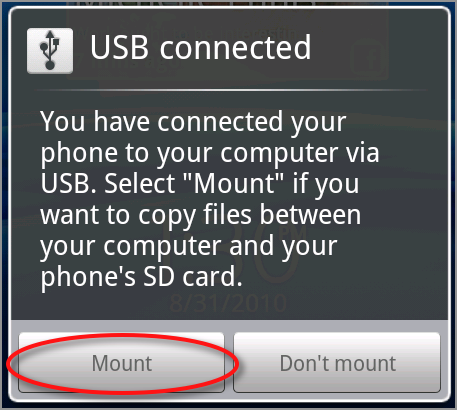
click the mount usb button

5. The phone’s media card should be mounted as a drive by OS X. Click on the drive to open it in Finder.

6. Move/Copy any music files that are not copyprotected into the music folder.
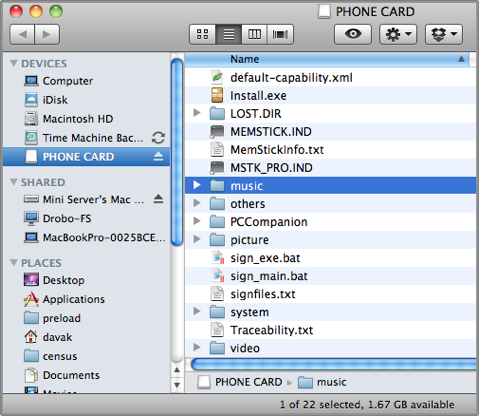
osx music folder

7. Likewise, you can drag any photos that you want out of the DCIM -> 100ANDRO folder. You can also drag files into the folder if you want to move photos on to your device as well.
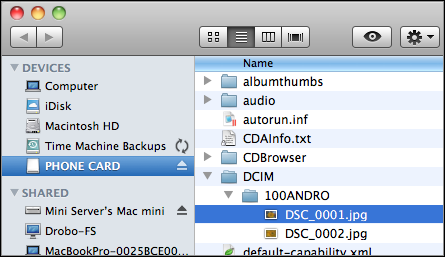
x10 Images Folder in OS X


9 Comments -


  1. Mohith said on October 20, 2010

    Thnx, this was really helpful. I bought SE X10 yday and i was not able to figure out the way to use with my macbook pro

  2. David Kirk - Founder/Editor said on October 20, 2010

    Cool. I’m glad I could help.

  3. Irving Jimenez said on November 23, 2010

    I connect my phone to my computer but nothing happens. I click mount on the Xperia but my computer doesn’t seem to respond, please help

  4. Jason Nystrup said on November 26, 2010

    There is a program made for mac if you want to sync it with your itunes. Its called media sync. Here is a link for it: http://www.sonyericsson.com/cws/support/softwaredownloads/detailed/mediasync/w995?cc=gb&lc=en
    The thing is that you have to install it and open the program. When you have done so you will have to mount your phone just like its described here. After that you are able to sync your itunes with your phone. There is also another isync program for the SE phone. Here is a link for that: http://www.sonyericsson.com/cws/support/softwaredownloads/detailed/sonyericssonisync/c905?lc=da&cc=dk
    This makes you able to sync your contacts and and upcoming events, and so on. Hope this helps !

  5. liam said on December 4, 2010

    That program is NOT for the X10. No such program for the X10 exists at present.

  6. Parkour_pro1996 said on December 30, 2010

    thank you very much

  7. Guest1 said on May 11, 2011

    Hi

    When I pull down the x10, I don’t get the option to connect via USB, I just get the carrier and the notifications thing.

    Anyone have any experience and help with this?

  8. Tej said on May 30, 2011

    when you connect the phone it takes about 2-3 mins before the screen pops up for mounting… just connect and wait !!

  9. someone said on July 14, 2011

    you need to  hold on the middle button and it will pop up connect to computer


RSS feed for comments on this post. TrackBack URL

Leave a comment -