

How do I keep my kids from playing with their computer all night? Kids love technology. My kids would spend every waking moment in front of the computer or gaming system if I let them. Obviously, there is no replacement for the watchful eye of a parent; however, parents cannot directly observe their children 24 hours of the day either. This tutorial describes how to lock a computer from a child’s use for certain hours of the day.
Important:
-Your child must have his/her own account and you will need to log into as administrator to set time limits for them.
-Make sure your administrator account already has a password so your children can’t change the settings.
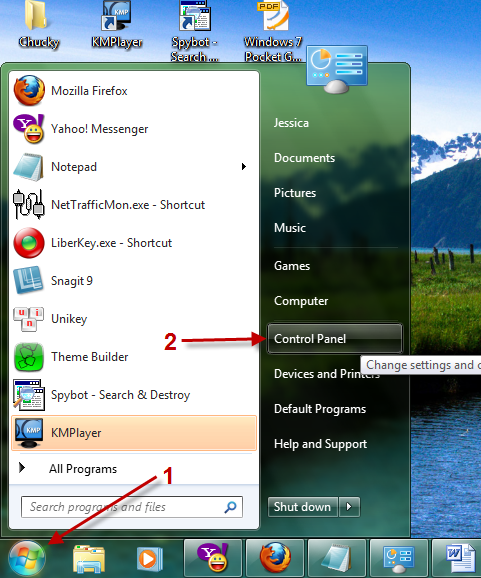
1. Click the Orb (Start button) and choose Control Panel.
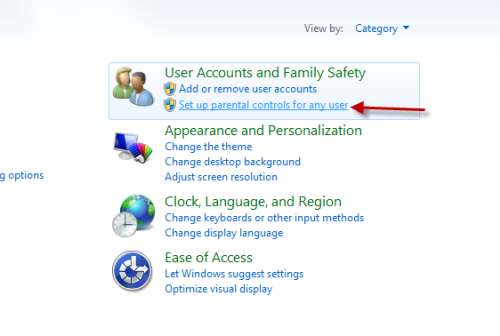
2. When the control panel pops up, choose Set up parental controls for any user.
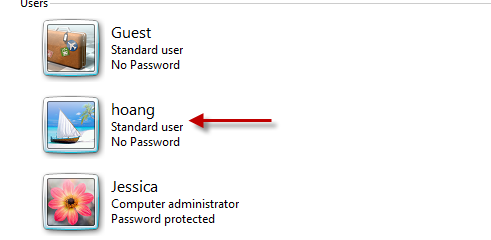
3. Choose user account that you want to set time limit.
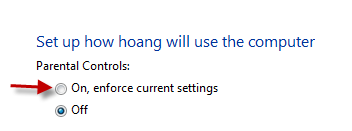
4. Choose On, enforce current settings in the next step to turn on Parental Controls for that user.
5. Now, the Time limits option is visible, click on it to change the setting.

6. Hold the left-mouse and drag the hours you want the hours you want to block. Click on OK to save settings.
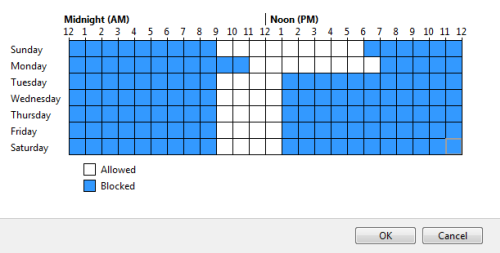
The steps are easy to follow, and now you have worry that your children are playing online games at 3 o’clock in the morning. 🙂




