
Facebook: How To Get Only Status Updates on Your FB Home Page

Contributor Icon Contributed by Rob Rogers  
Tag Icon Tagged: Internet  

Facebook’s News Feed (and Live Feed) tend to be way to much information to sift through. Everytime that one of your friends becomes someone else’s friend, it ends up on your home page. In fact, it seems that each time any of your friends does anything on Facebook, it is thrown onto your homepage. Here’s how to tame it down to only Status Updates. (Updated for latest facebook update.

This tutorial has been updated for the latest facebook changes. Scroll to the bottom of the article for the new changes.

1. Go to Facebook and login to your account.

2. You will be taken to the home page where you will see either the News Feed or the Live Feed (depending on which one you’ve activated).

3. Go to the menu on the left side of the screen.

4. Click More.

Small gray rectangles will appear to the right of each of the menu entries.

5. Locate Status Updates.

6. Left-click your mouse and drag Status Updates to the top of the menu (place it above News Feed).

7. Release the mouse button.

8. Click Status Updates.

The page will refresh, displaying only the status updates of your friends. To update your staus, click the Update Status button.

Your home page will stay this way unless you change it down the road.

UPDATE:

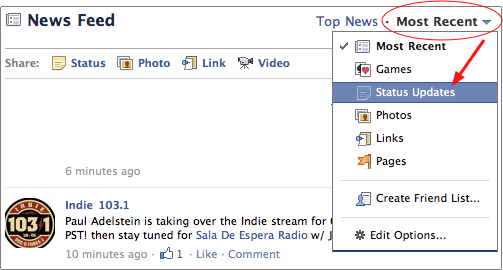
With the new “improved” Facebook profile, the above method no longer works. To get only status updates, go to your Facebook homepage. At the top you will see Top News and Most Recent. Click the downward pointing arrow next to Most Recent. Select Status Updates from the dropdown menu.
 

16 Comments -


  1. David Kirk - Founder/Editor said on October 27, 2009

    LOL. I almost posted the exact same tutorial last night! I think I even uploaded my pictures to the server.

    I decided against it after I realized I missed all the pictures and GreenThumb score updates that you’ll miss by viewing status updates only. ;)

  2. Anonymous said on October 28, 2009

    Thanks, very useful.

  3. Anonymous said on October 28, 2009

    Nice recipe, thanks!

  4. monica l martin said on October 29, 2009

    good tip.. thanks!

  5. Nordzin said on January 15, 2010

    Thank you – really useful.

  6. Anonymous said on April 3, 2010

    cant get farmville back on help

  7. Anonymous said on April 3, 2010

    Type your reply…

  8. Anonymous said on December 12, 2010

    I am not able to do this…
    Is this feature removed now?

  9. where is it said on December 22, 2010

    I can’t either, can’t filter to see only status updates, where did it go ???

  10. Anonymous said on December 22, 2010

    Update to this article coming in the next 24 hrs. Thanks for pointing out the changes.

  11. Rob Rogers said on December 22, 2010

    Looking at it.

  12. Anonymous said on December 22, 2010

    Article updated.

  13. Anonymous said on December 22, 2010

    Shamanstears as updated the article… Thanks for everybody who pointed out that the older way no longer worked. Directions for the new method have been added.

  14. Waki Don Waka said on January 23, 2011

    I’ve modified my face frontp. by “Edit Options” settings. Select Show posts from: “All of your friends and pages” instead of just “Friends and pages you interact with the most” to have the most optimistic view over ur friends! :)

  15. Guest said on July 13, 2011

    There is a script that will do this for you on the new FB layoutA chrome extension
    https://chrome.google.com/webstore/detail/niibjigimiaihbihflghjcbbkfgamoojA Greasemonkey userscripthttp://userscripts.org/scripts/show/106701

  16. ZeeAce said on October 16, 2011

    How do i get to see the “Status Updates” alone in this changed FB 3.0?!
    During the OG FB, it was easy, then during the 1st change, it was found under “Most Recent” and now, it’s not to be seen anywhere!
    Any help is much appreciated.


RSS feed for comments on this post. TrackBack URL

Leave a comment -



