
Sony Playstation3 and PS3 Slim – How to backup your PS3 harddrive to an external harddrive / thumbdrive before upgrading

Contributor Icon Contributed by seamonkey420 Date Icon August 26, 2009  
Tag Icon Tagged: Games

The Sony PS3 Phat and PS3 Slim are amazing gaming consoles and a great media center playback device too.  One thing that Sony has done right with the PS3 is that they allowed users to upgrade the harddrive using any normal SATA/SATAII, 2.5″ laptop harddrive.

However, the most common question I notice about upgrading is not the upgrade itself but how do i retain my data from my original PS3 harddrive? how can i backup that data?

Lets get to it: backing that ps3 hdd.

Requirements:

  • External USB harddrive that is larger than the data on your current PS3 harddrive (ie 40gb ps3, 40GB external or smaller, depending on how much is used up) or a Thumbdrive or Memory Card (if you only have say 15gb of data or a fairly new ps3).
  • FAT32Format (to format your ext hdd into fat32, ps3 will not read ntfs
  • PC (windows used for guide)
  • PS3 / PS3 Slim

1. Download FAT32Format from here.  Once downloaded, copy the fat32format.exe into your C:\Windows folder.

2. Connect your external harddrive to your pc and figure out which drive letter it is.  (in my example, D:)

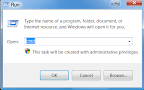
3. Go to your Start Menu > Run or hold the Windows Key + R to bring up the Run window.

4. In the run window, type CMD and hit Enter.  This will open up a command prompt.
5. Type in this command, replacing myhdd with your drive letter of the external harddrive:

fat32format myhdd:

(in my example, i would type:  fat32format D: )

and hit enter.
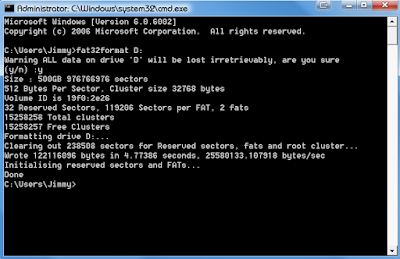
6. It should only take a few seconds to do. Once its completed unhook your harddrive and connect it to your PS3.

7.  First lets backup our Trophies.  On your PS3, first go to Game > Trophy Collection.  Once you have Trophy Collection highlighted in your XMB, hit the Triangle button to bring up the menu and choose the “Sync with Server“. This will backup your trophies to the PSN server.  Do this for each user you may have on your PS3.

8.  Once thats done, go to Settings > System Settings > Backup Utility.   Then choose the Backup option.  It will warn you if you haven’t synced your Trophies and then do a Yes.  Then read the next prompt and do a Yes to that.

9. Choose the external harddrive to backup to and hit X.

10.  Now the backup process will start.  This can take anywhere from 2 hours to 12 hours (in my case w/420GB of data on my PS3’s 500GB harddrive, it would take about 12 hours for a full backup).
–After the backup completes, power down your PS3 and let it cool for an hour.  Remove your old harddrive, put the new one in.  (see my blog post / vid on how to for a ps3 phat here )

–Finally, restore your data from the usb harddrive we backed up to.  Just go to System Settings > Backup Utility > Restore and read and follow the prompts. :)

This will backup:

  • Game Data
  • Game Saves
  • DLC
  • Demos/Games
  • Movies/Photos/Music
  • Chat messages/sessions
  • PSOne/PSN Games

Backing up your PS3 harddrive (video):

http://www.youtube.com/watch?v=Zeyve-VSIgk

Some PS3 Harddrive notes:

http://www.tech-recipes.com/rx/2433/ps3_upgrading_harddrive_notes_tips/

Previous recipe | Next recipe |
 
  • gundamboy
    just a quick question, if I've already got a 500gb external HD formatted to fat32, but its already had 50% of it full, and i'm backing up a 60gb ps3, do I need to erase all my data before backing it up, or will my other files on the external drive remain safe?

    thanks :)
  • crsn891
    gundamboy, you can safely place the PS3 backup on your external hard drive. A backup file is usually one large file with the information organized within. The restore utility will know how to interpret the data to restore your settings.
  • dwrekker86
    Hey,
    So i've tried to format my external hard drive. I get to step 5 where i have to type in fat32format. It's in my F drive and it keeps saying "fat32format F: is not recognized as internal or external command, operable program or batch file." do you have any idea how to point me in the right direction?
  • scottmdj
    Here's a good question for you: I want to get a new PS3 slim...but how do I backup a huge (34gig) video file copied to the original PS3 hard drive. Strike x3: FAT32 wont recognize more than a 4gig file, the PS3 doesn't recognize NTFS, and the PC won't recognize the PS3 hard drive.

    My only "option" may be a 64gig memory stick that doesn't exist yet :)

    Any suggestions?
  • MeloD
    Hey dwrekker86, all you have to do to change the drive to FAT32 format is get into the command prompt then type "format/FS:FAT32 X:" the "X" would be whatever your drive letter is when you plug it in to the computer. Then it'll say "The type of file system is NTFS. The new file system is FAT32. Enter correct volume label for drive "X:"
    To find the correct volume label get to "disk management" in your computer and you should see your plugged in external drive in the very top part of the list (NOT TO BE CONFUSED with your internal drive marked "C"). Under the column in that list that says "volume" you'll see the correct name (or label) of your drive. Thats what you type in after it prompts you in the command prompt for the correct volume label. :-)
  • MeloD
    Hey dwrekker86, all you have to do to change the drive to FAT32 format is get into the command prompt then type "format/FS:FAT32 X:" the "X" would be whatever your drive letter is when you plug it in to the computer. Then it'll say "The type of file system is NTFS. The new file system is FAT32. Enter correct volume label for drive "X:"
    To find the correct volume label get to "disk management" in your computer and you should see your plugged in external drive in the very top part of the list (NOT TO BE CONFUSED with your internal drive marked "C"). Under the column in that list that says "volume" you'll see the correct name (or label) of your drive. Thats what you type in after it prompts you in the command prompt for the correct volume label. :-)
blog comments powered by Disqus



