
Using iPhone 3G S Voice Control Commands

Contributor Icon Contributed by qmchenry Date Icon June 24, 2009  
Tag Icon Tagged: Apple iPhone

Apple’s latest hardware upgrade for the iPhone line, the iPhone 3G S, adds voice control capabilities. Without looking at the device, using voice control you can easily dial the phone using numbers or a contact’s name, and control the iPod with various commands. Here are the details:

Voice control can be accessed at any time by pressing the home button (the round button just below the screen) for a few seconds. When Voice Control is ready for you to speak, your iPhone will vibrate and chime twice quickly. Then it’s time to overcome your stage fright and speak your command.
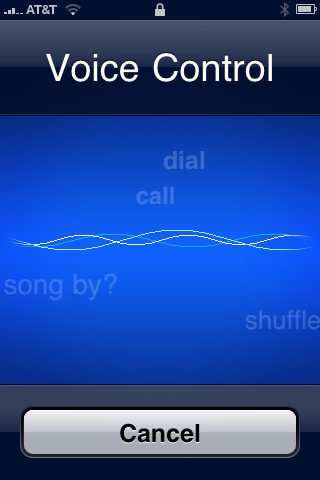
Here are some available commands:

Dial 1 800 5 5 5 1 2 1 2
Dialing by numbers works remarkably well, even understanding “eight hundred” in addition to “eight zero zero.”

Dial Jennifer mobile
Accessing phone numbers from your address book is simple. Use the contact’s name followed by the specific phone number you want to call (work, home, mobile, pager, etc.).

Call Jennifer
Call is interchangeable with dial. In this example, just the contact’s name is spoken. If the contact has one phone number, that number will be dialed. Otherwise, the display will show the contact’s name at top plus the text “Multiple Numbers” just below. The iPhone will tell you which phone numbers are available (i.e., “Jennifer, mobile or work?”). Tell it which one you want to call and it will do the rest.

Play album (album name)
Play playlist (playlist name)
Play songs by (artist name)
Play artist (artist name)
These commands provide a variety of ways to select music to play.

Play more like this
This command creates and plays a genius playlist from the current song.

Play music
Play
Pause music
Pause
These commands start or stop playing, just like hitting the play/pause button on an iPod.

Next track
Next
Previous track
Previous
These commands do what you’d expect, behaving like the next and previous buttons on an iPod.

What song is playing?
What’s playing?
Who plays this song?
Who sings this song?
These commands all do the same thing. The song title and artist will be spoken by the iPhone.

Shuffle
This simple command will toggle the state of the shuffle setting. It will also tell you what the shuffle state is to confirm that it is what you want.

If you find any more voice commands, please share them in the comments!

Previous recipe | Next recipe |
 
  • @qmchenry Thanks for the great tutorial. This is much better than my random-yellings driving down the road. ;)
  • Mike
    How do I turn it off? ... Before when I pressed and held the home button it shut down the application running.
  • There doesn't appear to be a way to turn it off (other than an option when the phone is locked with a passcode). But there is still a way to force quit an application that's gone astray:

    Press and hold the power button (top of iPhone) until the red "slide to power off" slider appears (a few seconds). Then press and hold the home button for a few seconds until the home screen reappears.
  • Mike
    Arg,.. I like the old way of just holding the home button while the application was running .. it used to shut down applications gone astray very nicely.

    Oh well.
  • I was hoping that I would be able to rate my music using the voice prompt. Anybody else have that feature on their wish list??
  • qdideas
    Oh, totes. That would rock.
  • adambruzon
    To be able to ask for the time would be great.....
  • arash
    me either
  • chris
    how do I shuffle all songs from all albums?
  • It sounds great, but just an hour ago I received a call from a friend who said "it doesn't work very well at all, it dials everybody except the person I want to reach"

    I told him, I discontinued it for the very same reason. I do understand Apple has another app doing the same thing that will work better, will check that out instead, this thing definitely doesn't work. By the way, I read about this auto dial thing in USA today, guy also didn;t think much of it. There you have three negative experiences.
  • thomasz
    Apple is great when creating iPhone 3G S Voice Control. It's wonderful.
  • Just found out voice commands also work through headphones, just hold down middle button on headphones and speak.
    Don't even have to take your phone out of your pocket, cool!
  • 3g voice commands via headphones are really great! especially when walking
  • Thanks! Great additional info.
  • roman75
    Apple rocks!!! Commands in russian has almost 100% accuracy.
  • pralabhd
    How can I switch off the voice control for ipod?... the voice control prompt keeps coming up when I am running on the tread mill! Its very very annoying!!
  • rosswoodie
    My iphone voice control is going crazy. While walking the dog it will pop up without me pressing the home button, shuffle songs, skip songs, fastforward songs, pause them. It will interrupt songs without prompting all the time. What do i do? Can I turn off this feature?
  • bz
    I had the exact same problem... I think it's a faulty switch in the headset. I just got mine replaced and hope the problem will go away.
  • robsummers
    Hi Ross, Did you get any answers to your comments, I'm having the same problems however I keep calling people without knowing it and leaving long messages on friends voice mails, very annoying.

    Rob
  • aneilmishra
    Vlingo is so much more accurate that iPhone Voice Control, and it's free. I used it very successfully on my Blackberry Bold, and it works just as well on my iPhone 3G S.
  • i would like to turn off voice command as when its in my pocket it dials random phone numbers is their a patch to disable it??????
  • hong1
    Don't ever do turn it on. Once you turn it on, the only way to reset it is to restore the software.
blog comments powered by Disqus



