
Macbook Air – Enable Four Finger Gestures on OS X Leopard 10.5.7

Contributor Icon Contributed by seamonkey420 Date Icon May 12, 2009  
Tag Icon Tagged: Mac OS X Leopard

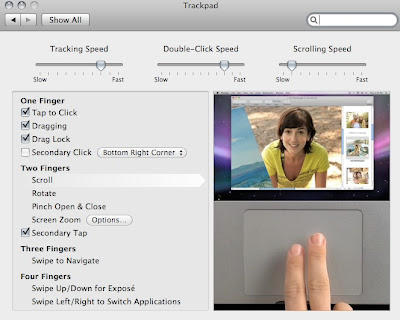
This recipe is for all of you macbook air (pre-oct 2008 owners) who are lusting after those macbook pro and macbook air users w/the four finger gestures.

Back on 10.5.6, user michaelb over at macrumors found a way to enable four finger gestures. As expected, once i updated to 10.5.7, my four finger gesture mod was gone.

However, enabling four finger gestures is just the same as on 10.5.6.  Again, be sure to backup your current AppleUSBMultitouch.kext file and as always when modifying kext files; you can make your machine not boot by doing this so you’ve been warned.
download my already 10.5.7 modded: Info.plist

First things first, upgrade to 10.5.7.

Next, we will be editing the info.plist in the AppleUSBMultitouch.kext file to enable the four finger gestures.

1. In Finder, go to YourMacSystemLibraryExtensions

Find the AppleUSBMultitouch.kext and right-click on it and choose to Show Package Contents.

Now copy the my Info.plist into here replacing the current one

2.  Finally, go to ApplicationsUtilites and open Disk Utility. Click on your main system drive and go to the Repair tab and the Repair Permissions.  Once this finishes running, reboot and enjoy your four finger gestures on your early macbook air! :)

or

1a. however if you want to modify this yourself, go into the Contents folder and right-click on the Info.plist file.

Choose to Open WithTextEdit

Once you do, TextEdit will open the file. You’ll see tons of lines of data. We’ll just scroll down or use the Find option and look for WSTrackpadANSI

Under the main key, add these four lines:

<key>TrackpadFourFingerGestures</key>
<true/>
<key>TrackpadSecondaryClickCorners</key>
<true/>

1b Do this for the WSTrackpadANSI2, WSTrackpadANSI3, WSTrackpadISO, WSTrackpadISO2 entries (should be all in a row).

The WSTrackpadJIS3 entry should already have the 4 lines so you are done once you find this entry.

Now save your Info.plist

2a. Finally, go to ApplicationsUtilites and open Disk Utility. Click on your main system drive and go to the First Aid tab and the Repair Permissions.

Once this finishes, reboot and go back to your trackpad preferences and enjoy four finger gestures :)

Previous recipe | Next recipe |
 
  • btw, here is a link to my already configured info.plist:

    http://rapidshare.com/files/232327695/Info.plis...

    also, when applying copying the info.plist into the kext; it is easier to copy the kext to your desktop and then add info.plist into and then copy back and then repair permissions.
  • Jeff H.
    Will this work for Early 2008 MBP?
  • Dave
    Didn't work for me with 10.5.7 and many others reporting it's not working. Whatcha talkin' bout?
  • Dave
    Sorry... talking about Macbook Pro. I see you are talking about Air.
  • Lagadu
    Not working for my first gen MBA. Was fine with 10.5.6 too :(
  • Lagadu
    Well, I managed to get it working by doing what I did for 10.5.6, replacing the whole .kext file. For some reason replacing just the xml file and repping permissions wasn't cutting it for me.
  • Egnat
    worked for me as well ... didn't work with changing the plist manually ... however, replacing the whole kext will not work while it's in use (i switched to snow leopard on a second partition) ... running an early 2008 mbp btw
  • doitdeviant
    How do you get Snow Leopard? I'd like to test it out.
  • Alejandro
    Does this work on a early 2008 MacBook Pro?
  • Gemini
    it doesn't work in my first gen MBA.... Don't know why ?
  • Johan Andersson
    First try didn't work, but I had some problems with the permissions. Just lost all other multi-things like two finger scrolling and things like that, and the pointer feels like it's stuck in jam or something, will try another time otherwise, back to the backup file
  • doitdeviant
    Any luck with the Macbook Pro (the model just before the unibody). I updated to 10.5.7 and it took away the 4 finger gesture

    I’ve realized now how much i’ve been utilizing this feature. It sux not having it.

    Thank you!
  • Johan Andersson
    finally got it to work, couldn't get the permissions to work right, what I finally ended up doing was to recover the Info.plist from my time machine backup, and now it's working again. I was going mad without it.

    Thanks allot!
  • eaviles
    Didn't work with me either just by copying the Info.plist, I had to copy the complete .kext. Now it works again.
  • actually, the original 10.5.6 hacked .kext will work on both the mba and macbook pros w/the new version. :)

    i am going to retest doing this to the oringal 10.5.7 .kext but copy it from the original location and modify permissions. thanks for the heads up on this not fully working.
  • Dave
    did not work for me nothing changed bummer...
  • famegadget
    woww.. it's works..
    thanks
blog comments powered by Disqus



