

Excel automatically converts URLs into hyperlinks. Using the steps in this tutorial, you will prevent the conversion from taking place. Additionally, the process for converting URLs back to text is discussed.
I frequently keep track of various web statistics in Excel worksheets. In this data, numerous web addresses are included. Microsoft Excel, like most Office programs, automatically coverts text that appears to be a URL into a hyperlink. Although it is useful in certain circumstances to be able to jump directly to the web page in my browser from within Excel, most of the time the hyperlinks are simply annoying.
Throughout the entire history of Excel, including Windows version 2003, 2007, 2013 and modern Mac versions 2008 and 2011, this hyperlink conversion can be blocked.
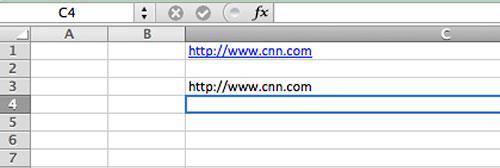
During manual text insertion, you can prevent text that contains a URL from being converted to hypertext by prefacing the text with an apostrophe.
For example, http://www.microsoft.com would be converted to a hyperlink while ‘http://www.microsoft.com would not. The initial apostrophe does not show on your spreadsheet.
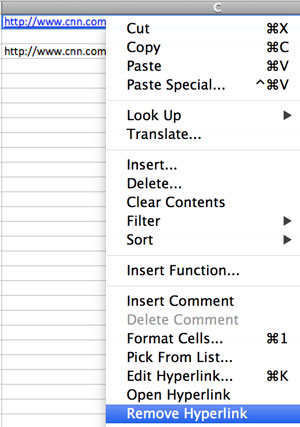
If you forget this tip and Excel converts your URL to a hyperlink, you can correct this through the following steps:
1. Right-click on the URL.
2. Select Remove Hyperlink from the menu that appears.
Sometimes you need to remove all the hyperlinks from a document in bulk. Selecting and editing each text box through the methods above would be too time-consuming.
We have created a bulk macro to remove all hyperlinks if you need to convert a large amount of hyperlinks at once.





