Creating a virtual hard drive (VHD) is useful if you need an extra place to lock down your files.
This tutorial will describe all the steps necessary to create a VHD. Keep in mind that the minimum size for your virtual hard drive is 3 mb.
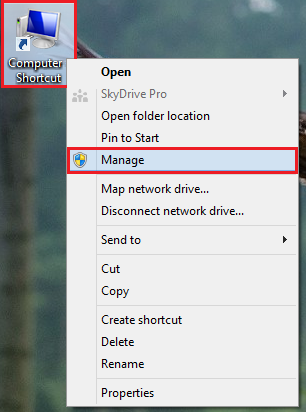
1.First, right-click on the Computer shortcut, and select Manage from the drop-down menu.
2.A Computer Management window will come up. Select Disk Management under the Storage title.
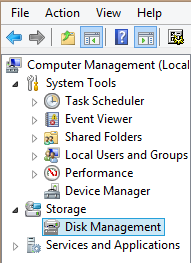
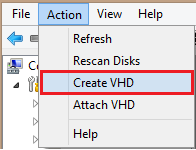
3.Now, click on Action, and select Create VHD.
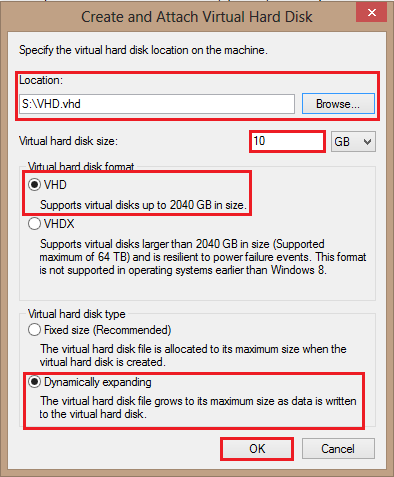
4.The Create and Attach Virtual Hard Drive window will appear. From here you will configure all of your desired settings.
First, browse for your location, and then select the size of your VHD. Under Virtual hard disk format select the preferred format. For this tutorial, I have chosen VHD. Finally, select the virtual hard disk type. For this tutorial, I have selected Dynamically expanding. This means that the disk capacity will increase as your virtual drive begins to run out of space. When you are finished, click OK.
Now, we will go to the previously selected location and see our new virtual hard disk. You can start using it exactly as you would use a physical hard drive.