Usually when I using google from the toolbar, I do not want to close out my current page. If you want to open a new tab when searching from the firefox toolbar, here are your options.
Typically when you search from the firefox toolbar, it changes out your current tab for your search results. Here is how to open that google search (or whatever search engine you choose) in a new tab.
After you input your text into the search box in the firefox toolbar, hold ALT when you press ENTER.
Yeah, ALT+ENTER will do it. Easy, huh?
If you want this to be your default way to search…
-
1. In firefox, type about:config in the URL box
2. In the filter box, paste this text:
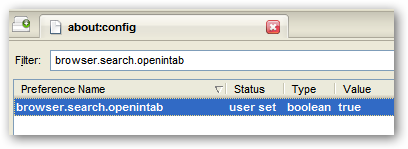
browser.search.openintab
3. Change the value to true by double-clicking the previous “false” text.
It should look like this when you are done: