
Vista Business Edition: Install or Enable Games
Posted by David Kirk in Microsoft Vista
A buddy of mine was shocked when his addition of vista business did not include any games. Well, they are there, but they are just hidden. Here are the steps to access and unhide the games in Vista Business.
Business is business–except when it is not. Business people need their little games too. Here is how to find them in vista business edition:
1. Click Start
2. Click Control Panel
3. Click Programs
4. Click Programs and Features
5. Select Windows features on or off from the left column
6. Accept the UAC
7. Check the Games checkbox
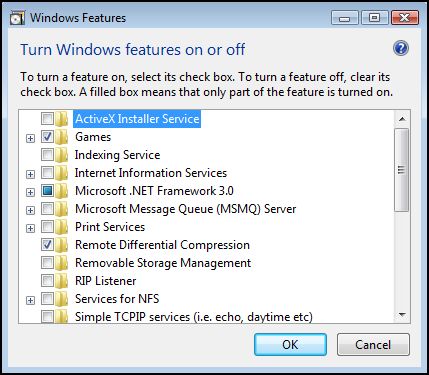
8. Hit OK
About David Kirk
View more articles by David Kirk
The Conversation
Follow the reactions below and share your own thoughts.


October 14, 2008 at 12:07 am, Tony said:
I completed the above – exactly- on several occasions and each time I hit “OK” the system froze and I had to reboot .
Any ideas waht I can do ??
Tony
January 24, 2009 at 10:51 pm, Yaguan said:
You got to really wait, maybe even 10 minutes – have a coffe or smthn.
P.S. I had to wait about 15 minutes for my VistaBsns to proceed with installation – after formating…
November 09, 2008 at 9:40 pm, Jith said:
great TIP!!!, HAPPY GAMEING!!!
November 13, 2008 at 5:52 am, Tim said:
Thanks
November 14, 2008 at 12:18 am, learyf said:
thx, i did not know this before, i really thought games are not included in vista business
November 25, 2008 at 10:26 am, john said:
Thank you!
January 24, 2009 at 10:47 pm, Yaguan said:
Thanks for the games!!! – I’m searching the web all day for Windows solitaire and there they are – magnificent. Thanx again.
March 17, 2009 at 6:42 am, Allison said:
thanks so much, it worked!
March 24, 2009 at 3:55 pm, Shader said:
Thanks dude..simple trick but nice post.
March 30, 2009 at 6:11 pm, Josephine said:
Thank you very much. I need my games to keep me sane
April 16, 2009 at 10:52 am, bri said:
Excellent instructions.
July 07, 2009 at 8:16 pm, brian martin said:
i did not help tried and tried and tried stil donot have any games please help want games
July 15, 2009 at 11:43 am, Anonymous said:
Thanks.
This works
July 28, 2009 at 9:31 am, Anonymous said:
thx
this really helped me out since i got hooked on the inkball game when playing on my gf’s pc, and i freaked out i could not find it at work too
August 04, 2009 at 3:43 am, Anonymous said:
8 Aug. 2009
So happy to have this recipe in my files. everything worked fine. Thank you!
saltyseascott
August 26, 2009 at 9:31 pm, Anonymous said:
Si vienes algún día por Cartaya (Huelva) Spain, te invito a comer en el mejor restaurante de esta zona espléndida de turismo. No me lo podía creer que los juegos estuviesen tan escondidos
November 26, 2009 at 9:01 pm, JoAn said:
That worked. THANK YOU!! Now….where’s the website that tells us how to cure spider solitaire addiction???
January 12, 2010 at 9:15 am, Anonymous said:
I have the same problems but my games checkbox is gone. It use to be there.
January 21, 2012 at 4:58 am, Kumar said:
Thank you Dear Sir.



