
How do I use Gmail or Yahoo Mail keyboard shorcuts in Hotmail?

If you have just switched from Gmail or Yahoo Mail to Hotmail, you may not be used to using all the Hotmail keyboard shorcuts while working with emails. Luckily, you can easily configure Hotmail to use shortcuts settings from these two previous services.

1. Log in to your Hotmail account.

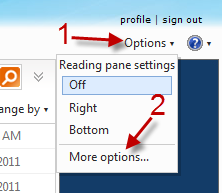
2. Go to Options -> More options.
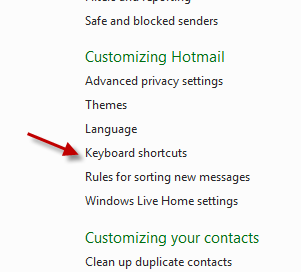
3. Click on the Keyboard shorcuts link under Customizing Hotmail.
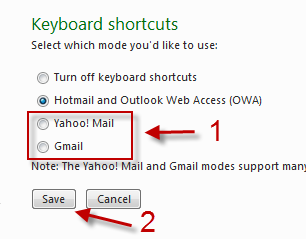
4. Choose the shorcuts mode you like and hit Save.
 

About Lê Hoàng

When not creating exciting new Android games, Lê Hoàng is here crafting tutorials, tweaks, and fixes for your enjoyment.
View more articles by Lê Hoàng

The Conversation

Follow the reactions below and share your own thoughts.

Leave a Reply

You may also like-

Backup Gmail, Hotmail, and/or Yahoo! Mail Contacts to your ComputerLately, everyone seems to be looking into backingup their inboxes for their online email accounts. While this is important, what would happen if you ...



