
Outlook for Mac 2011: How to Import a PST (Outlook Data File)

If you are switching from Outlook to Windows to Outlook for Mac, you will want to import an Outlook Data File (PST) containing contacts, email, appointments, etc.

1. Open Outlook 2011.

2. Go to the Menu, click File and select Import.
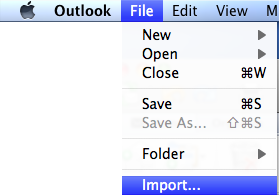
3. Select the Outlook Data File (.pst or .olm) radio button.
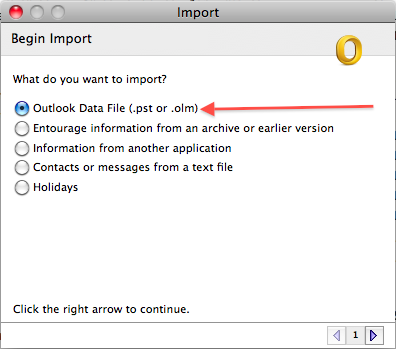
4. Click the right arrow in the lower-right corner.

5. Select the Outlook for Windows Data File (.pst) radio button.
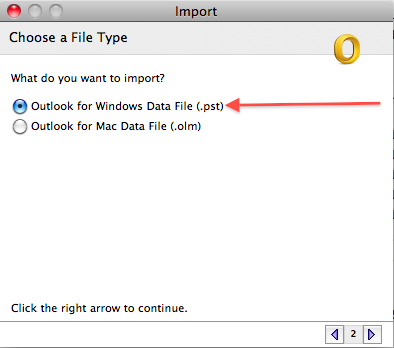
6. Click the right arrow in the lower-right corner.

7. Browse to the location of the desired .pst file, select it and click the Import button.
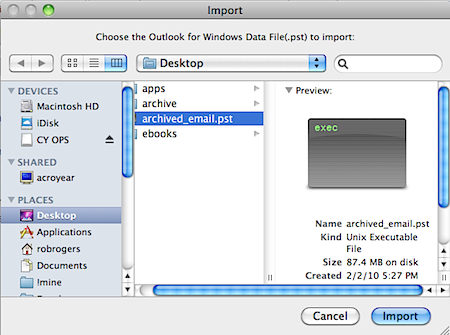
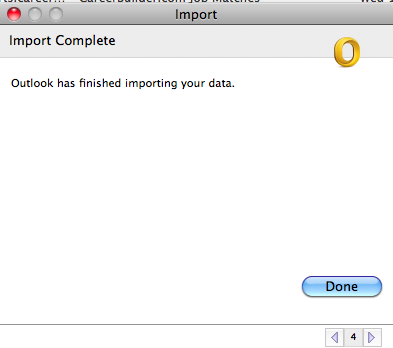
8. When finished, click the Done button.
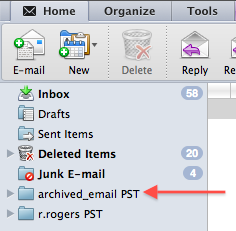
The contents of the .pst file will appear in a folder in the left pane of Outlook 2011. The folder name will be that of the imported .pst.
It is important to note that the .pst has been converted to an .olm file, which is an Outlook for Mac data file. At this time, Outlook will not export back to .pst, so it is best to not do away with your original Outlook for Windows data file, just incase you need to access it from a Windows machine sometime in the future.


 

About Rob Rogers

Once a prolific author here on Tech-Recipes, Rob has moved on to greener pastures.
View more articles by Rob Rogers

The Conversation

Follow the reactions below and share your own thoughts.

5 Responses to “Outlook for Mac 2011: How to Import a PST (Outlook Data File)”

  1. January 07, 2011 at 11:42 pm, arti.fact said:

    Thats all well and good but the trouble begins trying to find where the pst file is hidden on a old Mac.

    Reply

    • February 10, 2011 at 4:34 am, Jsmith_34685 said:

      NOW WHAT!????
      I cannot open the darn file. I imported archive.pst, and I see it in the navigation panel, but nothing happens when I click on it!!!!
      Man, I hate MS products!!!!!!!!!!

      Reply

  2. January 13, 2011 at 10:45 pm, Fleur said:

    but how to open the pst-file, so you have all your mails back (and the structure of maps I made in Windows)?

    Reply

  3. September 19, 2011 at 12:57 am, Simon said:

    Hi Jsmith,

    Don’t give up.
    Please run auto- update of office manually. Then try again.

    Reply

  4. July 04, 2012 at 3:23 pm, wtf said:

    lol @ you stupid Mac users.

    Reply

Leave a Reply

You may also like-

Outlook: Change the Calendar ColorOutlook: Change the Calendar ColorOutlook will automatically set the color of your calendar to suit the overall interface of the program. However, you can always change it to ... Google Calendar: Howto Import Outlook (CSV) or iCal Calendar EventsGoogle Calendar: Howto Import Outlook (CSV) or iCal Calendar EventsWant to import your schedule from Outlook into Google calendar? Importing from any CSV or iCAL file is very easy. Users frequently need to ...


