Safari: How to Clear the Google Search Box History

Contributor Icon Contributed by AlexTheBeast  
Tag Icon Tagged: Apple Mac Google  

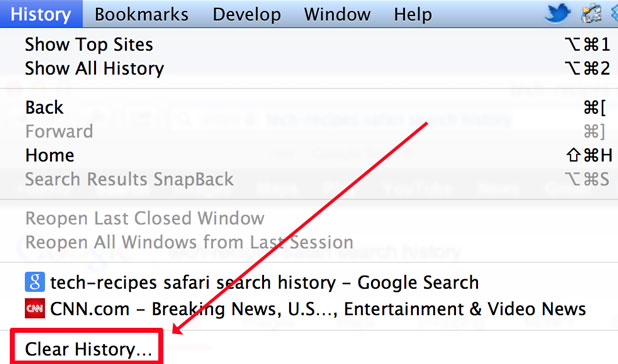
Clear the Google Search box history in Safari to prevent people from seeing your prior searches. This tutorial has been updated to show how to erase your google history in Safari version 5 and above. I have also clarified some other questions that people frequently ask regarding google search histories. Thanks for the comments regarding the updates!

Updated!

Thanks to the multiple comments, I’ve updated this post to show how to clear safari’s google search history in the latest version of Safari.

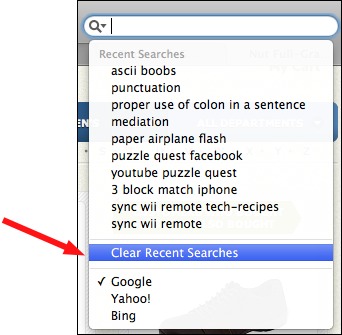
1. Click the magnifying glass to the left of the google search box
2. Select Clear Recent Searches
When searching for information on clearing the google searches, people often actually mean a couple of other things.

Reset Safari:

This just doesn’t erase just your google data, it erases your cookies, autofills, cache, history list, usernames, and passwords. This is like the nuclear bomb of removing your google information from safari.

1. Goto the Safari menu
2. Click Safari
3. Select Reset Safari

Clearing Just Your Web Google History:

If you want to clear the autofill information that appears when you search on the actual google website, you should follow these steps.

1. Goto the Safari Menu
2. Select Preferences
3. Select Autofill tab
4. Select the Edit button from the Other Forms Line
5. From the AutoFill list of sites select Google.com
6. Select Remove
7. Select Done


28 Comments -


  1. Jacquie said on October 20, 2008

    This doesn’t permanently keep new searches from being stored.
    (I find it annoying, for some reason, to be reminded of past searches.)
    If you follow these instructions under “Clearing Just Your Google History,” this gets you half way there. After that, you also have to uncheck the Autofill box.
    That’s working for me so far.

  2. Sam said on November 11, 2008

    At item #6 there appears nothing to remove. I’m unable to select “remove.” My problem is that Safari reset command, has been somehow disabled. It work correctly for a period of time. Now, it doesn’t work at all.

  3. abby said on November 25, 2008

    thanks really helpfull!
    :D

  4. Alan said on November 30, 2008

    Very helpful. Thanks.

  5. mechu said on January 6, 2009

    thank you!!!!! those damn autofill get really annoying

  6. Silvia said on January 30, 2009

    Thank you so much i learned some new from you my friend . again thank you so muchhhhh ! ! ! !

  7. hack_4_hires said on February 14, 2009

    your solution is close to perfect but when you only want google to be deleted it doesn’t permanently deletes recent searches, and for a second look it just disabled auto fill. but this tip is quite helpful tough. now its for me to find my own solution for permanent deleting program.. anyway thanks its nearly a help.

  8. fiasco frenzy ferocious said on March 15, 2009

    Thank you so much for this! I really needed this in case my parents ever wanted to Google search something on my laptop. Thanks!

  9. frazzle said on April 20, 2009

    yes you’re heaven sent! i barely have enough time to clean up my act before anyone starts sharing with me my laptop. it is inevitable because we type patient records and all that. thanks so much!!!

  10. clueless mac user said on May 1, 2009

    THANK YOU SO MUCH!
    i’ve been wondering how to do this for a while
    thank you :]

  11. jasmine miller said on May 31, 2009

    THANKYOU

  12. naweed said on June 3, 2009

    were is the safri menu on google

  13. Jean Loew said on September 27, 2009

    getting rid of Google.com in Auto Fill does not work in Safari 4.03….now what?

  14. Hank said on October 15, 2009

    To delete search items you need to edit the preference file for Safari ~/Library/Preferences/com.apple.Safari.plist. Look for the RecentSearchStrings tag in the xml and you can delete any/all items.

  15. Anonymous said on November 3, 2009

    Hank, there IS no Safari.plist.

    I go from … com.apple.RegLogicStudio.plist
    … to … com.apple.security.systemidentities.plist

    Even if Safari.plist WAS there, no amateur [like me] would DARE fiddle with it.

    I am new to Apple, and am very disappointed at the lack of a delete facility in the search box. Very short sighted.

  16. Anonymous said on December 12, 2009

    Just click the down arrow next to the magnifying glass in safari’s search box to the right of the address bar. Make sure nothing is typed in the box. You will then see a list of recent searches, with a “Clear Recent Search History” option at the bottom. Just click that and you’re done.

  17. Dave said on December 29, 2009

    I unselected the other forms option but it still keeps autofill and if I follow those steps listed there is nothing in the other forms

  18. Anonymous said on January 9, 2010

    Clearing just your google search history in the autofill menu does not work. I deleted everything in the “other forms” menu as I could not locate google.com there. The past history is still there, although the clear recent searches did clear those that I did today. I have Snow Leopard as my operating system with Safari 4.0.4.

  19. Name said on March 20, 2010

    The second method does not work

  20. Jaime Ball said on May 29, 2010

    Four years later there’s an even easier way: Click on the magnifying glass to the left of the word Google and select “Clear Recent Searches”

  21. Tyler said on July 29, 2010

    didn’t work

  22. Sttapley said on October 19, 2010

    hilarious. thank you for the laugh and duh!

  23. Anonymous said on January 22, 2011

    Thanks, Jaime! I’ve updated the original post. AlexTheBeast hasn’t been around much lately and let his article get out of date. It’s greatly appreciated.

  24. Cjfogo said on February 20, 2011

    OMG i looked on so many websites and they all said go to system preferences! THEY WHERE SO WRONG!!!!! Thanks

  25. Kk Rox said on May 23, 2011

     I NEED TO ERASE PORN THNXS

  26. Dvsccoach said on May 31, 2011

    None of these “tips” work!!!  I still see EVERYTHING I have ever searched for try to autocomplete as soon as I start typing in the Google search box

  27. 99 said on July 11, 2011

    ^^^^^^^^^^^^^^^^^^^ All porn addicts ^^^^^^^^^^^^^^^^^^^

  28. yourmother said on August 6, 2011

    if you change the little drop down menu in the search bar to bing, then back to google, it should delete your search history


RSS feed for comments on this post. TrackBack URL

Leave a comment -