
Facebook: Hide Recently Tagged Photos Row in New Profile
The new Facebook profile puts a row of recently tagged photos of you at the top of your profile. If you don’t want your friends to see that row in your profile, this tech-recipe will show you how to hide it.
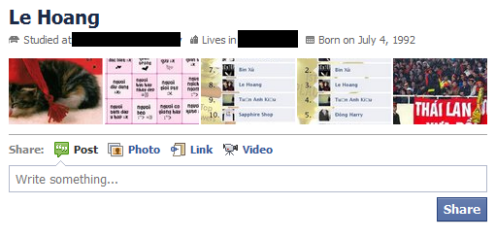
Here is an example of the recently tagged photos row in the new Facebook profile (viewed from my friend’s account):
Before:
After:
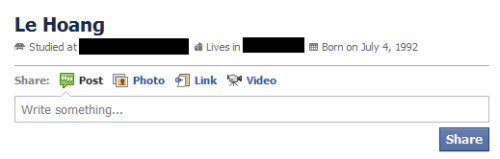
Here is how to hide it:
1. Log in to your Facebook account.
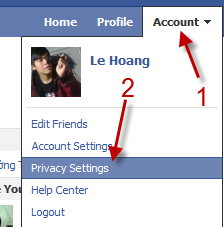
2. Go to Account->Privacy Settings.
3. Choose Customize settings.
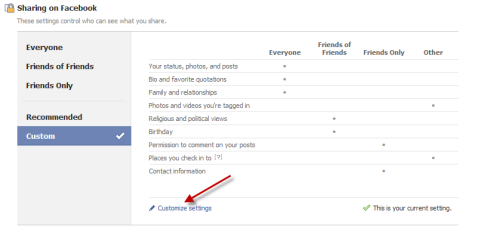
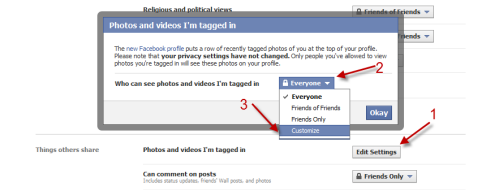
4. Scroll the page down and find Photos and videos I’m tagged in, choose Edit Settings. A new window will pop up, click on the drop down menu, choose Customize. (You can choose Everyone, Friends of Friends or Friends Only if you want)
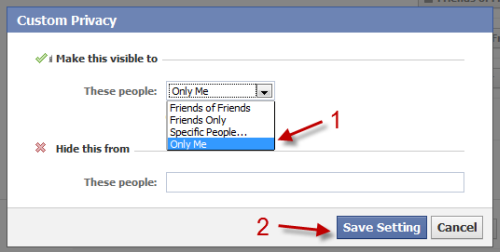
5. In Make this visible to option, choose Only Me and hit Save Setting. From now, the recently tagged photos row will not appear in your profile anymore.
About Lê Hoàng
View more articles by Lê Hoàng
The Conversation
Follow the reactions below and share your own thoughts.


December 25, 2010 at 4:16 pm, Forex said:
Very useful stuff on your blog man. Thanks once more.
December 29, 2010 at 2:06 am, Elton Sites said:
Thanks. This is very useful. I have not used the new Facebook profile because of that feature. I find it unnecessary to show recent photos of me. I will change to the ne profile and follow your instructions.
January 02, 2011 at 2:07 am, Matthew Pancake said:
The ad you have on this page is a rollover ad, that if you leave your cursor over the ad, after a few seconds it takes over the screen and starts playing… Ban these sort of ads.
January 08, 2011 at 5:44 am, Cas Per said:
This works ok to take the recently tagged pics out of the row of pictures. But whether Facebook has changed things since you posted this or what, but the row remains but with uploaded pictures instead.
Is there a way currently to completely remove the row?
January 08, 2011 at 8:49 am, Anonymous said:
I don’t think that they have changed it
I viewed my main account from the 2nd account and there wasn’t any row there
Did you view it from your own account?
January 14, 2011 at 9:41 pm, O Henry said:
Same here. Your concept eleminated the tagged pics, but there’s still a row of random albums shots running across the same area. Can’t imagine why they didn’t just provide a way to turn it off.
January 14, 2011 at 9:49 pm, Ohenry said:
Ah. You have to X each one until their all gone. What a pain.
January 15, 2011 at 3:18 pm, judy Cobb Woods said:
I hope this works because I DO NOT want that line of photos. I do want to be able to put a line of type – quote, statement, poem – whatever on top of my page. There was always the option to take it off if you wanted to.
January 16, 2011 at 8:58 pm, Angela Slatzer said:
I have “x’d” them out on the strip but the tagged photos keep reappearing in the line of photos anyway – I also changed the custom privacy settings for tagged photos to “only me” — I hate the row of pictures at the top and would love to get rid of this feature all together
September 07, 2011 at 1:30 am, Alice said:
But the settings have changed on facebook and you can no longer go to the page where you get to customise your own settings… how do I remove tagged photos with the newest version of facebook?
September 20, 2011 at 2:08 pm, Cynthia said:
But it Shows My Profile Pictures, I DON’T WANT ANY PICTURES THERE! How can iMake It Just Dissapear? /:



