
How to install Android SDK without internet connection

Contributor Icon Contributed by Lê Hoàng  
Tag Icon Tagged: Android  

Android SDK is a great development kit for developer to create applications for Android platform. To use it, you have to download the Adroid SDK manager. The SDK manager let you download the rest of SDK components (which will require internet connection). So how can you install Android SDK on computers that have no internet connection? This step by step guide will help you.

Important: All files must be downloaded first before we install it on a computer without internet connection. This works well in deployment environments where all files would be downloaded to one storage device and then moved to be installed on computers without internet connections.

1. Download the SDK manager. We won’t use it to download any components. We need it to lauch the emulator later.

2. Lauch your browser and go to http://dl-ssl.google.com/android/repository/repository.xml

3. Quicky find the android platform that you want to download by pressing Ctrl+F ( In FireFox), we want to find the latest Android platform 2.2 so we typed in: 2.2
Other available platforms: 2.1, 1.6 and 1.5

As you can see from the picture below, we have zip files for Linux, Mac osx and Windows. Highlight the part: android-2.2_r02-windows/linux/macosx.zip and copy it.

Note: We can use this trick to download future Android platform ( 2.3, 3.0….)
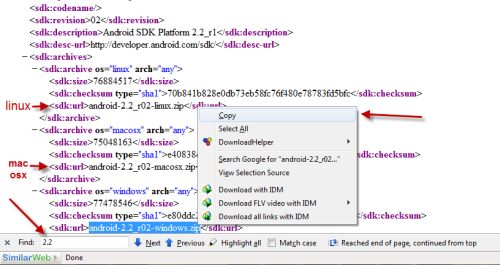
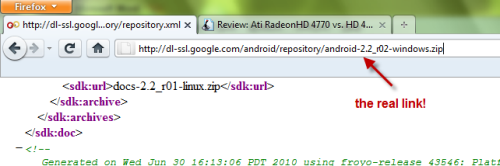
4. Paste what you have copied right after http://dl-ssl.google.com/android/repository/ and we will have the direct link to download the Android 2.2
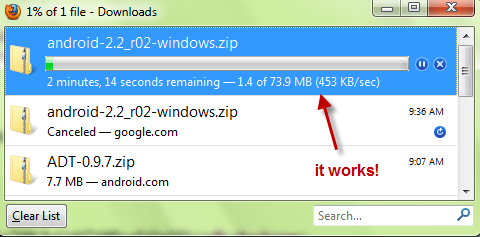
5. After you download these two files mentioned above (the SDK manager and the zip file), you can install the Android SDK on your computer without internet connection.

6. Extract android-sdk_r06-windows.zip and android-2.2_r02-windows.zip.
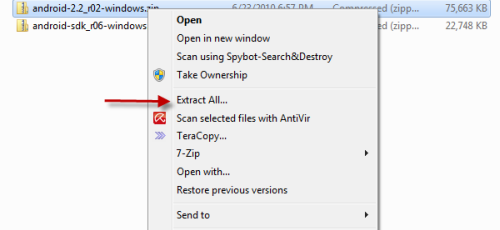
7. Copy or cut all files inside android-2.2_r02-windows folder.
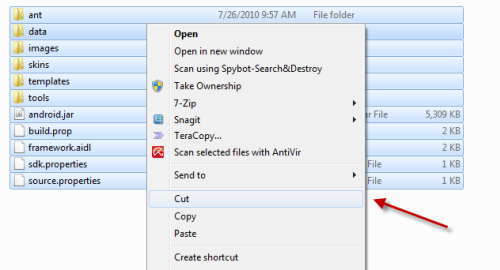
8. Go to …\android-sdk_r06-windows\android-sdk-windows\platforms and creat a new folder (You can name it anything you want, we named it android 2.2)
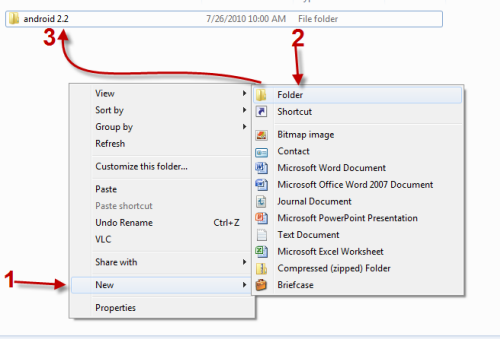
9. Paste all your copied/cut files to that folder (in this post is: android 2.2)
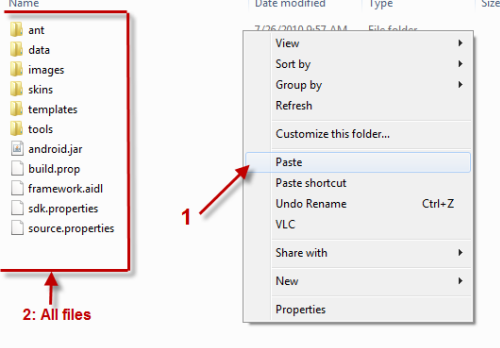
10. Lauch ….\android-sdk_r06-windows\android-sdk-windows\SDK Setup.exe

11. The SDK and AVD Manager will autodetect the SDK Platform.
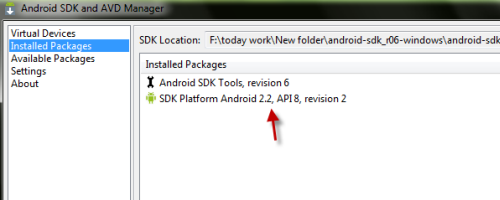
12. Go to Virtual Devices and click on New to create a new android virtual device.
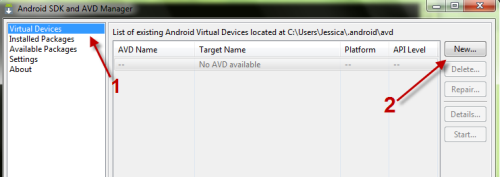
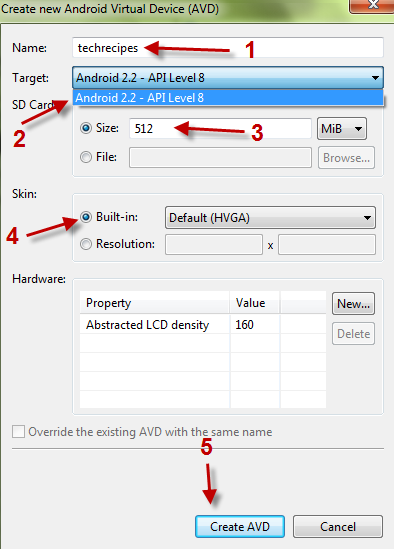
13. A new window will pop up, you can name your device, choose target, set size for SD card, choose skin. Click on Creat AVD to create your device.
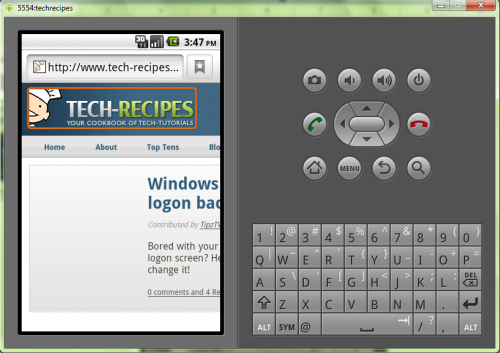
14. Click on Start to lauch your virtual device.
 

47 Comments -


  1. Jhonemoore said on August 29, 2010

    Very good. very useful. Thanks

  2. Anonymous said on August 29, 2010

    Glad you like the post ;)

  3. B Chandrasaimohan said on September 7, 2010

    Super And Very useful
    Thaks

  4. Anonymous said on September 8, 2010

    Thank you! ^^
    Glad to hear your feedback :d

  5. Nasereldeen_1 said on September 12, 2010

    Thanks ..

  6. varun bhat said on September 17, 2010

    Thanks a lot :)

  7. B Chandrasaimohan said on September 20, 2010

    Hi, I am trying to include Googlemaps API . I downloaded from this site n followed steps as given. but the sdk is not recognising the google maps API. Can u suggest me any idea?

  8. Anonymous said on September 20, 2010

    what are you talking about? This guide is for android sdk not google maps.
    Anyway, can you give me screenshots? :) I think i can help

  9. Maheshbinny said on September 23, 2010

    is this procedure requires eclipse installation

  10. Anonymous said on September 23, 2010

    No. Just follow the guide and you will get the SDK running :)

  11. Dtybel said on October 13, 2010

    Muito bom perfeito, justo o que procurava. Just I what find for…thank you!

  12. Riod said on October 29, 2010

    Dude, this post is the best! Just what I was looking for. Thanks so much

  13. Anonymous said on October 29, 2010

    You are welcome :D Glad i could help ;)

  14. Alen Siljak said on November 3, 2010

    One of the components to install as a part of SDK is Google APIs, including Google Maps. They can be installed by following these same instructions and applying some reasoning to it. :)
    i.e. http://dl-ssl.google.com/android/repository/google_apis-8_r02.zip

  15. Anonymous said on November 3, 2010

    Oh i see! Thank you :D

  16. Emdad said on November 12, 2010

    Thanks a lot. Good job.

  17. Sathyanmarx said on November 24, 2010

    You are awesome..I couldn’t access the website because of firewall restriction in office..finally this website helped me..Thanks a lot

  18. Bsod said on November 29, 2010

    I couldn’t download using the SDK manager as I’m in a corporate environment that is locked down to one browser (guess which…). I was able to get the android emulator up and running with no problems using the above instructions, thanks heaps!

  19. Anonymous said on November 29, 2010

    You are welcome! :D

  20. Seema said on December 9, 2010

    Very good post after a long search some good working stuff.Thank you so much ;)

  21. Senthil Nathan said on December 27, 2010

    Thanks a ton. It helped me big time!! :-)

  22. Senthil Nathan said on December 27, 2010

    Good pst. Thanks a ton

  23. Anand Sunny 7 said on December 31, 2010

    Plz Let Me Know How Install Sample For Platform 2.1 Thanks In Advance

  24. Anand Sunny 7 said on December 31, 2010

    And Let Me Know Where To Save Sample Folder Content

  25. Anonymous said on January 1, 2011

    Can i know the link to these samples?

    Thanks

  26. Raman_raja said on January 18, 2011

    I want to use Eclipse for my Android development. I am behind a firewall that prevents Internet connection. How can I install Android zip files and make them work with Eclipse ?
    Thanks,
    Raja

  27. wiki said on January 18, 2011

    thanks very good from Algeria

  28. Anonymous said on January 18, 2011

    You can just follow the guide here. To make them work with Eclipse, follow android offical guide here: http://developer.android.com/sdk/eclipse-adt.html

    Thanks

  29. Sandra said on March 15, 2011

    It still works! (March 15.)

    Thank you very much indeed! :-)

  30. Sandra said on March 15, 2011

    I’ve to add following information

    In some cases you ought to set the ANDROID_SDK_HOME environment variable before you start your new AVD. e.g.

    set ANDROID_SDK_HOME=D:

    if your .android folder is created on the drive D:

    HTH

  31. Dentbagoest said on April 11, 2011

    waw…. nice…
    thank very much…. :)
    i`ll try…..

  32. Chris Le said on May 10, 2011

    Very nice, works fine when you wanna make a virtual device to see anything. But if you wanna develop Android Apps with Netbeans like me, you have to download over the Android SDK Manager, cause the Plugin for netbeans find the versions and other thins but they doesnt make any platform. Know I dont know whether it is a bug in the plugin or by the coping, you have forgotten anything in an other Folder.

    Regards

    Chris

  33. Anonymous said on May 17, 2011

    Great tips for us. Thanks

  34. Anonymous said on May 17, 2011

    Great tips for us. Thanks

  35. Oleg said on May 19, 2011

     Thanks a lot, this is realy useful for me!!!

  36. NikoK said on May 26, 2011

    Very helpful, though every time I load my AVD, it sits there saying “(Not Responding)” for the longest time, then when it starts responding, all I get is animated ‘android’ text and no button pushing or anything else does anything. :( Did I miss some vastly important step or something? *is very new to this*

  37. Anonymous said on May 27, 2011

    The Android SDK is very slow (even on quad core CPU). From what you described, the android text is just a boot screen (which is normal), just wait until it is loaded.

    It seems like your hardware is a problem too. Usually, it takes 1 min for everything to be completely loaded.

  38. Denis Pizarro said on June 23, 2011

    una consulta, cuando hago funcionar el android sdk m funciona muy bien la interfas,todo menos internet, me podian decir como configurarlo para que el emulador me lo tome.desde ya gracias

  39. Melody said on June 23, 2011

    I love u!!! God bless u!!!

  40. Umi said on July 7, 2011

    Very usefull tutorial! Thanks a lot! =) It helps me!

  41. Ced Pascal said on July 25, 2011

    Thanks !

  42. Koarng Kao said on August 9, 2011

    Thanks a lots, it works well.

  43. Sethathi said on October 18, 2011

    Thanks a lot. :)

  44. Vito said on October 25, 2011

    Thanks for the great post, this helped me revert my eclipse away from the detrimental r14 update.

  45. Athlass said on October 28, 2011

    very usefull information, please where to download android-2.3.3, I can’t find it in this xml file, may be there is an other xml?

    Please informe your answer to: wdesign1@gmail.com

    Best regards

  46. Abubakkar said on December 28, 2011

    Will it work for windows 7 as there is no android 2.2 for windows its only shows linux?

  47. Anonymous said on January 11, 2012

    Great!, thanks a lot for the intructions. The Andorid SDK was just giving connection reset every time i tried to download an SDK.

    Just 1 question. I have been able to install andoird 2.3.3 SDK, but i’m having trouble to install andoird 4.0.3, the reason is that the SDK-platform and the emulator images are diferent files. I have downloaded both and make a similar instalacion to android2.3.3, but the emulator doesn`t boot.

    Any suggestions?


RSS feed for comments on this post. TrackBack URL

Leave a comment -



