
iPhone 4 Trick: Invert Colors for White Text on Black Background

Contributor Icon Contributed by David Kirk     
Tag Icon Tagged: Apple iPhone  

iPhones and similar digital devices are frequently difficult to see in certain situations. The 4th generation of the iPhone now comes with a shortcut to quickly inverse the colors to improve visibility. Here is how to enable “white text on black background” inverse colors mode on the iPhone.

When reading a long time or in certain lighting situations, I love this shortcut to be able to quick inverse my colors. Just getting white-text on a black background is a nice change of pace.

The secret is the use the iPhone’s accessibility’s settings to assign the inverse color mode to the triple-tap of the Home button.

1. Click General icon
2. Select Accessibility
3. Select Triple-click Home
4. Select Toggle White on Black
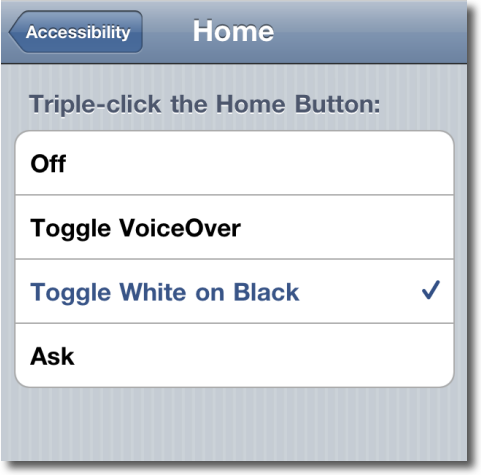
how to setup invert colors on iPhone

Then to inverse (or to return to normal again) just triple click your home button.

The iPhone will not take a screenshot showing this mode so here’s an external picture showing the invert mode.
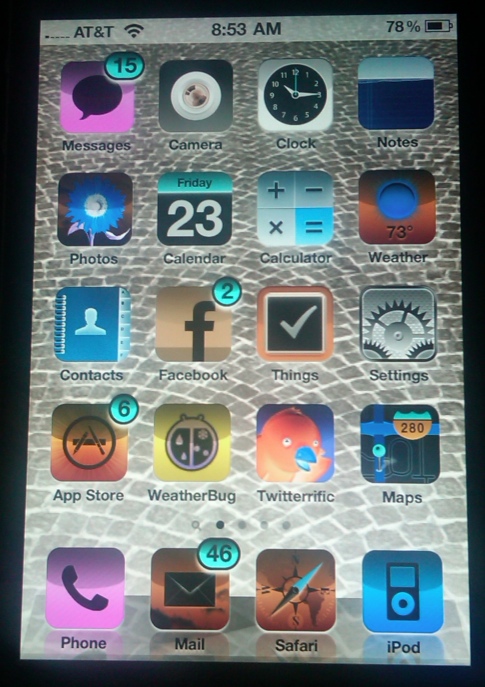
example of inverted iPhone


8 Comments -


  1. Quinn McHenry said on July 23, 2010

    Also a spectacular prank to play on a non-Tech-Recipes reader.

    Which makes it a valuable lesson: read Tech-Recipes every day.

  2. David Kirk - Founder/Editor said on July 23, 2010

    I agree completely!

    Thanks for the idea…

  3. Javier said on July 29, 2010

    Thank you for the cool tip!

  4. Manny13 said on August 13, 2010

    Can you have only text (not pictures, icons, etc.) in high-contrast mode? Is there an app or setting that corrects this?

  5. SweetartMD said on June 25, 2011

    I found (on accident) that if you click your home button 3 times I can invert my colors.  I had no idea how to change it back till I messed around with it a little bit more! Very cool! 

  6. Ella said on September 3, 2011

    Manny13 I also would like to know about that as the black on White contrast isn’t clear enough but when I switch to White on black, its clear But I am not happy to view my pics in negatives :(

  7. joshua said on January 24, 2012

    I love this feature ‘Toggle white on black’ , I can now type on my iPhone keyboard like as twice as fast than the normal ‘black on white’ keyboard

  8. don said on February 1, 2012

    THANK YOU VERY MUCH!!!!!
    I only have one eye and the other one has a cataract so this trick makes it possible to see THANK YOU THANK YOU


RSS feed for comments on this post. TrackBack URL

Leave a comment -



