

uTorrent: Dramatically Increase Download Speeds
Posted by Alex Bahdanovich in Internet
Using these simple adjustments should greatly improve uTorrent download performance.
Are you tired of uTorrent’s sluggish download speed that does not take full advantage of your high speed internet? This is a very frequent complaint among uTorrent users that can be fixed by tweaking uTorrent’s settings.
For this tutorial we are going to assume that you have uTorrent running and a torrent is being downloaded.
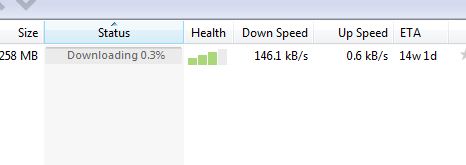
As you can see, our current speed is only at 146kB/s. Considering my broadband capabilities, I am not using my entire download potential.
1. Bring up the Preferences window by either pressing Ctrl+P or clicking Options -> Preferences.
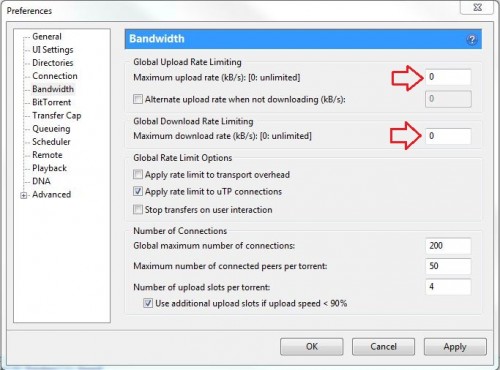
As you can see both maximum upload and download speeds are set at 0. uTorrent even tells you that 0 means that your download will be executed at its maximum potential. In many circumstances, however, this is not the case.
2. Now we have to change the download speed to something much higher than the expected allotted bandwidth. We will use 3000kB/s. You will likely set the upload speed to as little as possible; however, do not set lower than 7kB/s. We’ll use 8kB/s.
Note: If you set the upload limit to below 7kB/s, uTorrent will cut off your download speed exponentially.
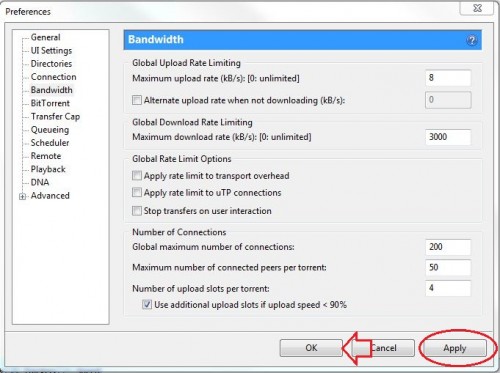
3. Press Apply then OK.
Congratulations you’re done. If this works for you, you should soon notice an increase in your download speeds.
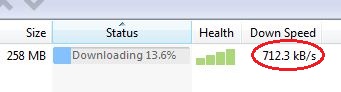
Through these steps, I have increased my download speed almost by a factor of five. Obviously, your mileage and success will vary on your broadband potential. In many cases, however, this tweak will dramatically improve your torrent download speeds.
About Alex Bahdanovich
View more articles by Alex Bahdanovich
The Conversation
Follow the reactions below and share your own thoughts.


October 22, 2012 at 6:39 pm, shawn said:
Nice tip, thanks. I had my upload set to 5kB/s before reading this. Although my speeds weren’t ever that bad, it’s definitely worth trying. You might also want to note that creating a listening port for incoming connections can really help speed things up, too.
Thanks
October 23, 2012 at 6:10 am, mike said:
I’m disappointed that you’d advocate limiting your upload speed to something so slow. p2p, like uTorrent, relies on people sharing.
I bet you get annoyed when a torrent’s downloading very slowly. That’s because people like you feel that you should take without giving anything back.
As most connections are asymmetric i.e. a higher download speed than upload speed, for the majority of users, giving something back to the community from which they’re taking won’t make much (if any) difference to their download speed.
BAD netiquette!
October 23, 2012 at 12:30 pm, Alex Bahdanovich said:
I only recommended limiting upload speed for the duration of the download. After you get the download you can change your upload speed to something high and seed the torrent
February 17, 2013 at 3:57 am, hrishi said:
Helped me big time
gives me 4X more speed !!
Thanks a lot
March 04, 2013 at 6:22 am, TOFA said:
thanks for your effort.
March 08, 2013 at 12:25 am, roshan said:
my download speed is 300 kb ps at max but for download wow cata it is onlt 5kbps!!!!!!!!!!!!!!!
what shud i do?
March 29, 2013 at 3:09 am, IOwnAPC said:
Depends on the amount of seeders for the torrent. Try getting a torrent with the most seeders, or download 3.3.5a and manually patch your way up to 4.x.x>
March 30, 2013 at 4:51 am, mohit said:
thnk…bro…well can u tell how to get full seeds..???
April 22, 2013 at 12:50 pm, Vivek Raj said:
Thnkx frnd
it will work
thnku so much
May 01, 2013 at 2:11 am, Amit Singh Rawat said:
Nothing happend it remains around 10kbps



