Google Chrome: Put the Home Button on the Toolbar

Contributor Icon Contributed by Rob Rogers  
Tag Icon Tagged: Google  

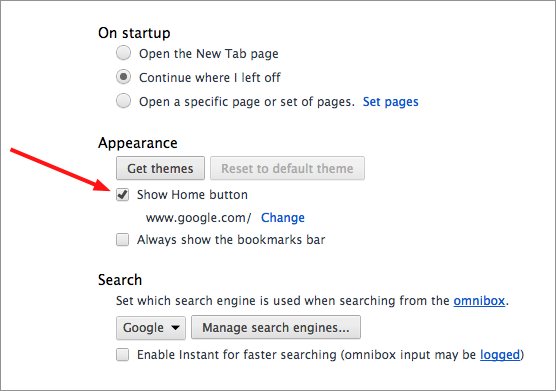
By default, Google’s new web browser doesn’t give you a button on the toolbar to bring up your homepage. Here’s how to add the Home button so that the browser’s toolbar works like your other web browsers.


1. Open Google Chrome.

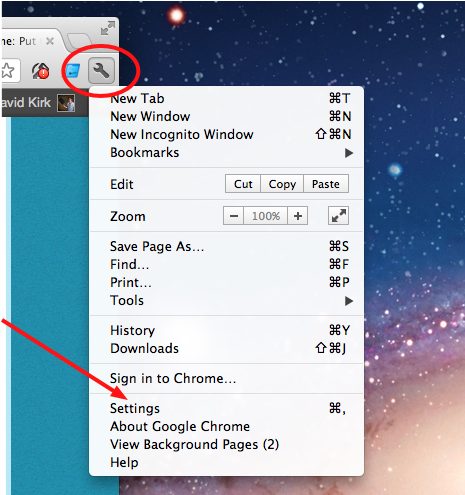
2. Click the wrench icon in the upper-right corner of the toolbar and select Options.

3. On the Basics tab, go down to the Home page section and check the Show Home button on the toolbar checkbox.

4. Click the Close button.

Now your Home button is where it should be:


56 Comments -


  1. Brittany said on November 18, 2008

    Nice!

  2. Morgan said on March 19, 2009

    Thanks for this. I don’t understand why they don’t have it activated as standard but with the option to take it off if you wanted. Wierd.

  3. Max said on April 1, 2009

    you can also press Alt+F3

  4. Max said on April 1, 2009

    no not Alt, but the “option button”+F3. on some laptops, the same way you can increase/decrease screen brightness, or put the computer to sleep. option button + one of the F# keys.

  5. andrea said on April 24, 2009

    Why do you have to make everything so confusing?
    It seems that something as simple as click on home page shouldn’t be a difficult thing!!
    WHY hide something so needed. Every time I want to go back, after looking at an attachment, I have to first close my email, reopen google, then sign in all over again and type in my id and password every time. I’m really getting fed up with email providers that make my life difficult.

  6. Barry said on July 9, 2009

    thanks. amazing it isnt there by default!

  7. Taha said on October 16, 2009

    Thanks for the help.

  8. Anonymous said on December 23, 2009

    I have no “OPTIONS” button when I click on the wrench.

  9. Anonymous said on December 23, 2009

    I’m a firm believer in “if it ain’t broke, don’t fix it” but somebody keeps screwing up things. I used my “KEYWORD” daily, and also used the “HOME” button/icon constantly. . then they disappeared. Someone obviously thought this made things too easy.

  10. L Brigham said on January 30, 2010

    After clicking on the tool icon, I see nothing like your instructions and certainly not any way to return the “home” button. Now all I want to do is escape from this awful Google mess and return to my previous version. What a mess. Another arrogant software developer who thinks “their way or the highway”.

  11. Chris said on February 10, 2010

    Awesome!!! I was getting bummed out. Thanks so much!

  12. Fox said on May 29, 2010

    Thanks!

  13. Fox said on May 29, 2010

    Or not.

  14. nolan said on June 6, 2010

    lol, thanks

  15. greg said on June 10, 2010

    I do agree, a home button should be there by default and give the user the option do disable the function. All the other browsers have the home button as the default

  16. Riel41 said on June 12, 2010

    very clear and precise!a simple thanks from Philippines^_^

  17. Marvin C said on June 17, 2010

    very useful

  18. Rick said on June 21, 2010

    They must have decided to remove the wrench icon. I just downloaded Chrome…no wrench icon, no home button, nothing in preferences. Maybe it’s because it’s the Mac Version. Uninstall

  19. M_yasir87 said on June 21, 2010

    Thank you so much! You have made my life much easier :D

  20. Stan said on June 23, 2010

    wow ….. thank you soooooo much!

  21. K34jfa said on June 30, 2010

    thanks…..

  22. Scottemailaccount said on July 7, 2010

    Thanks for the help with the toolbar

  23. Mee Abu said on July 10, 2010

    thanks

  24. George said on July 12, 2010

    thanks tried to figure it out for ages

  25. Alyssa692007 said on August 4, 2010

    thnx ; it workedd (:

  26. Guglielmomacroni said on August 5, 2010

    Fantastic dude

  27. bella0g said on August 16, 2010

    that was super easy thanks :)

  28. lokeshnadella said on August 19, 2010

    very good solution with simple steps and with demo i like this

  29. julie said on August 23, 2010

    omg…. i looked at that box like 20 times and it didn’t click. thanks for posting this!

  30. o2j20 said on August 24, 2010

    thanks, i just dont understand why this is not an automatic feature…as basic it is. but great browser anywayz. thanks

  31. Possumcourt said on August 28, 2010

    Thank you!

  32. Chris said on September 19, 2010

    Cool ! lol

  33. Rob said on September 20, 2010

    Worked perfectly! thanks for the tip.

  34. louis said on September 25, 2010

    I just downloaded Chrome…no wrench icon, no home button, nothing in preferences. Maybe it’s because it’s the Mac Version.

  35. Anton Hassan said on September 29, 2010

    You’re right, I have the same question to Chrome development team.

  36. driver said on October 6, 2010

    Excellent post. This was actually what I was looking for.

  37. Alam said on October 14, 2010

    Fantastic.

  38. Failmat said on October 14, 2010

    that was freakn awesome. so simple! thanks

  39. Sarathrohini said on October 26, 2010

    Thanks

  40. blantonious said on November 3, 2010

    perfect. Guess I could have looked but thought maybe Google had some clever reason for not showing it by default.

  41. H Mayer1 said on November 4, 2010

    what happened to the wrench in the toolbar. You have made life miserable for users

  42. sworden said on November 13, 2010

    on my screen it’s “Preferences” instead of “Options”

  43. Tim said on November 25, 2010

    Really concise and well, GOOD. Thank-you!

  44. cool guy said on November 28, 2010

    thatnkss

  45. Tgkg said on December 12, 2010

    awsm thnx

  46. Debna Matej said on December 19, 2010

    What, ever tried back button? Or backspace?

  47. boys said on January 2, 2011

    THX work great

  48. Der_puma_ivan said on January 6, 2011

    stinken chrome is good but i get alot of stupid advertisements

  49. Radovan Karadžić said on January 12, 2011

    Thanks. Fala.

  50. Jaad said on February 1, 2011

    or you can press Alt+Home on your keyboard..

  51. Reverend said on July 20, 2011

    Thanks for the info on Home Button.

  52. IckyVicky said on September 27, 2011

    Click the wrench and then click PREFERENCES at the bottom (some versions say options, but others say preferences) and then scroll down and the third thing will be “Toolbar” and just check the box that says “Show Home Button” :)

  53. bob said on October 15, 2011

    thanks that was so simple

  54. kk said on October 28, 2011

    Thank you it worked!

  55. KidsCan said on December 31, 2011

    Thank you! For once, I actually got help from an internet question and answer forum. Once again, THANKS!

  56. Tom said on January 14, 2012

    So what’s the logic in placing the home button on the left? Every other browser (IE & Firefox) have it on the right. Dumb move Google.


RSS feed for comments on this post. TrackBack URL

Leave a comment -