
Google Calendar: Change the Default View
Posted by David Kirk in Google
If you’re constantly selecting a different view of your calendar instead of using the default, then you should change the default view to one that better suits your needs. That way, you’ll always see what you want each time you view your calendar.
Whenever I think about my schedule, I think about the entire month. Therefore, when my Google Calendar opens, it want the entire month showing. Many other people log in each morning to see what the day’s schedule is. For them, it makes sense for the daily view to be the default view.
Changing Google’s Calendar is not difficult once you find the settings area. This article has been updated for the most recent changes to the service.
1. Go to Google Calendar.
2. Click the Settings gear in the upper right hand corner.
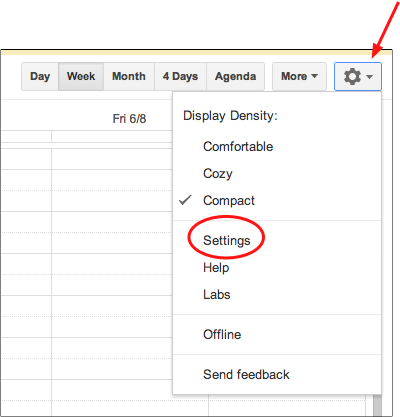
3. Select the Settings link.
4. In the General tab, use the Default view dropdown to select the desired view. Choices are the following: Day, Week, Month, Custom View and Agenda.
If you select Custom View, use the Custom View dropdown to select the desired value. The choices are Next 2 Days thru Next 7 Days, Next 2, 3 or 4 weeks.
5. Click the Save button.
About David Kirk
View more articles by David Kirk
The Conversation
Follow the reactions below and share your own thoughts.
June 16, 2010 at 7:10 pm, Cmoran said:
Nice trick! A side benefit appears to be that Android phones (including my Nexus One) that automatically sync with google calendar seem to switch their default calendar view to whatever you set it to in google calendars! Nice!
January 30, 2011 at 5:59 pm, John Wathen said:
I don’t have a “general” option after I click settings. now what?
June 05, 2012 at 7:02 pm, Dan Brown said:
I cannot find anything except “Comfortable” , “Cozy” and “Compact” in the settings gear in Google Calendar. There is no “General” tab, and no “Default” option. Did Google remove the options? Does it only work on Android phiones? I want to change this on my PC, not my phone
June 05, 2012 at 8:25 pm, David Kirk said:
Hey, Dan. I’ve updated the article to show the latest version of Google Calendar. Click the settings gear and then click the settings link. When the settings page shows, select the General tab. You should see the option then. Let me know if you continue to have problems.



