

If you’re constantly selecting a different view of your calendar instead of using the default, then you should change the default view to one that better suits your needs. That way, you’ll always see what you want each time you view your calendar.
Whenever I think about my schedule, I think about the entire month. Therefore, when my Google Calendar opens, it want the entire month showing. Many other people log in each morning to see what the day’s schedule is. For them, it makes sense for the daily view to be the default view.
Changing Google’s Calendar is not difficult once you find the settings area. This article has been updated for the most recent changes to the service.
1. Go to Google Calendar.
2. Click the Settings gear in the upper right hand corner.
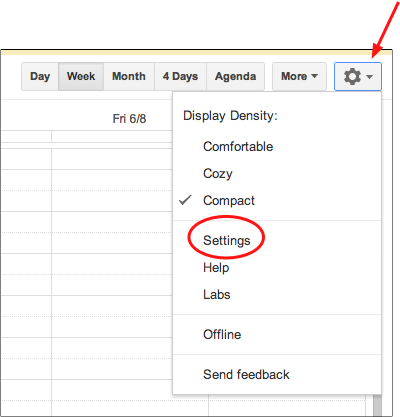
3. Select the Settings link.
4. In the General tab, use the Default view dropdown to select the desired view. Choices are the following: Day, Week, Month, Custom View and Agenda.
If you select Custom View, use the Custom View dropdown to select the desired value. The choices are Next 2 Days thru Next 7 Days, Next 2, 3 or 4 weeks.
5. Click the Save button.





