Import CSV file directly into MySQL
Instead of writing a script to pull in information from a CSV file, you can link MYSQL directly to it and upload the information using the following SQL syntax.
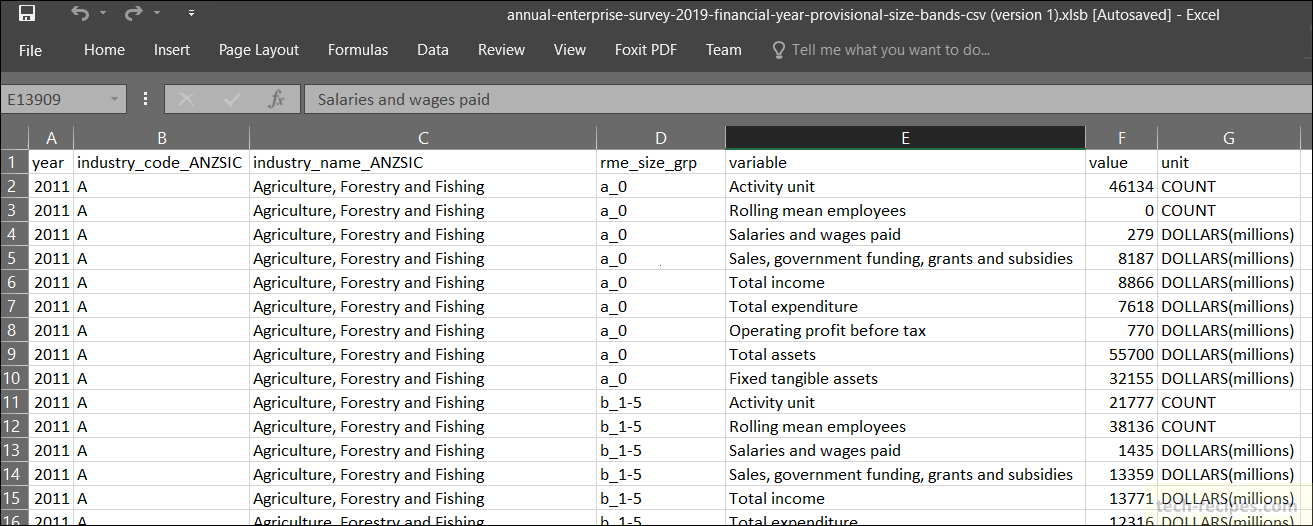
To import an Excel file into MySQL, first export it as a CSV file. Remove the CSV headers from the generated CSV file along with empty data that Excel may have put at the end of the CSV file.
You can then import it into a MySQL table by running:
load data local infile 'uniq.csv' into table tblUniq
fields terminated by ','
enclosed by '"'
lines terminated by '\n'
(uniqName, uniqCity, uniqComments)
The fields here are the actual tblUniq table fields that the data needs to sit in. The enclosed by and lines terminated by are optional and can help if you have columns enclosed with double-quotes such as Excel exports, etc.
The Conversation
Follow the reactions below and share your own thoughts.

October 07, 2008 at 3:39 pm, Rafael said:
Thank you. Short and sweet. Very straight to the point.
October 10, 2008 at 5:49 am, Ng said:
Thanks, buddy!
October 22, 2008 at 1:28 am, robert said:
thanks pal! finally somethin’ working
October 26, 2008 at 7:22 am, ashikur said:
Thank you!!! it really works !!!
Copied the csv file into /var/lib/mysql/mydb at my ubuntu box.
*mydb is the name of my database
June 19, 2010 at 1:09 am, webguest said:
thanks for your comment of the path, i know where to put the file and make it work!
October 24, 2010 at 6:43 am, rob said:
I went to the directory where I placed the csv files, placed the above code into its own file “create.sql” and then launched mysql client ie “mysql -u root -p”. Next I made sure I selected the db ie “use someDB;” then issued the command “. create.sql” and the data got there. Works well.
October 24, 2010 at 12:54 pm, Anonymous said:
Thanks for the additional information!
January 28, 2011 at 6:02 am, Steve said:
Thank you for the path. This was the only unknown. Great post from all. Thanks!
December 02, 2008 at 5:59 am, Chris said:
Thank you Thank you. Very nice.
December 23, 2008 at 3:28 pm, priyadarshan said:
very very superb 1 line query.. i love it !!!!!!!!!!!!!!
February 03, 2009 at 4:02 am, ir said:
help!! can this be possible??
(idnum,username,md5(password))
how about if i used md5 in my password??
and i want my password field converted into md5.
email me pls. ir_bs756@yahoo.com
February 05, 2009 at 10:04 am, ashish said:
hey
please send full code of importing file into mysql database. at my email (ashish@tiainterweb.com)
thanks
May 24, 2009 at 5:38 am, Okpali D Great said:
the above code is can do it. You need to specify the url of the csv file with / slash and not .
February 18, 2009 at 5:15 am, zild said:
Can MySQL automatically assign the column names using the column headers from the csv file?
April 14, 2009 at 7:33 am, vasu said:
where to place the csv file…
April 25, 2009 at 10:31 pm, Partha Kar said:
Thank you very much.
May 24, 2009 at 5:42 am, Okpali D Great said:
thanks very much
June 29, 2009 at 7:38 pm, Mindy said:
Ok, I must be missing something here. Are there more explicit instructions for this? Do I paste this code using phpmyadmin and putting it into the sql box? I’m a little lost here.
June 29, 2009 at 7:41 pm, Mindy said:
I wanted to add the fact that I already have my database set up in MySQL with all the appropriate tables. I created a test CSV file and messed around with it a bit but wasn’t sure where and how I was supposed to implement it using the code you have given.
July 08, 2009 at 5:41 am, Gopi said:
Thanks kaly…
September 08, 2009 at 10:58 am, jaky said:
Thank you mate!
September 11, 2009 at 3:58 am, Sari said:
Thank You!!! I have 7 MB CSV file successfully imported to Mysql in 1.6 seconds!
October 09, 2009 at 6:44 pm, eqcc said:
Thanks for the info! It worked perfectly! Thanks again!
October 12, 2009 at 4:37 am, Anonymous said:
Thanks, it is so important. But, I have 5 columns, it doesn’t complet, it left the last column. It emty.Could you help me.
November 23, 2009 at 2:08 am, Anonymous said:
Thank you very much for this excelent recomendation, it works good.
Ecalvillo.
January 09, 2010 at 9:30 pm, Anonymous said:
what if, we have two excel sheets in a excel file. How do we import ?
January 20, 2010 at 3:12 pm, Anonymous said:
works fine. thanks a lot!!! do you know how can I schedule the sql statement once per day? i want to execute it every day at 3pm for example… thanx
January 25, 2010 at 5:13 pm, Anonymous said:
yes nice but i get an error message:
File ‘omg.csv’ not found (Errcode: 2)
Where to locate my csv file? in which directory?
any help
thanks
January 25, 2010 at 5:17 pm, Anonymous said:
where to place the csv file ?
Couse i get an error message
File ‘omg.csv’ not found (Errcode: 2)
thanks
January 25, 2010 at 10:34 pm, Anonymous said:
saplamaev, I put the csv file into the same directory as my database. See if you have a ProgramData directory just below your Programs directory, probably on C drive. Inside that I have a MySQL directory. Keep digging until you find your database directory. Hope that helps. I also removed the word ‘local’ from the script. I have other problems. It keeps telling me fields are too long.
March 18, 2010 at 3:09 am, sheraz said:
you can use absolute paths which works fine for me
e.g.
load data local infile ‘/this/is/where/my/file/is/uniq.csv’ into table tblUniq
fields terminated by ‘,’
enclosed by ‘”‘
lines terminated by ‘n’
(uniqName, uniqCity, uniqComments)
March 22, 2010 at 3:22 pm, steffen said:
hi dood, this is wicked, can insert a URL to the file?
April 05, 2010 at 9:45 am, Anonymous said:
where to place the csv file?
April 07, 2010 at 5:33 am, pari said:
Awesome!!! u r great!! Tonnes of thanks.. I was desperately looking for this
April 09, 2010 at 7:14 pm, Akilah said:
What if your data of items that contain commas, i.e. text datatypes?
April 13, 2010 at 10:00 pm, Anonymous said:
for each data item that has a comma, you would enclose that with quotes ‘ ” ” ‘ like the code suggests “enclosed by ‘ ” ‘ “.
April 13, 2010 at 9:57 pm, Anonymous said:
Thanks so much for the code. You saved me a lot of time. Thanks again.
April 30, 2010 at 7:00 am, Anonymous said:
suppose I have database with field employee and address I want to import data like
yogesh,”line 1,main street”
vishal,”market street, main bazzar”
How should I write query to import these field without double quote ["] for address field
May 04, 2010 at 6:17 pm, Leonardo Rebolledo said:
Example In windows XP:
load data local infile ‘D:\Leonardo\correo\listaCorreos\todos\listaCorreos.csv’ into table listaCorreos
fields terminated by ‘,’
enclosed by ‘”‘
lines terminated by ‘rn’
(correo)
Bye and may God bless us and may the Blessed Virgin Mary intercede for us, sinners.
May 27, 2010 at 6:16 pm, Rob said:
VERY NICE!!! YES ALL CAPS!!! VERY NICE!!! THANK YOU!!!
June 05, 2010 at 3:01 pm, GbMax78 said:
I create a table on my MySQL 5.1 on Debian Squeeze:
mysql> CREATE TABLE reference
(
id INT NOT NULL,
name VARCHAR(40),
surname VARCHAR(30),
city VARCHAR(20)
);
After when I import the *.csv file, on id column I have all 0 and on the name column I have the surname, I don’t know how i can start the import file from name column and not from id column.
Best regards.
GbMax78
June 24, 2010 at 12:31 pm, Gbmax78 said:
Sorry for my newbie post, i have solve the “problem” reading the example:
lines terminated by ‘n’
(uniqName, uniqCity, uniqComments)
I have replace uniqName etc. by column2, column3 etc. and the import process start not on column1 (id) but on column2 !
GbMax78
July 05, 2010 at 6:22 am, Mcheali said:
how can i put date from csv to mysql?
December 30, 2010 at 9:51 am, Jeyanthi said:
hi,…
i am also unable to upload the date and time through this, but it works when you change the system time to the corresponding date format of your CSV data…
try it..
Jeyanthi, jeyanthi1983@gmail.com
July 22, 2010 at 12:17 am, celega said:
How come when I used the code, only the first row is inserted into a mysql table? thanks!
April 18, 2011 at 10:42 am, Asd said:
me too…
July 30, 2010 at 9:03 pm, Rob said:
Ditto…very succinct. Thanks!
August 12, 2010 at 6:54 am, Fourteen_naveed said:
Thanks it is working fine
August 13, 2010 at 2:04 am, Jason said:
Thanks, just what i was looking for. But can you use a absolute path to point to the csv files?
August 17, 2010 at 5:49 am, Sibbald said:
just did it using c:/file.csv
@katy8439 thanks, you saved me lot of hassle
October 19, 2010 at 2:55 pm, Rajmahendran said:
thank you its working. keep it up!!
November 02, 2010 at 7:11 am, Bhavya said:
if i want to select only a particular column from my csv file and insert into mysql database.. which syntax i have to use to get it without making remaining columns of the table as null values
December 09, 2010 at 4:42 am, Vish said:
I am using the same query . it excute properly but csv data is not being inserted into the table. Instead of the csv data a garbage data is being saved into table.
please any body can tell me why it been happening and how to resolve it.
December 22, 2010 at 9:53 pm, Okaatech said:
Excellent, for phpadmin users in Windows, remember to comment out the back slashes and use relative path and it works perfectly. Here is mine
load data local infile ‘C:\xampp\mysql\data\eweek\alfa.csv’ into table alabama
fields terminated by ‘,’
lines terminated by ‘n’
(abcear,abcde,abcde,xyz,123xyzl, abcdef);
December 30, 2010 at 10:27 am, karuna said:
hi,
but i cant able to import dat time info… whats wrong i dont know.. can you tell if you know…
January 13, 2011 at 9:56 pm, KG said:
Hi, Is there a script that can help automatically import this file on a daily basis?
April 19, 2011 at 8:00 pm, Scott said:
If you are in a Linux OS you can use a cron job (/etc/crontab) to run a php script or something similar. In Windows you will have to create a scheduled task and run a batch script or something similar.
February 18, 2011 at 10:34 am, Nikamvishvajeet said:
Thanx for Information
April 07, 2011 at 4:59 pm, atrichtc said:
Excellent post. Very quick and readily launchable from PHP, unlike direct dump or messy scripts. Quite helpful.
May 06, 2011 at 4:46 am, Munir hussain said:
Thanks a lot
May 06, 2011 at 6:00 am, Vijayanand Gurudev said:
@vgurudev Thanks a lot, saves lot of time.
May 31, 2011 at 9:07 pm, Bob Jackman said:
Hi. Thanks for this
June 28, 2011 at 11:13 pm, Cinto Thomas said:
Thanks saved my 2 hours………
June 30, 2011 at 7:21 am, Harminder singh said:
Hi, I am importing a .csv file to mysql and it imports 1 to 133 records but then gives this error “Invalid field count in CSV input on line 133.” . What should i do.
Thanks in advance
Harminder Singh
July 16, 2011 at 12:45 pm, Pseudo003 said:
HI.,
Simple to do…… write the script as below:
load data local infile ‘D:/DB Scripts/test.csv’ into table scr_component_risks
fields terminated by ‘,’
enclosed by ‘”‘
lines terminated by ‘n’
(give here all the columns for which you’re importing the field values separated by comma);
use above and ur done…..
Nice.
September 05, 2012 at 8:30 am, varun said:
> i want to load data from csv file from any directory using load datalocal infile .
how it work pls tell
July 18, 2011 at 5:07 am, Iyap77 said:
How can I “UPDATE” date not add new data? Can anybody help me?
July 18, 2011 at 5:07 am, Iyap77 said:
How can I “UPDATE” date not add new data? Can anybody help me?
July 18, 2011 at 5:16 am, Iyap77 said:
How can I “UPDATE” data not adding new data? Can anybody help me?
July 27, 2011 at 4:42 pm, Jary Hernandez said:
The same, happens to me. Do you know how can I solve this problems. Please if you can help me you can send me an email at jary.hernandez@gmail.com. Thanks!!
August 09, 2011 at 6:05 pm, Keira Heu-Jwyn Chang said:
I was having the same problem and my line terminator ended up being ‘r’ but some others might be ‘rn’
July 27, 2011 at 4:42 pm, Jary Hernandez said:
The same, happens to me. Do you know how can I solve this problems. Please if you can help me you can send me an email at jary.hernandez@gmail.com. Thanks!!
August 05, 2011 at 10:19 am, Mandeep said:
$data = fgetcsv($filename,1000,’,')
August 05, 2011 at 10:21 am, Mandeep said:
update `table_name` set `feild_name1` = ‘$variable1′ , `feild_name2` = ‘$variable2′;
September 06, 2011 at 8:02 am, Maan said:
load data local infile ‘uniq.csv’ into table tblUniq
fields terminated by ‘,’
enclosed by ‘”‘
lines terminated by ‘\n’
(uniqName, uniqCity, uniqComments)
September 25, 2011 at 7:20 pm, Mark said:
This was so helpful. If your on a Mac and your using the MySQL Workbench. Here is what I placed in my Query:
load data local infile ‘/Users/MarkDickinson/Documents/Saddleback Resources/RKW Database/RKW_weeklys.csv’ into table rkw2011.weeklys
fields terminated by ‘,’
enclosed by ‘”‘
lines terminated by ‘\n’
(weekly_id, date, ip_number, title, series_title, author, 057_cd, 056_tape, 049_dat, 003_transcript, 008_outline, 059_note, 060_tio, 027_s_master_wav_audio, 012_mp3, 041_vhs, 042_vhs, 046_beta, 058_pro_res, podcasts, media_center)
Best of luck!
November 09, 2011 at 3:37 pm, Luis Reis said:
Hello
I got one problem when I import data with special characters
I got one txt file coded in windows(ansi) and when do the import with this command, gives errors where the data have special characters,
Some like “Ílhavo” gives this error
Incorrect string value: ‘\xD6lhavo…’ for column ‘DESIG’ at row 5
and do not import this record
December 05, 2011 at 11:36 pm, Parthiban said:
Thank you. It is worked..
January 04, 2012 at 10:15 am, Shane said:
Thanks a lot for that post. I’ve used this method successfully offline. Now I’m trying to take my offline database and put it on my hosted server. When I run that coding on the server and reference it to the CSV on my computer, it obviously can’t access it. More troubling is that even if I upload the CSV file onto the server, MySQL still can’t access it:
LOAD DATA INFILE “.db_upload/shane.csv”
INTO TABLE new_table
FIELDS TERMINATED BY “,”
OPTIONALLY ENCLOSED BY “”"”
LINES TERMINATED BY “\r\n”
Any ideas on how to get an offline database onto a hosted server, by this method or any other?
Thanks!
January 10, 2012 at 10:57 pm, ravi said:
Thank you very much buddy, in my case… working perfectly …
Thanks
ravi
March 06, 2012 at 12:23 pm, Sehaj Mathur said:
Thankyou very much. Working PERFECTLY!
Really helped it alot. Thanks!
Sehaj Mathur
March 24, 2012 at 11:19 am, Patrick Zeinert said:
Uh, DAMN!
I always come up against this issue and I have used all manner of convoluted php code to figure this out. Most of the time I just quickly need to populate a DB for a client with their existing data and this is perfect.
BOOKMARKED!
**Also, I don’t usually use caps and exclamation points, but you have no idea how happy this makes me.
March 24, 2012 at 11:28 am, Patrick Zeinert said:
Shane,
” I’ve used this method successfully offline.”
Export the database as an .sql file and import it on your server. I know this works in PHPMyAdmin
March 26, 2012 at 8:08 am, David Kirk said:
@Patrick – Thanks for the input. I’m glad it helped!
March 27, 2012 at 12:49 pm, php-mysql-newbie said:
Thank you very much. I’m really appreciate. It’s very helpful.
March 29, 2012 at 8:59 am, haripriya said:
Thanks
April 16, 2012 at 12:42 pm, Manoj said:
Tnx.. Great help
April 18, 2012 at 8:00 am, amit said:
Hello when i use LOAD DATA LOCAL INFILE command it works fine but inserted data in database is in some other format.
wat to do?
Please tell me
Thankyou in advance
April 30, 2012 at 4:47 am, Roger Flores said:
Thank you very much! It was a great help!!!
May 07, 2012 at 10:31 am, jatinder said:
in my case this works like this (in phpmyadmin browser) :
load data local infile ‘http://localhost/onlinetest/hello.csv’ into table tab_hello fields terminated by ‘,’ lines terminated by ‘\n’ (Name, Age)
thanks..
June 22, 2012 at 6:07 am, anand dhage said:
Thnx!!!!!!!!
Simple and sweet………………………
July 03, 2012 at 10:23 pm, Danish Ali said:
is there any limit on file size or number of rows being inserted?
I have large CSV files, it contains 13,000 Records, but this query is inserting only 2400 records
July 10, 2012 at 10:17 am, pooja said:
hey this helped me…..i have problem……i am able to import data from .csv file into mysql table…..but if i made some changes in .csv file and fire same query.. its not updating into table……..plz help me out……
You can send me an email at pooja.tarlekar@gmail.com. Thanks!!
August 02, 2012 at 12:15 pm, raja said:
i am used xampp server..
i want insert the data to mysql database from the MS-excel files..
i hv refer the more sites..
but i dnt gt the any..
jst help me..
August 10, 2012 at 6:23 am, Mahesh Katariya said:
Thanks friend this code really helpful.
Thanks again……
August 13, 2012 at 7:50 pm, manoj said:
Really Thanks for valuable information
September 24, 2012 at 7:27 am, Anup said:
What is the CSV file has URL in it as the data?
Few lines from the CSV for example.
—
“ID”,”HealthInc”,”HealthSource”
1,”http://hh.abcdef.com/category/fitness/cardio/”,”http://www.uvwxyz.com/sports/fitness-equipment”
2,”http://hh.abcdef.com/category/fitness/diet/”,”http://www.uvwxyz.com/nutrition/dietary-supplements”
3,”http://hh.abcdef.com/category/fitness/exercise/”,”http://www.uvwxyz.com/sports/fitness-equipment”
4,”http://hh.abcdef.com/category/fitness/gymming/”,”http://www.uvwxyz.com/sports/fitness-equipment”
—
I tried importing but I the fields for URL is blank.
output:
+—-+————-+——————+
| id | healthinc | healthsource |
+—-+————-+——————+
| 0 | | |
| 1 | | |
| 2 | | |
| 3 | | |
| 4 | | |
I feel slash in the URL caused the issue. Any suggestion on how to get this working ?
September 24, 2012 at 7:36 am, Anup said:
> I aswered my own question…
You need to escape the quote i.e. enclosed by ‘”‘ –> enclosed by ‘\”‘
September 28, 2012 at 2:13 am, KHS said:
May I know where to implant your code to?
October 04, 2012 at 8:57 am, ramasamy said:
You have to give the full path of the CSV file. EX: C:/wamp/www/SITE/x.csv
October 12, 2012 at 5:08 am, Andrea said:
Thank you, i was wasting my time to import a csv throw a servlet. It’ s so easy!!
November 01, 2012 at 9:19 pm, Christopher Thomas said:
Thanks! I just used this and it worked first time!!
November 03, 2012 at 2:15 pm, hans said:
Thank you for your article is very nice
November 12, 2012 at 9:39 pm, tim said:
Is this a live link to the CSV file or does it have to be refreshed every time an update is made? Will any queries made include the data in the CSV?
November 17, 2012 at 5:31 pm, pfuj said:
Man! Been trying to do that whole day. I’ve just gotta say one big THANK YOU!
December 23, 2012 at 1:09 pm, Mudi said:
my problem is this my db import data in differenct shapes and words…………why is this???????????
load data local infile ‘D:\HOSTEL LISTS FROM DEC,12.csv’ into table excel
fields terminated by ‘,’
enclosed by ‘”‘
lines terminated by ‘\n’
(id,name,father)
February 28, 2013 at 9:44 pm, Nick said:
I found that the documentation on MySQL’s page helpful in conjunction with this. dev.mysql.com/doc/refman/5.0/en/load-data.html. I was beating my head against getting this to work on my standalone server. Removed the LOCAL keyword and it worked like a charm.
April 01, 2013 at 6:48 am, renu said:
really very much help full…. thank you…
May 04, 2013 at 4:30 pm, Nat said:
Thank you, great job!
May 09, 2009 at 1:38 am, Dave said:
@ir:
If the passwords in your CSV file are not already MD5() then just import them as per the instructions above then run this query:
UPDATE `users` SET `password` = MD5(`password`);
@ashish:
That is the “full code”. There is no more. The only step you have to do before this is to create a table that matches the CSV file you already have. No one can tell you how to do that without having your CSV file. Don’t forget to modify the query above to match the table you have just created.
@zlid:
No it can’t. Fields are given names and types at the same time when the table is created. To assign the names automatically, MySQL would have to also assign the column types automatically which would mean scanning down through the entire CSV file to make sure that there were no letters in a column that started with numbers and finding the longest string in a column that started with a string and so on. There are too many options in table creation to allow it to be left up to software. NULL or NOT NULL ? DATE, DATETIME, TIME, CHAR, VARCHAR or TEXT ? What if you have a column full of numbers but one Excel error message that looks like “#value” ?
You will have to create the table yourself before importing the CSV file.