While the new splash screen for Adobe Reader is attractive, it gets old very quickly. Many people do not like the welcome screen either. If you would like to disable these screens, this tweak will get you started. Instructions for both the Windows and Mac verions of Adobe Reader included.
The slash screen for the Adobe Reader can be very distracting. By following these steps, you can easily disable it. This has been tested for all recent versions of Adobe Reader. Later versions of Adobe Reader also have a welcome screen that can be disabled here.
Mac OS X
1. From the Adobe Reader menu, select Preferences.
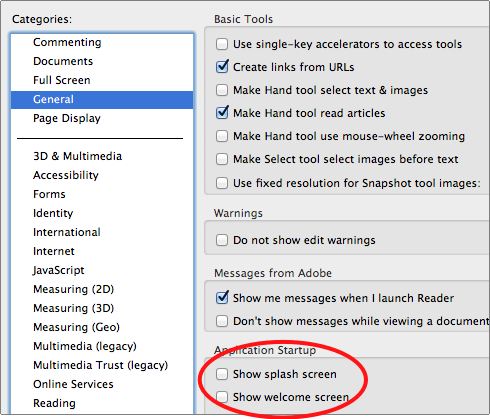
2. In the General category of the Application Startup section, uncheck the appropriate areas for the splash and/or welcome screens.
Windows Adobe Reader Welcome Screen Removal
This requires a registry edit. If you are not comfortable editing the registry, just leave this alone.
1. Be sure you have updated to 10.1.1.
2. Exit Adobe Reader X.
3. Open regedit and you may need to confirm you have the correct privileges.
4. Browse to HKEY_LOCAL_MACHINE\SOFTWARE\Policies\Adobe\Acrobat Reader\10.0\FeatureLockDown and create a New Key called cWelcomeScreen.
5. Within the new cWelcomeScreen key, create a DWORD value bShowWelcomeScreen and set the value to 0.
6. When you restart Adobe Reader, the screen will not appear.
Windows Splash Screen Removal
1. Open Adobe Reader.
2. Click Edit and select Preferences.
3. From the Preferences dialog box, select General in the Categories pane.
4. In the Application Startup section, uncheck the Show splash screen checkbox. You may wish to disable the welcome screen here as well.
5. Click OK.