
Facebook: How to view your active Facebook sessions and end them

Facebook is one of the most popular social media networks.  However with the influx of new users to Facebook, hackers and hacking will increase.  This guide will explain how to view where and when your Facebook account is actively logged into and also how to log out these active sessions.  This can be very handy if you think your account has been hacked by checking the active sessions and their locations and times or even if you forgot to log out on a public terminal.

1. Login to your Facebook account

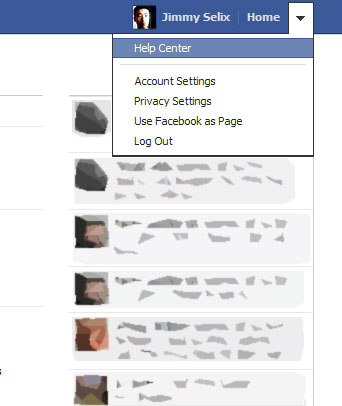
2. In the upper right hand area, click the Drop-down arrow and then Account Settings.
3. Go to the Security section on the left.
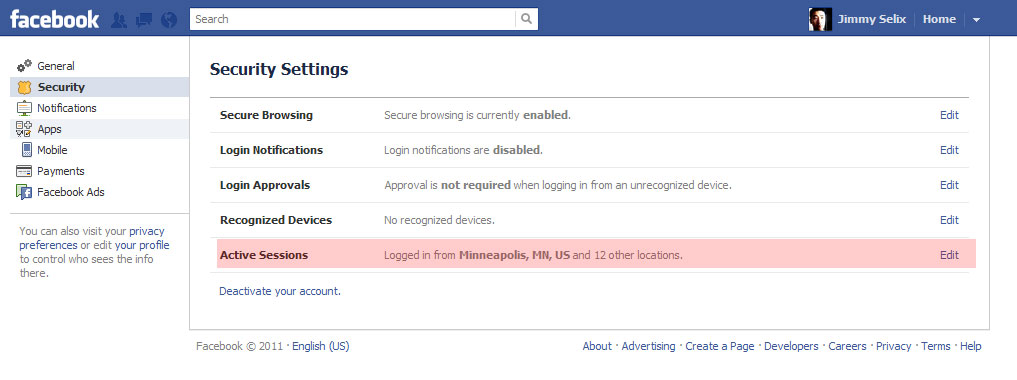
4.  Now on the right hand section, choose the Active Sessions setting.

5.  You will see your current session at the very top and any other sessions that are currently logged in or connected.
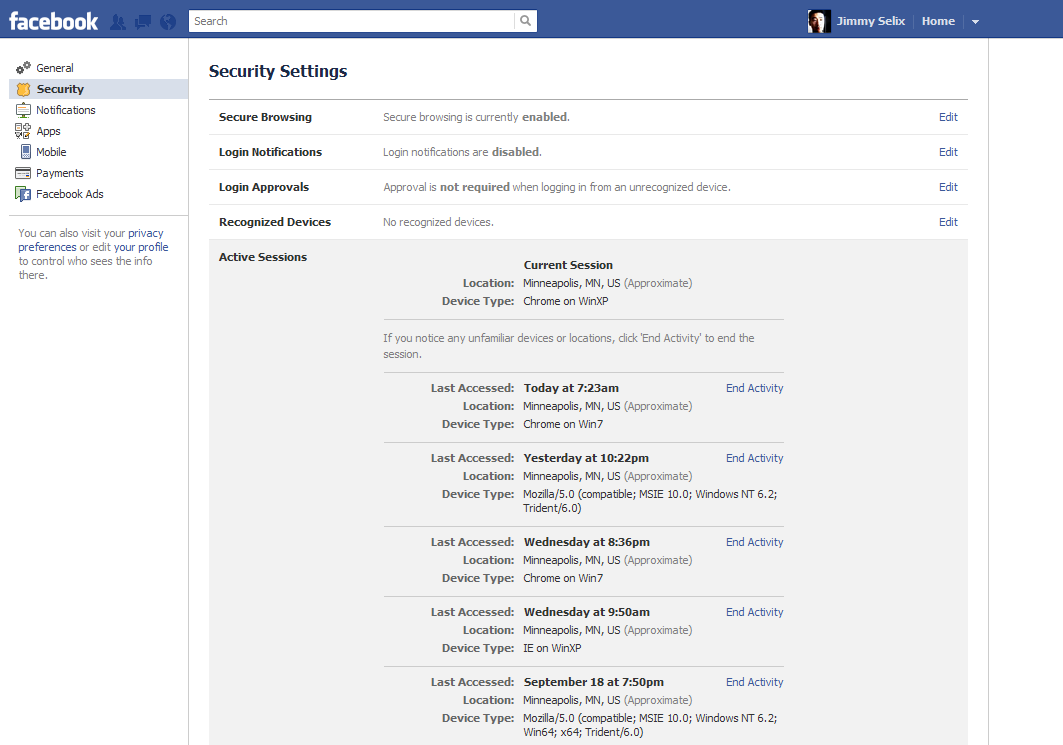
This list will show your Android, iPhone, Blackberry and other connections.  The Device Type field shows the device or browser that was used and Location field where (not exact of course but approximate) and the date of course shows the date/time of last activity in that session.

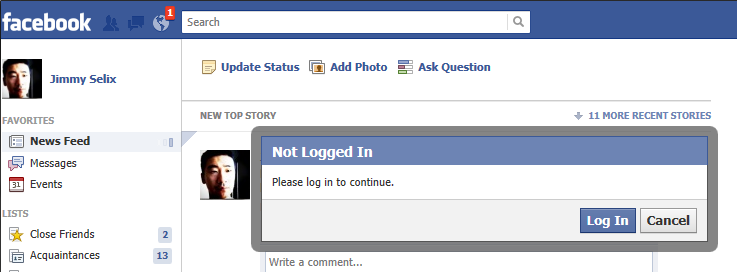
6. If you see an unfamiliar session, just click on the End Activitybutton and it will disconnect that session and require the session to re-login.
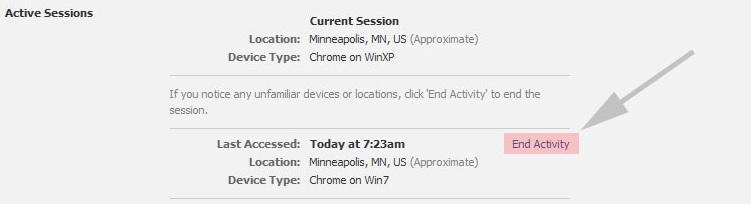
Any session that is logged in and you hit the End Activity on will receive a re-login message the next time they try to refresh the view or click any item.
NOTES:

-Password notes: be sure to use a secure one, adding a number and a non-standard character (ie @#$%) can increase it dramatically.

-If you end session on a device (ie iPhone, Android, Blackberry), you will just need to re-login to the app the next time its launched.


 

About Jimmy Selix

Jimmy Selix is an early adopter that loves to be one of the first on the block to have the latest and greatest in technology and gadgets. Another love of his is being able to share his knowledge to others seeking it. Feel free to drop any comments or questions that you may have.
View more articles by Jimmy Selix

The Conversation

Follow the reactions below and share your own thoughts.

10 Responses to “Facebook: How to view your active Facebook sessions and end them”

  1. November 19, 2011 at 8:03 am, christy said:

    I received sec alert at login that my account had been accessed from another location. I need a copy of that alert showing time and place of the login.How can I get it? Or how can I get more history in active sessions to go back to that time – a little over 24 hours ago.

    Reply

  2. January 14, 2012 at 2:32 am, uzwal said:

    How do i end an active session from a nokia phone?it always shows 2 active session nd i am online 24hrs since 2 days…plz help..

    Reply

  3. March 21, 2012 at 3:54 pm, Carole Boucher-Roussel said:

    What if in the Active Session there is no “end activity” what do I do then? I still have somebody logging on to my facebook page in the middle of the night, this is really getting ridiculous. Please help me.
    Thanks
    Carole

    Reply

  4. March 22, 2012 at 6:12 am, Jimmy Selix said:

    RE:Carole

    i’d recommend changing your password for facebook and see if that resolves this. you can’t prevent someone from logging in if they have your password; this just allows you to end logged in sessions. they are not saving the login it prob won’t have a “End Activity” option. Also, sometimes the location it shows here may be inaccurate since mobile connections don’t always go through the router in your area (ie my tmobile devices may show Colorado as the location even though i’m in minnesota w/my device).

    hope that helps!

    Reply

  5. April 02, 2012 at 8:49 pm, Janet said:

    If a password is changed–can someone that is in a active session see your new password when you change it. There is not an option to end the session.

    Reply

    • April 21, 2012 at 10:13 pm, Jimmy Selix said:

      >i dont believe so. i would assume the logged in session would log them out and in turn ask them to relogin using the new password.

      Reply

  6. April 19, 2012 at 6:00 pm, felia said:

    I’m sure one of my friend still open my account from her blackberry to read my private message, once I was log in from her device and unable to log it out because of something (i really regret it). i’ve end all of session active, i doubt it because i only see active session from computers, I’m also logged in my mobile phone, and the session isn’t appear when i check it from my laptop, so i think there is a possibility she still able to access my account from blackberry since I haven’t end the session. I ‘ve change my password, will it work?

    Reply

  7. April 24, 2012 at 6:10 pm, lorna said:

    my active session keeps showing accessed via android even though i have ended it several time and im using an iphone. Can it be mistaken my iphone as android?

    Reply

  8. May 11, 2012 at 1:07 pm, Dori Ducharme said:

    Question – I do not have an iphone, I have a blackberry, but when I looked into my facebook account it looked like my account was accessed with an iphone (the activity session) – but it was at the same exact time I was using my blackberry to access the account.

    Reply

  9. May 18, 2012 at 5:46 pm, Kevin said:

    I am showing ‘facebook for android’ session sometimes on my account. I don’t have an android…could this be an error on facebook? Or is somone definately accessing my account from an android?

    Reply

Leave a Reply

You may also like-

How to Remove Your Mobile Contacts from Facebook and Prevent Future SyncThere is a growing concern about the Facebook mobile application accessing the contacts on your mobile phone and sending them to Facebook. While Facebook ...


