See All Word Shortcuts

Home -> Windows -> Office -> Word

11193 views

From the computer of: davak (396 recipes)
Created: Sep 19, 2003     Updated: Sep 28, 2003


0 comments:
View all comments

Add a comment

Add to:
Add to stumbleuponAdd to del.icio.usDigg itAdd to FURL

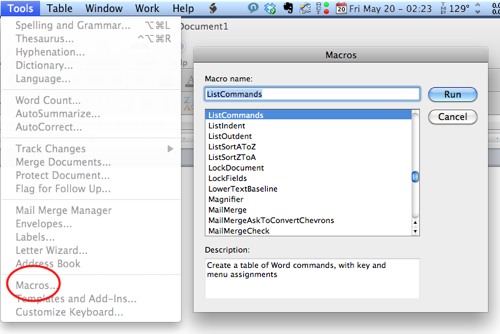
Perform the macro that will create a document with all the shortcuts available in Word

Hundreds of word shortcuts exist. Everybody uses a few. People buy books that have tons. Well, word contains a macro that will display every shortcut available.

1. Goto the Tools menu
2. Goto into the macro section and select the Macro choice
3. In the Macros in: dropdown select Word commands
4. In the Macro name: select ListCommands
5. Select Run
6. Select either selection in the popup box, although All Word commands is the most impressive.
7. Your new document containing the shortcuts (and then some) will be created.

Subscribe to the Tech-Recipes Newsletter

You can get tips like this delivered in your email every week!

Enter your Email

We will never, ever sell your email address or spam you.


Related recipes:

  Word 2007: Handy Keyboard Shortcuts
  Microsoft Word: Customizing Keyboard Shortcuts
  Word 2007: Customize the Quick Access Toolbar
  Adding Symbols Quickly into Word
  How to run Microsoft Word in Safe Mode
  Word: Store and Reuse Large Blocks of Text
  Word has a Thesaurus
  Microsoft Word: Change the Default Font for New Documents
  Word 2007: Delete Words from Custom Dictionary
  Select Nonconsecutive Items in Word


Sponsored links


Login

Nickname

Password

Don't have an account yet? You can create one. As a registered user you have some advantages like theme manager, comments configuration and post comments with your name.