Windows 7: How to Import and Export Sticky Notes
Posted by Lê Hoàng in Microsoft Windows 7
Sticky Notes is a very useful feature in Windows 7. For users who work on multiple computers, importing and exporting the notes can be very helpful. These directions will show how to do it.
If you love Sticky Notes, this tech-recipe will show you how to easily share them between multiple computers.
On first computer:
1. Go to C:\Users\Your user name\AppData\Roaming\Microsoft\Sticky Notes and copy StickyNotes.snt
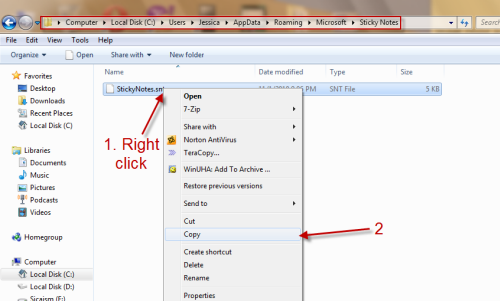
2. You can store the StickyNotes.snt on your USB.
On second computer:
1. Copy the StickyNotes.snt file on your USB.
2. Go to C:\Users\Your user name\AppData\Roaming\Microsoft\Sticky Notes (if you can’t find the Sticky Notes folder, creat one) and paste the file there.
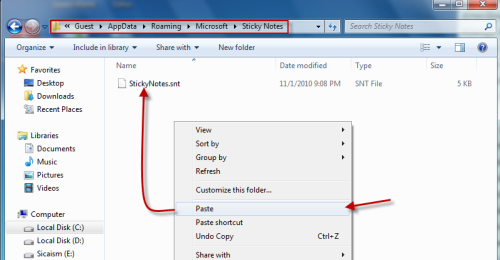
3. Launch Sticky Notes and you will have all your notes there.

About Lê Hoàng
View more articles by Lê Hoàng
The Conversation
Follow the reactions below and share your own thoughts.


November 05, 2010 at 8:18 am, Michelle_S said:
Thanks! It’s helpful.
November 05, 2010 at 8:49 am, Anonymous said:
Thank you
Glad we could help
November 07, 2010 at 1:32 pm, agentii de pariuri said:
hanks for sharing her story, it was so funny -
January 22, 2012 at 1:19 pm, Jess said:
This was of absolute no help with my problem. My motherboard crashed & my comp. tech was able to save the sticky notes, however I have them in a CD & tried to open it with a different computer & I could not open it. I also don’t know what program to open it with (since the comp. asked me) & to top it off, I chose to try & open it with Word & the text of the notes got encoded & the options given to decode it, are useless.